Tag Archives: FamilySearch

Full Text Search Finds – More Misfiled Papers

I’m working on an project adjacent to my George Long project. I want to identify his wife’s parents, or at least her father. Her name was Isabella McCullough. A will was located for a Hugh McCullough leaving things to his daughter Isabella Long. A slam dunk, right? Um no. These people are trying to take away my last remaining brain cells, I think. I have found TWO Isabella McCulloughs who married Long men, one to my George Long, and one to James Long. I am not sure if or how James Long is related to my Longs, but that is another story.

The main point of this post is to highlight the amazing perk from FamilySearch’s Full Text Search that I hadn’t anticipated, but makes total sense. We can find papers that have been misfiled! I posted about another couple of examples of this before, but just came across another one. In the midst of Hugh McCullough’s estate papers, are several papers that clearly belong to a different estate, that of John Abraham of Jefferson County, Ohio.
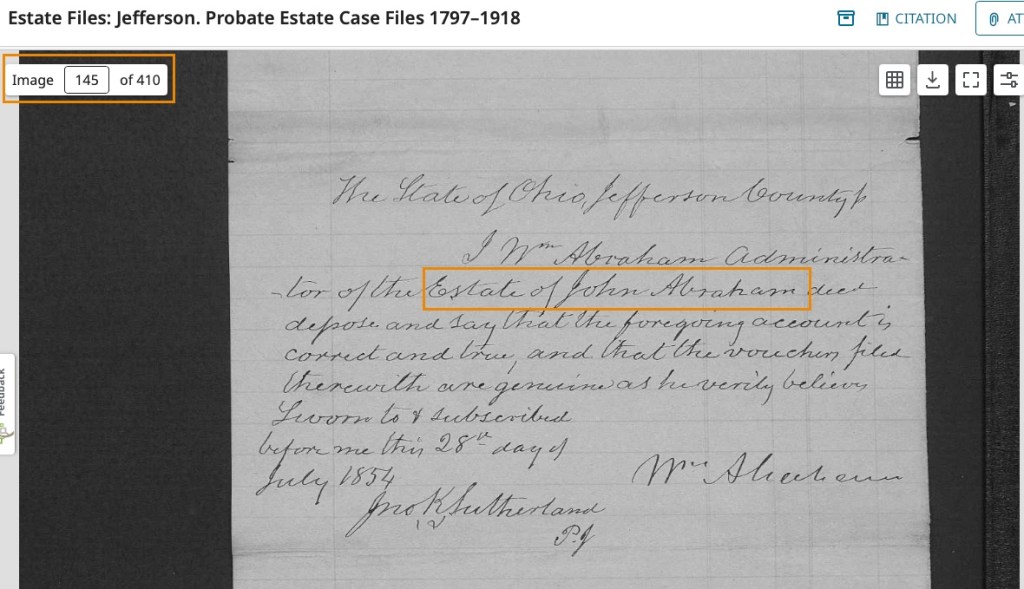
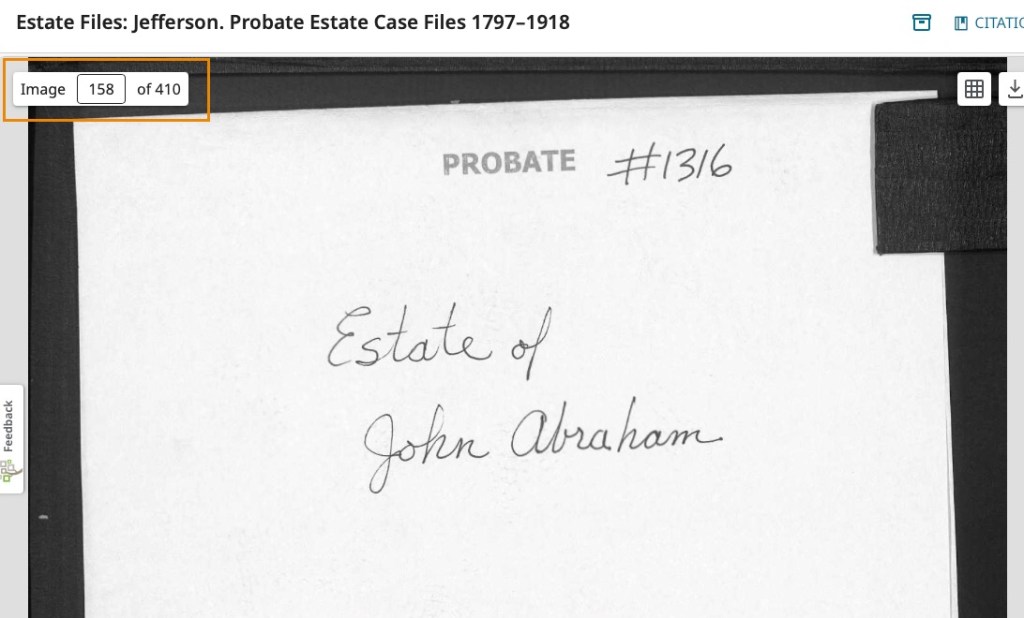
A few images later, we find the Estate of John Abraham.

If we were researching John Abraham, unless we examined every page of the microfilm, every file in the courthouse, every image on the digital film, we would have missed this! The images that belong in John Abraham’s file start at image 139 and end on image 145. The pages consist mostly of receipts and the inventory list of the estate sale. Documents I like to see for my ancestors.

FamilySearch just filmed the pages as they were contained in the folders, so this misfiling happened sometime before the filming. I couldn’t find a beginning placard on this digital set that might have clued me in to the year of filming. It doesn’t really matter. The point is, this happened (and still happens). Papers get misfiled all the time, and are then “lost” because they are not in the right folder. They have been “lost” to us researchers, but they are now findable again because of the Full Text Search. Amazing!

Full-Text Search Finds Another One

In my last post, I said I was going to go over some of the basic how-tos and some tips I’ve learned. However, I have another example of how amazing this tool is.

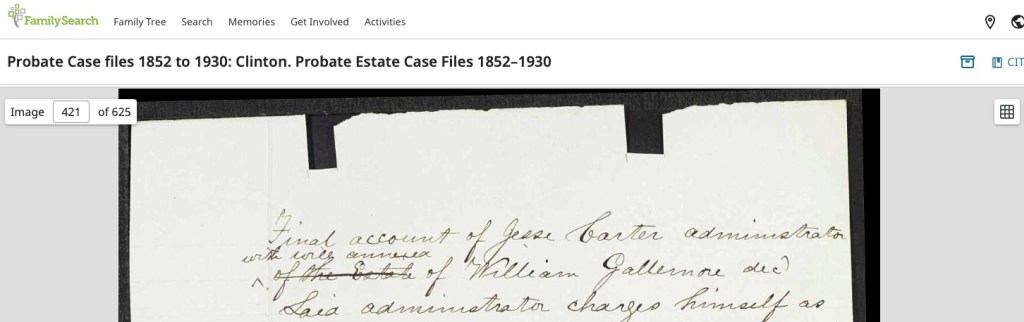
Working on my client’s Gallimore family from the last post, I needed to try to prove a father-son connection. One great place to look for that kind of link is in probates, wills, and estate files. Using Full-Text Search, I found the Gallimore will quickly and easily. However, when I went to formulate my citation, I realized that I likely wouldn’t have found this estate packet if it weren’t for the Full-Text Search!

The estate states that the heirs of Isom Gallimore, deceased, are to receive his portion of William Gallimore’s estate. That is not the important part of this story, just a little bit of background. It turns out that these estate papers were filed in the middle of another probate packet!

Here is the file folder of Michael Garoutte, image 411 of 625:

On image 421, we find the first of several pages of the Gallimore file:

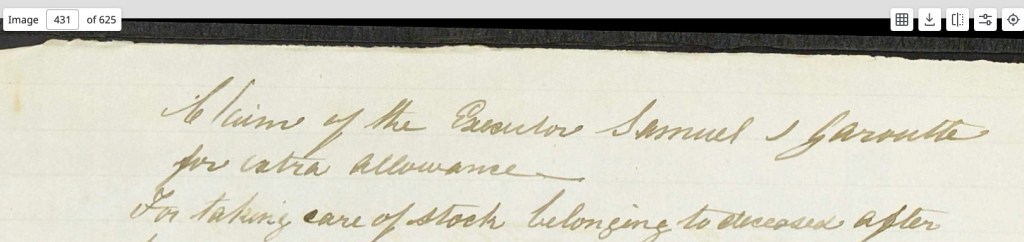
Then, on image 431, we are back to the Garoutte file:

Are there more Gallimore papers elsewhere in this film roll? Possibly. I found what I needed for the purposes of my original search. However, again, it was when I went to begin crafting my citation for the one piece of paper I wanted to reference that I discovered that I had found something that is probably lost. Maybe these missing documents are part of why my clients’ family have had so many brick walls with this family.

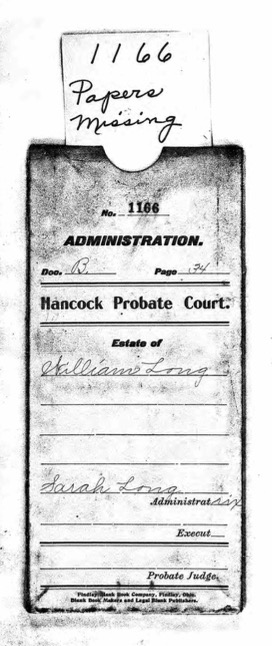
It makes me think of this image I found for my own ancestors:

I’m going to have to go back and use the Full-Text Search to see if I can find William Long’s file stuffed into someone else’s packet!

Full-Text Search Finds

You may have heard about the FamilySearch Labs “Full-Text Search” already. If not, I’m shocked. It has rocked the genealogical community’s discussions in online forums for months and months now, and it is growing by the hour. The Full-Text Search “for historical records uses artificial intelligence (AI) to transcribe images into text so they can be fully searched. This feature is meant to save hours previously spent manually reviewing thousands of images for an important piece of information—that can be found almost instantly with an automated search.” This new technology takes handwritten documents and scans them, creating fully-searchable text transcriptions. Searching is no longer limited to just an index, but the entire document!

Because your search is not limited to indexes any longer, names found in the middle of another document can now be found. You may find your ancestor listed in someone else’s deed, will, court record, or other document, possibly in a document you would have never thought to examine! But there is it. From time to time I plan to share documents I’ve found, that I wouldn’t have found otherwise, to showcase the power of this new technology.

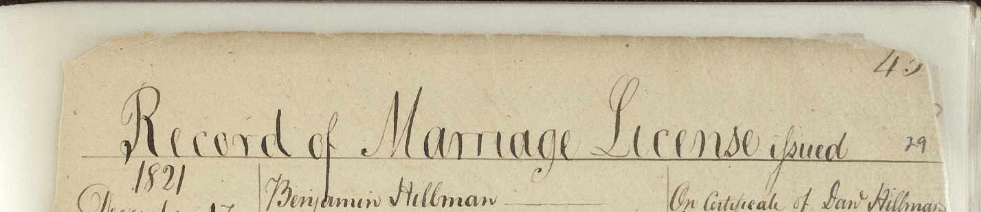
Here is an example of what I mean. I was looking for a marriage record in Clinton County, Ohio, for Isom Gallimore. I knew he should have been married in about 1821 from other research. However, my examinations of the books covering that year did not turn up a record. Using the Full-Text Search, I found the record quickly! Amazing. But why? What is going on that stopped me from finding it where it should have been?

The following page is roughly in the middle of the book and clearly shows that these marriage licenses are from 1821 according to the top of the first column.

Looking forward and backward in the book, I noticed something. This is the last license in the book. It was recorded in 1817.

I also noted that the FamilySearch label for the book states the book covers 1810-1817.

What is going on here? Looking closely at the pages, you can see that they have been put into an archival sleeve or a lamination-type of preservation material (likely using the processes called “encapsulation” and re-set into a book cover.

The link for this page is: https://www.familysearch.org/ark:/61903/3:1:3Q9M-CSHP-C4VS

Using Full-Text Search, I was able to find this record which is obviously in the wrong book based on the dates and labels. Some of the page numbers have been lost to the torn and worn edges. Someone wrote in new page numbers in pencil on most corners. It looks to me like someone did their best putting a book back together that may have fallen from a shelf and the pages spilled all over.

Without Full-Text Search, I may have never found this record. I may have if it were important enough for me to go through every book and read every page. This was for a client project and they rarely want to pay us for the time it takes to do that level of searching. However, with Full-Text Search, we are far more likely to be able to find documents that are hiding from us or that we may not even know exist in the first place.

As I find examples of this, I plan on sharing them in this blog. My next blog will walk through some of the steps and tips I’ve learned along the way. The new technology is amazing. I can remember thinking, after OCR technology became readily available, that it would not likely happen to be able to train a computer how to read handwriting. I’m so glad I was wrong!

Using Websites’ Catalogs: FamilySearch

The FamilySearch website has several different aspects to it such as the Family Tree, records, images, books, the research wiki, and more. Ninety-nine percent of the time, my first stop is the catalog.

The Catalog is found under Search.

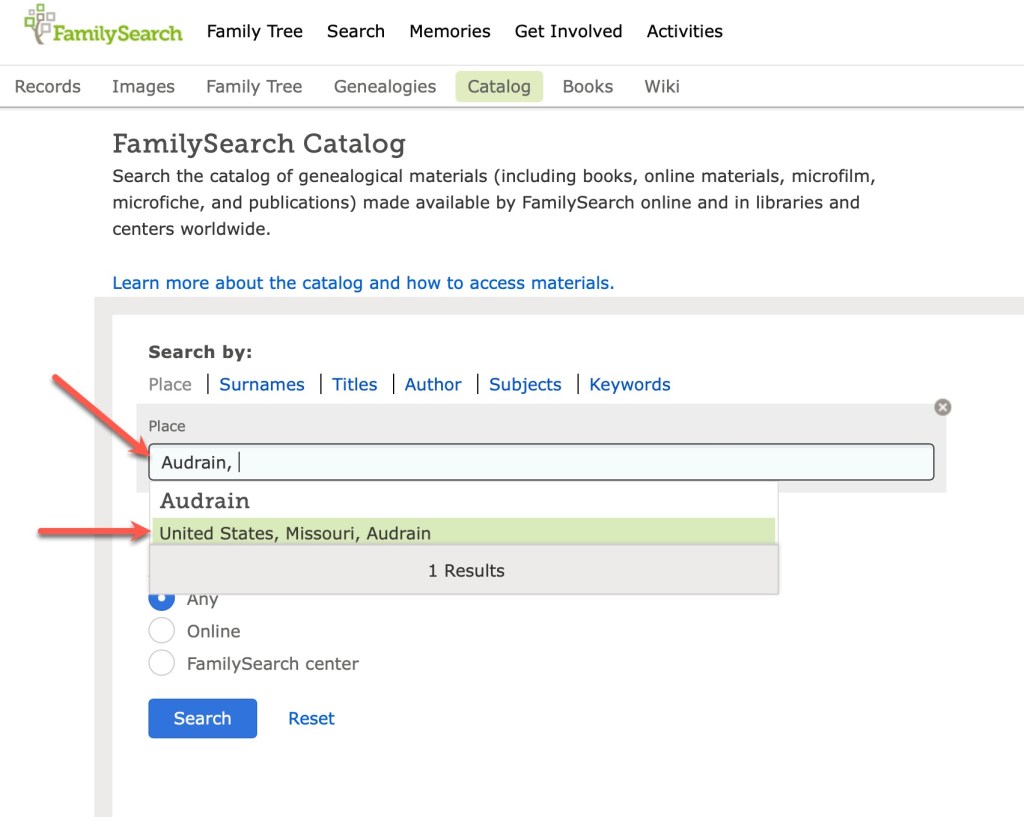
When I am planning my research, or wondering what records might be available for a given location, I always start with the catalog. It’s just the way I work. You might prefer to start with the Wiki or the records or images. This is just how I learned it back when I was a “baby genealogist” and it makes sense to me. You find the catalog under the Search tab. I nearly always put in a location to get started.

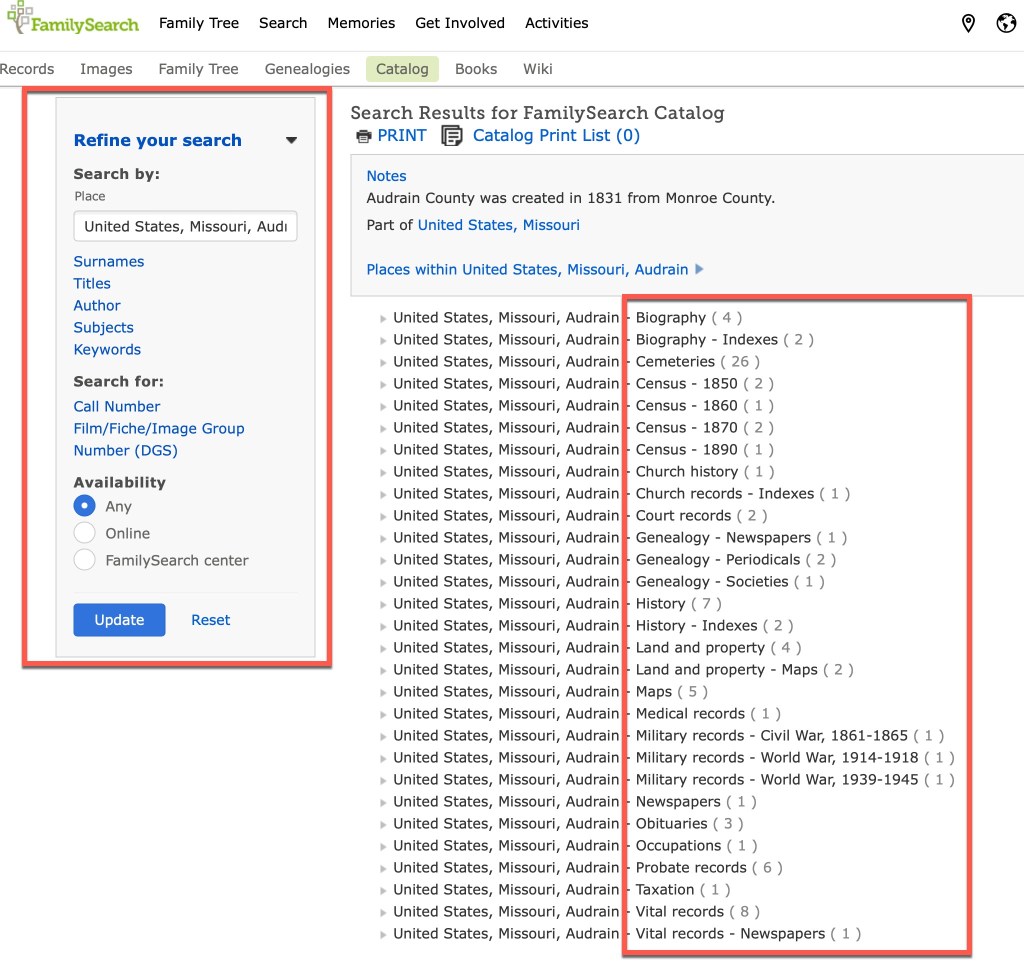
I start by typing in the county, and the catalog brings up the places that match that name. Lucky for us, there’s apparently only one county in the United States named Audrain. Once you click on that location, you are then taken to the page that has all of the topics available for that location.

You’ll notice, on the left are various filters you can use to narrow down your results. However, in the main section on the right, you can see all of the topics (see red box on the right in the screenshot above). You can see the topics such as biography, census, church records, land and property, probate, vital records, and so on. Clicking on vital records gives you the following options:

If those records have been incorporated into a larger database, you might see a link to that database on the page:

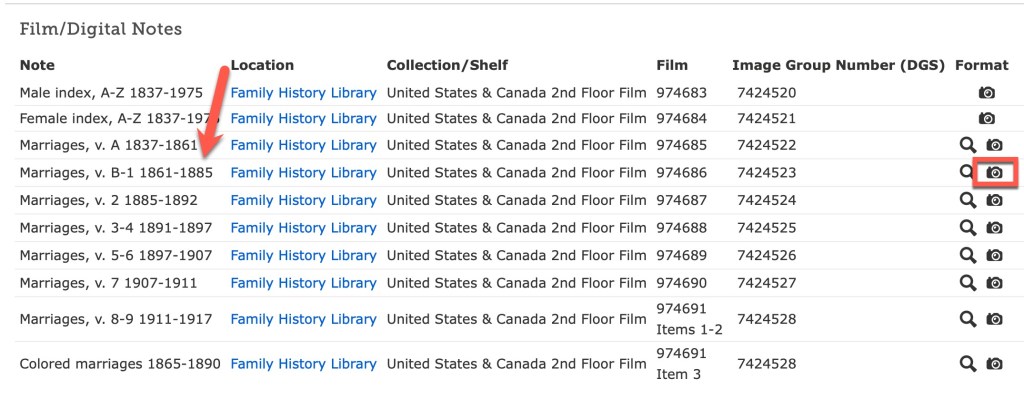
This one tells us that the Audrain marriages are included in a larger database. Usually I will click on that link and see if the record I’m seeking can be found quickly. However, they don’t always show up and I’ll go “old school” and click through the digital microfilm. This sometimes happens because of handwriting/indexing issues, or because this particular film hasn’t been indexed, or probably a number of other reasons I am unaware of.

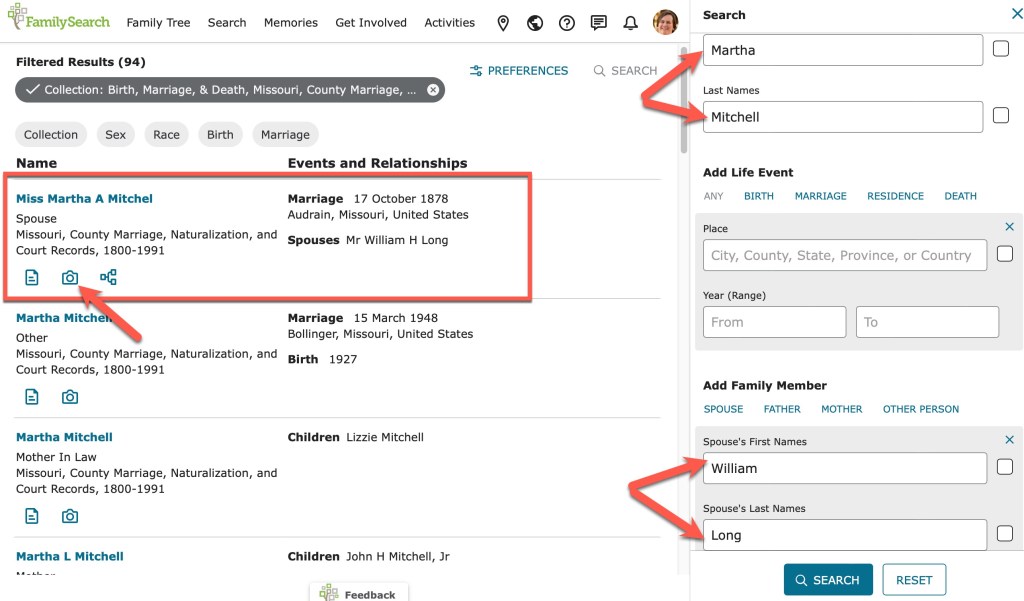
A search through the database does indeed bring up the record I am seeking.

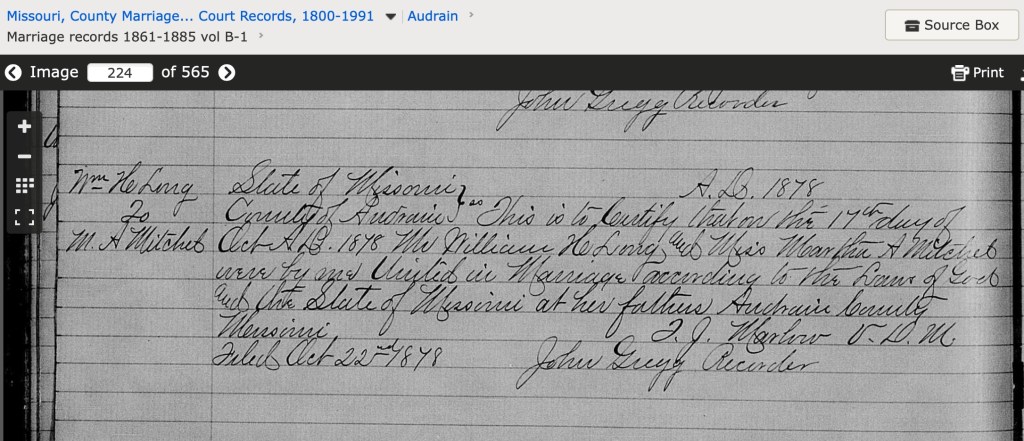
Martha Mitchell, daughter of Thomas Mitchell, married William Long in Audrain County in 1878. The index entry shows a camera icon which, when clicked, takes you directly to the image.

Sometimes, you will not be taken to the image because they haven’t gotten everything connected. But you will usually be given enough information in the index to find the record on the appropriate digitized microfilm.

If you click on the camera icon, you will be taken to the digitized microfilm that you can “scroll” through just as if you were looking at the microfilm.

Those are the basics of using the FamilySearch Catalog. There is a lot more to the FamilySearch site, and we may come back to that in a future series. We will stick with catalogs for now. Next time we will look at a few others and see how they are very similar in function.

Building a Locality Guide: Resources

Now that we’ve talked basics and you’ve made some decisions in terms of how to put your locality guide together, let’s go over some resources you can use to build your guide. These are places you can turn to for general to specific information that can build your guide’s usefulness.

First, let’s examine some resources for general information.

  • FamilySearch Wiki – Use this fantastic wiki for general information about a genealogical topic (such as probate records, vital records, census records, etc.) or about a location (county, state, or country).
  • Cyndi’s List – Use this valuable resource to find general websites of interest that can help you build the historical and geographical portions of your guide.
  • Wikipedia – Use this for general historical information about a particular location or topic, I find Wikipedia most helpful for a quick overview of a subject and then determine what I want to know more about, then will look for more specific sources of information. Often, Wikipedia articles have very helpful citations that can lead to other sources of information on a topic.

Next, let’s examine some resources for specific information.

  • FamilySearch Catalog – Use this part of the FamilySearch site to find books, microfilms, digital collections, and databases for specific localities. This is where I go to identify many of the collections that are available for a particular county.
  • Cyndi’s List – Also useful for links to websites about specific subjects or locations. I often find websites here that I didn’t even know I needed!
  • Local public libraries – Look for the public libraries that serve the county (or town or region) you are building your guide for, especially one that has a local history collection. Examine their catalog and websites for useful resources.
  • Local college or university collections – Many colleges and universities have archives and manuscript collections that can have useful collections or online resources useful to note in your guide.
  • Local genealogical and historical societies – Look for the nearest genealogical society that may cover your guides’ area. Check their websites for any databases, publications, collections, or services they may provide.
  • Local museums – Many locations have historical or specialized museums that may also have a research room. Check for those in your area of focus.
  • Books and journals – Look for histories, reference books, journals, articles, and other published materials that cover your guide’s area of focus. You may find them on WorldCat, Amazon, at the local public libraries, in bibliographies, and so on. These may be quite useful to note in your guide and provide you with content for certain portions of your guide.

Now that I’ve shared some of the resources I use to build my locality guides, I will share next time more about the specifics of what to include in your guide. We will go over each of the sections, how I put them together, what I like to include, and other tips.

Pray for NO DIRECT EVIDENCE!

image from wikimedia commons

So, I went “on the clock” (for BCG certification) in December 2012. In the meantime a lot of “life” has happened but a lot of “life” is going to happen when you take a step like this. I’m the type of person who needs a deadline, so I went on the clock. Once I sat down and tried to locate a family/problem for my case study, I got concerned. One look at my office, my binders, my computer files, told me that I was horribly unorganized and I needed to do a lot of catching up, fixing, data entry (I have a thumb drive with scans from Salt Lake City from 2009 that I haven’t worked with yet!) and organizing, before I could even make an educated guess on the case study.

Well, in the last week, I went through a very large pile of notes with “to-do” items on them, some dating back to 2003. They said things like “find tombstone for …” or “locate obit for …” or one sticky note “I am not convinced that ––– is really –––’s father.” (Names being left out in case this REALLY is my case study.) That one sticky note sent me on a swirl of reviewing documents, notes, computer files, quick look-ups on Ancestry and FamilySearch. I MAY just have found my case study. I have a few pieces of indirect evidence but nothing conclusive that says who the parents of my subject are.

This project is so counter-intuitive for the genealogist. If you’ve never reviewed the Case Study requirements for the BCG portfolio, it basically requires that you use the genealogical proof standard to solve a problem of conflicting evidence or by using of indirect evidence. I know that I have many of these in my family research, but finding a good one can be challenging. And then, what happens when you start to work hard on it and then find that piece of direct evidence? … ah … back to square one.

I did get through my pile of to-dos and either figured out that they had been done (recycled), or if they were easy to do (just did it), or they went into my Evernote to-do list (then recycled). Now, on to some research! So pray for my project, that I find no direct evidence on this man’s parentage and instead am able to locate a lot of really good indirect evidence!