Tag Archives: organization

Revisiting My Roots: Another Case in Point

I’ve been working through my prior research on my Avery family from Wood County, Ohio. I’ve been going through my old research and mostly filling in blanks with the now low-hanging fruit of “easy” records hinted to me from Ancestry. Things such as census records, vital records, obituaries, and so on. I found another example of “trusting” old research in my binders.
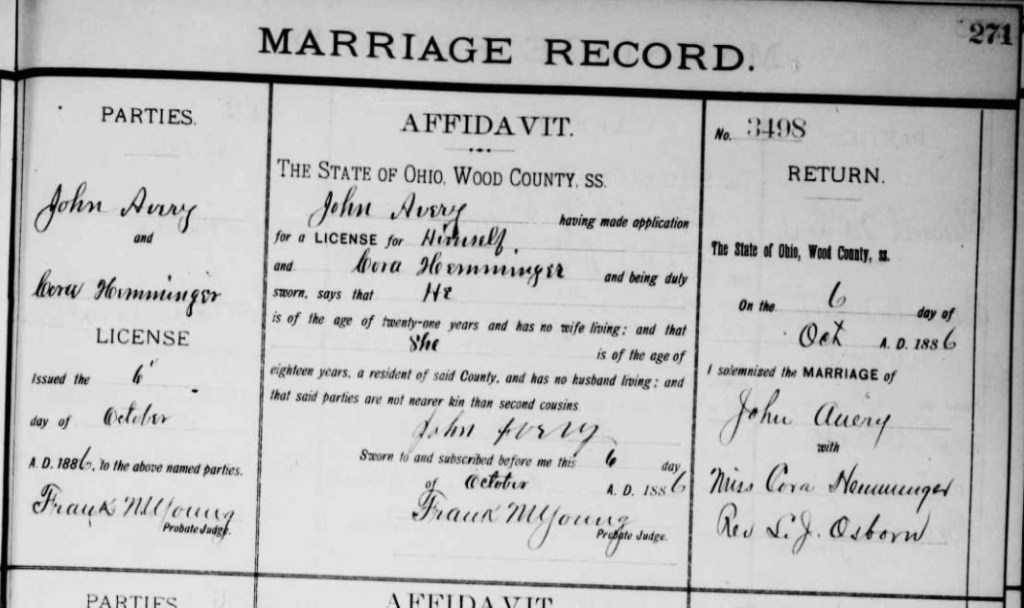
I’m working through the children of Gilbert Z. Avery, just grabbing their basics: birth, death, census, marriage, and obits, generally. According to my previous “research,” Gilbert’s son John B. Avery was married to Cora May Hemminger. I have their marriage record. They married in Wood County on 6 October 1886.1 However, as I’m working through the records this time, starting with Gilbert’s obituary and working through finding his children in the census records as adults, I found John B. Avery, in Arkansas where his father’s obituary said he would be. His wife was not Cora; it was Josephine.

Not to worry. He may have married twice. When did Cora die? Hmmm, not until 1939. John is in the census with his wife Josephine for most of his adult life. He and Josephine married in about 1878, a full ten years earlier than the marriage record for John and Cora. John and Josephine are together in the census from 1880-1930. John died in 1932 in Pine Bluff, Arkansas. So, John could not have been married to Cora. I set out to figure out where I went wrong.

It was another case of believing research done before me. This time from a genealogist cousin who had done a lot of the Avery research and who was kind enough to share it with me to get me started. I was looking back over her original family group sheet she shared, and there it says that John B. Avery was married to Cora Hemminger. There is a note that he “resided in Pine Bluff, Arkansas?” So, she wasn’t sure about that, but there is no mention of Josephine.

I found the marriage record back in my early days and didn’t question it. And I didn’t go looking for him in the census. I DID put him in one of my early public trees. I did some searching in online trees for him, and I’m happy to say that most trees did not make the same mistake I did. Phew. Most of them have Josephine or no wife at all. Thank goodness.

I also did some searching on Cora Hemminger. I wanted to make sure she was a real person and who she was married to if not John B. Avery. In my Ancestry tree, she has a lot of hints. And she is married to John Avery, of course. But she’s married to John Orlando Avery. They also lived in Bowling Green, Ohio. John Orlando Avery’s parents are Joshua Orlando Avery and Harriet J. Manley, of Groton, Connecticut. My Averys were from New York state. So, I’m not sure they are related.

Let’s be fair. The internet, digitized images, and revolutionary tools like full-text did not exist when my cousins began their research. This has definitely made it easy for me to figure out the mistake in a matter of minutes. This is all at my fingertips now, whereas it wasn’t “back in the day.” The moral of the story? It’s a good idea to check your old research and reevaluate some of the early work you trusted.


1. The marriage record is at FamilySearch: https://www.familysearch.org/ark:/61903/3:1:939K-BP64-D
Revisiting My Roots: A Case in Point

Several posts ago, I talked about how I “believed” others who had built the family tree before I started researching. I put a lot of “trust” out there.

“I believed everyone out there doing genealogy on the same families as me had been doing it longer and therefore must know more than I did, must have found the records already, and therefore their pedigrees, family group sheets, and trees posted online were correct.”

Well, I have just discovered an error that I’ve believed, and other genealogists before me had believed as well.

During my tree cleanup, I have recently been working on the Avery family. In one generation, the Averys and the Meekers lived next door to each other. From that, four Avery siblings married four Meeker siblings, creating a lot of chaos in my family tree. One generation down from this, I had another Avery marrying another Meeker. I hadn’t noticed before, because the Averys and Meekers are so intermingled. However, today, I noticed that this coupling was not in the right generation. I have in my tree, as many others do, that Mahlon I. Meeker married Pauline Avery. This would make these two first cousins. As I set out to research that, I could not find a marriage record for them, at a time when the marriage records exist and are pretty good.

So, I did a more global search for the Avery bride. I noticed a hint to another online tree that had the right groom, but the bride was Pauline Dunning, not Avery. At first, I thought this tree must be incorrect. So many trees have Pauline Avery as the wife of Mahlon I. Meeker. Well, I’ve learned that genealogy is not democracy, and just because there are so many “votes” for one thing does not make it true.

I reviewed the information I had that gave Pauline’s husband as Mahlon I. Meeker: they were all things from other researchers, not actual records. (See, I was believing them.) Then I reviewed the actual records I have. Pauline’s father’s obituary lists only “Polly deceased.” It does not give her a married name like her other siblings. Following the records for Mahlon I. Meeker, I do find a marriage record for him to Paulina Dunning. He is the correct Mahlon I. Meeker, but she was not the correct Paulina. I did consider that maybe Paulina was previously married before marrying Meeker, but I did not find that to be true. Mahlon’s wife’s maiden name was in fact Dunning and her parents have been identified; they are not Averys.

This was just the perfect situation to demonstrate why it is important to go back through your old research and clean it up. The good news, at least in this situation, is that both Mahlon and Paulina Avery are still in my tree, so I’m not lopping off an entire branch in this case.

Now on the hunt to find out what happened to the “real” Paulina.

Revisiting My Roots: Ancestry Tree Cleanup

Part of my process for cleaning up my work from when I was a “baby genealogist” involves cleaning up my Ancestry Tree. A few things about my tree on Ancestry. First, it’s a mess. Second, I keep it private now, mainly because it’s a mess and I don’t want people copying “bad” or incorrect information. Third, did I mention it’s a mess?

“Back in the day,” I uploaded a GEDCOM file from my Reunion software to start my Ancestry Tree. That was a huge time-saver because I had already done quite a bit of information collecting and data entry of family history information. Actually, I started with a freeware family tree software program (I in no way remember what that was called) (and then probably another one) before I uploaded that GEDCOM into Reunion. So, there were a couple of GEDCOMs created and uploaded before I got it into Ancestry. If you’ve ever imported GEDCOMs from one program to another, and especially in the early 2000s, you probably have noticed that sometimes the fields did not transfer all neat and tidy. And to say that my Ancestry tree is a mess now is no exaggeration.

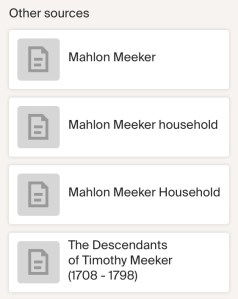
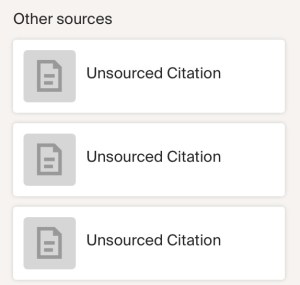
It’s not that the information is wrong, though some is. It’s more that citations didn’t port over neatly, or sometimes, if Ancestry didn’t know what a field was about, it just made it an “unsourced citation” or it just gave it a name, like this:


Some of these weird citations, I know exactly where it came from. Sometimes not. But part of my clean-up process is to just go through each person (as I’m working on a project or a family group) and fixing those up. The ones that say “Mahlon Meeker Household” are citations to censuses. I make sure the census in question is attached and then delete this “other” source. Those that are actual citations to books or records not online, like “The Descendants of Timothy Meeker (1708-1798)” I leave there. I may check to make sure all of the pertinent information followed over such as page numbers, or if there is a link to it on another website.

I also make sure all of the place names and dates are in a consistent format.

This is the kind of task I can do while sitting on the couch watching a show or a movie I’ve seen before and don’t need to concentrate on.

These are the minutiae that just makes things feel better, seem cleaner, look nicer. It is a form of decluttering and I find it helps me concentrate later on more important things, like research.

Revisiting My Roots: Correcting Errors

Back when I was a beginner, I trusted. A lot. I believed everyone out there doing genealogy on the same families as me had been doing it longer and therefore must know more than I did, must have found the records already, and therefore their pedigrees, family group sheets, and trees posted online were correct.

What a sweet summer child I was!

Every day I see trees full of … how shall I say it nicely…? Garbage? Is that too harsh? I don’t mean to disparage anyone who is a beginner. Not at all. But I am criticizing myself a little bit. And I am definitely admonishing those that don’t go back and review their work. Especially before posting it to a public tree where thousands of beginners like me just blindly copy that garbage. For example, why didn’t I notice that someone found in the 1880 census couldn’t have died in 1876? (This is a mistake I am literally fixing at this very moment in my own database.)

I came to realize that many family historians out there didn’t know more than I did. They too were flailing around trying to grasp on to any information to fill a hole in their tree.

Again, I don’t mean to be harsh. We all started somewhere. And we all didn’t necessarily understand how invasive and far-reaching the internet would be when we posted those trees with less than accurate information on them. I know, from Facebook groups I’m in and discussions with colleagues, even NGSQ articles working to correct mistakes, that I’m not the only one dealing with this phenomenon.

One thing I did several years ago to help mitigate this problem, was I made my research tree private at Ancestry. So, all of my “garbage” work wouldn’t be copied again. That doesn’t stop the copying that was already done, but it is something. I then made a clean tree, back five generations, that is public and mostly correct, and just the straight lines (not all of the collaterals), and attached that to my DNA. This allows my DNA matches to see the basic information. But my research tree with all of the mistakes is now not available for public consumption.

By going back through my earlier research is allowing me to find these mistakes and rectify them with actual research in DOCUMENTS, not just believing someone’s tree like I did in my early days.

Revisiting My Roots: Pick the Low-Hanging Fruit

Another step I take when working back through my research from when I was a babe in the genealogical woods, is finding the low-hanging fruit. When I started, there wasn’t a lot online. I wrote letters to libraries and courthouses, genealogical societies, sent forms in for vital records, etc. I think many of us in the field who started in this before the internet for genealogy really took off remember those days. And I think we can all agree that the digital world has absolutely exploded with digitized records.

What do I mean by the low-hanging fruit? The main thing I do is visit the person’s profile on my Ancestry tree and go through the hints. You will most likely find their census, vital records, obituaries, Find a Grave memorials, and so on, in their hints. Now, I do realize that the hints are not always correct and I do not blindly accept every hint on their profile. I carefully examine the ORIGINAL document, correlate that information with my known information, and make a decision from there. I accept the hint (and process the documents as I’ve shared in a previous post in this series) or “ignore” the hint. Ancestry asks why you ignored the hint and I try to give a good answer so they may be able to improve their algorithms over time. If you ignore a hint but later discover it was correct after all, they are not deleted, they are simply found in the “ignored” tab on the hints page. So, there is no harm in ignoring them. It clears out the hints pane.

Sometimes, the hints don’t provide you with some of the records you know should be there. I go searching for them. I generally know what records I should be able to find for my Ohio ancestors since I’ve researched in that state for all of the 25+ years I’ve been doing this. So, if they aren’t served up as hints, I’ll go checking all of my favorite online repositories.

My top “low-hanging fruit” are:

  1. Census records
  2. Vital Records
  3. Obituaries
  4. Find a Grave memorials

These records give me the basis for building a biographical sketch or digging deeper into that ancestor. Primarily, in this stage, I’m just trying to fill the gaps left behind when I was a beginner.

Revisiting My Roots: Census Records

Censuses are one of the foundational records for building a family group. They take a snapshot of a family’s structure every 10 years. One thing many census records have in common is poor visibility, whether that’s because of poor handwriting, faint pen/pencil on the original, poor quality scanning, or something else. They can just be hard to read, especially in printed form. In my binders, I find it annoying to have to find the family of interest on the page, and then see and/or interpret the writing every time I want to review my research. I can do some zoomed in screenshots and print those as well. However, I prefer to transcribe.

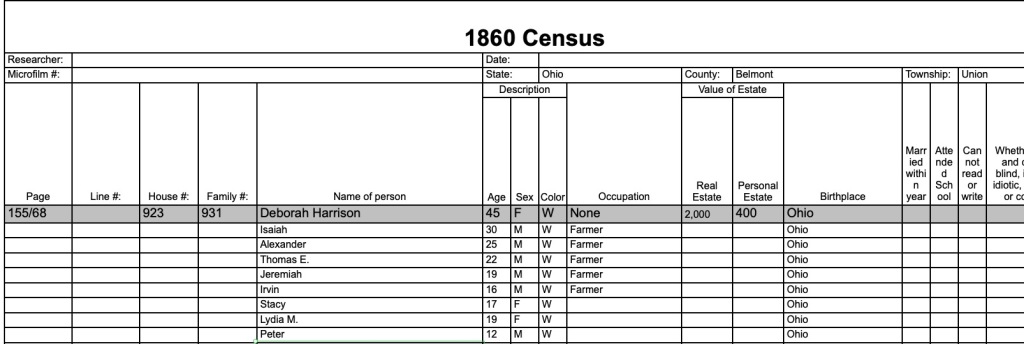
To solve this, I transcribe the census information and print it out, putting it into the other side of the sheet protector so I have the original and the transcription together in one page. I use a set of fillable forms from CensusTools.com. (This is NOT a paid advertisement.) They have created spreadsheets for every federal, state, special, and international census. The cost today is $13.95 for 40 fillable spreadsheets. However, if funds are tight, feel free to make your own, or just transcribe the information into a word processing document. I just appreciate having the form match the original census forms, making it easier to see the data at a glance.

Sample from one transcription of the 1860 census for my Harrison family.

Since this is a spreadsheet, you can add columns or rows, transcribe 10 households up and down the page, or collect all persons in a county of the same surname. Whatever your project needs, you can do. These are nice because they are already formatted matching the original forms.

I add this sheet to every census I have for a family and add it to my binder. It makes reviewing those records much quicker and easier on the eyes.

Revisiting My Roots: Handling Each Document

As we drill down through my system of revisiting old work, I want to share the process I do with each document. I do this with the entire binder before I start with new research because the process I do now is way more detailed than the process I did in 2000. So, some of these things were not done back then and I want to bring my binders up to the same level of “doneness.”

This process includes:

  • Write a full citation for each item. I put that citation in my touch-it-once citation list as well as in my desktop software. I never have to write the same citation more than once. I do have to fiddle with them from time to time based on writing project, audience, and any style changes that invariably happen over time, but the bulk of the citation is done once and forever.
  • Print that document, with the citation affixed to the front of the page in some way. I personally use Snag-it most of the time to add my citations in a text box on the page. You can also use Word or Mac Pages. This fulfills the genealogy standard regarding the separation of document from citation.1
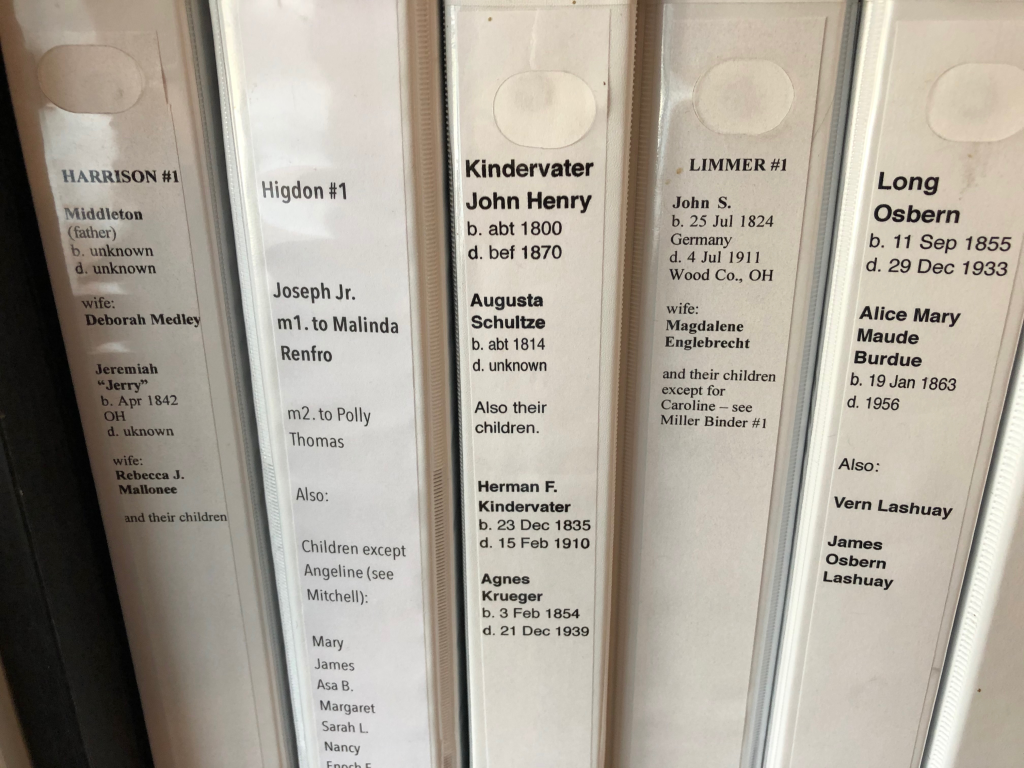
  • I put my documents into sheet protectors and file them in my binders in chronological order, with the children of the couple in their own section. This makes a visual timeline of their lives.
  • I also file that digital document in my electronic filing system that mirrors my binders. The main part of this step is with the file name so that the folder’s contents are in order to match the binder. This is largely done by putting the year first.
  • I make sure that document has been added to my Ancestry tree and my desktop software. I do have trees on other sites, but they are mostly for cousin bait and are not my full tree. My Ancestry tree (which is private) is where my work happens. It contains verified and unverified information, which is why I keep it private. I do have a public tree that I have attached to my DNA but it is a bare-bones tree with only the main details to get DNA matches the information they need. I also do not use a software that would sync with Ancestry (like FamilyTreeMaker). I like to have control over what is uploaded and downloaded. Plus, the act of adding items to trees sometimes reminds me of something else to do or shows me where I’ve made an error.

As I conduct new research to fill in the gaps from by “baby days,” I do the above as well. I don’t get “too crazy” with the children of each couple (except the one I descend from) unless I need to for a particular project. Remember, this is just the basics. I’m finding vital records, census, and newspapers as available. But I didn’t even do the basics when I didn’t know any better, so these binders have a lot of holes.

I’ll share some of the other things I do in my binders to make reviewing my research easier for myself. My future self thanks me when I do them and curses me when I don’t. Until next time…

  1. For more information on Genealogy Standards, visit the Board for Certification of Genealogists.  ↩︎

Revisiting My Roots: A 25-Year Reflection on Genealogy Growth

When I started this journey in genealogy in 2000, I had set out to find my family’s connection to Roy Rogers. We just always knew that he was our “cousin.” I wanted to figure out the connection and in the process disproved a dearly-held family myth. (If you want to know more, you should tune in to my presentation for IGHR on 28 July 2025.) Since then, I have been on a 25+ year journey educating myself, building my skills, and gaining the Certified Genealogist credential. In that time, I have developed skills, processes, and strategies that I have honed into a workflow that works for me.

However, as I look back at some of my early work, I see a lot of flaws. Of course, I do. As we gain knowledge and skills, those things we did before did not benefit from that knowledge and skill. I have been revisiting my old work, families I have not given attention to since I started. It has been eye-opening to see how far I’ve come. Working the daily grind, I find it hard to notice that my skills have gotten better over time. But when I look back at some of my earliest work, the contrast is stark. And it fills me with a bit of pride, but also some anxiety. If I died today, what would other researchers think of this low-quality (i.e. early) work?

It is from this anxiety that I have started on a journey to bring my older work up to standards. I’ve said in lectures that I feel like there are at least two phases in a genealogist’s life: the collection phase and the project (or brick wall) phase. The first is when you are just collecting all of the easy, low-hanging fruit for your ancestors and climbing your family tree as fast as you can. I believe this is where we all begin. In my beginning, since no one had built my tree, I started out with very little, so finding records and climbing branches is relatively easy. The second occurs when things get tougher. You run into research in that pre-1850 time when censuses did not name everyone in the household, for example.

As I’m revisiting my older research, I’m discovering that I didn’t even get all of the low-hanging fruit. When I started, genealogy on the internet was in its infancy. I had email. But digitized censuses did not exist yet. Or the 1880 census CD boxed set had just been published by FamilySearch (but I couldn’t afford it). I did most of my beginning research at the library (Denver Public Library, the Family History Library, or a local Family History Center) or via email or mailed letters. As I am going back through my work, so many things are online now, it is incredible to think about!

My current process includes:

  • Finding all of the census records each individual/family group should be in. Extracting that information into a spreadsheet. (I use premade forms from CensusTools.com.)
  • Find any vital records that are available online for the individuals.
  • Find online obituaries or news articles about the individuals.
  • Find probate, land, military, or any other records for the individuals.
  • I add the information from these records into my Reunion database.
  • I write the source citation for each document and add it to my master list and copy/paste to Reunion. (See my post on my “Touch it Once” Citations.)

As I’m doing the above, I often think of other records to look for. Especially after 25 years of education and practice, I have knowledge of other records that I didn’t know about in my early days. This is allowing me to fill in gaps and build better profiles for my ancestors.

I am doing this through all of my family groups. I keep a binder system, because that is just how I like to do it. I get tired of reading on a computer after doing that all day for my day job. Also, if all of my “stuff” is in a computer file, will anyone ever find it once I’m gone? My binders and my digital system match, more or less. The binders make an easier to see representation of my work and our family history. Of course, they could be tossed out, along with all of my unfinished craft projects. But I digress…

My next post will share some of my future plans for this revisiting old research and how I plan on improving what I’ve got.

Analysis and Correlation Tools used in George Long Project: Mind Map

To keep track of the data, and to be able to visualize the information I was dealing with, I successfully used a mind map on this project. I shared a very zoomed out view in a previous post. I identified 12 George Long candidates! I had to figure out some way to keep track of them, determine which George Long a particular record belonged to, and compare information so I could eliminate the wrong men.

I have not used mind maps much in my previous work. They just didn’t seem to apply to projects I was working on as well as another tool did. When I am writing, I usually start with an old school outline. That’s just how I was trained in my early english writing classes, and it stuck with me and makes the most sense to me. However, it was not working when it came to dealing with all of the George Longs. I had many documents and needed to be able to distill them down to individuals. A mind map worked great for this.

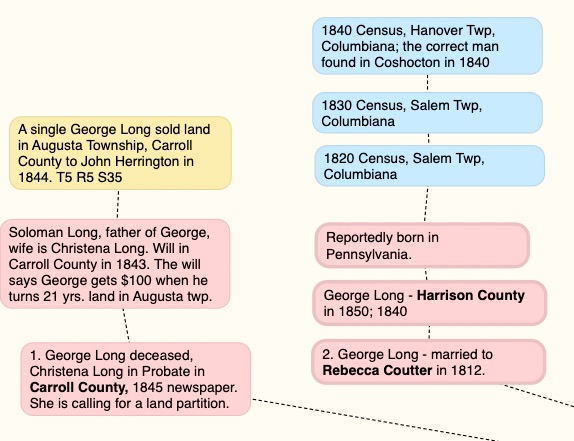
Here is a zoomed in section of my mind map for candidates numbered 1 and 2.

As I collected data from documents, and as I could determine who they belonged to, I added them as a “bubble” to my mind map. The colors didn’t mean a lot except to depict a different type of record, and I wasn’t necessarily consistent. The red bubbles were the starting point information and any records I could tell belonged to the same man.

Keep in mind, the mind map evolves over time. You’ll notice that there is a note in the image above about the 1840 census for a George Long in Columbiana County, that the correct man was found in Coshocton in 1840. That note came later, of course.

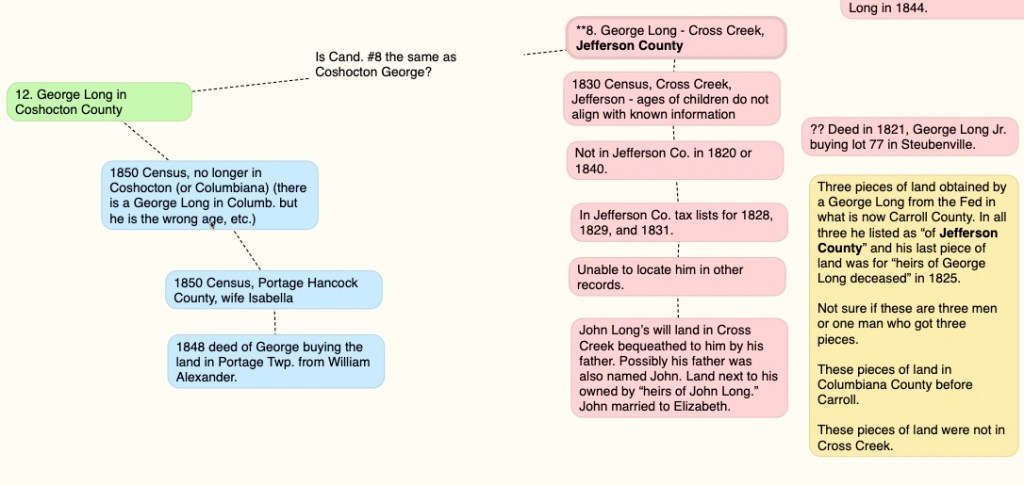
As I was working, I would suspect that two men I had were actually the same man, so I would make notes to that effect, such as the question in this image. “Is Candidate #8 the same man as Coshocton George?”

Then I would do more research to answer that question.

I would go around and around with questions and research until I felt like I had a solid understanding of who each man was and why they are not the “correct” George Long.

Again, keep in mind you are seeing the last version of this before I started writing. This was used as the outline to write up my final findings on the George Long project. The mind map, in my use of it, is never meant to be a final product. I would not publish a mind map as a visualization of my research. It is just for my own organization and visualization of the information gathered.

Next time we will look at the timeline I created for this project. It was the other major tool I used to prove which George Long was the correct George Long. Until then…

Identifying 12 Candidates

In my recertification project, I examined census, tax, land, and probate records and identified twelve candidates in the right time and place to be George Long, father of William Long. But how did I decide on those twelve?

  1. Census – The biographical sketch of J. W. Long mentioned in the last post stated that William’s father was George Long and he arrived in Ohio in 1817 from “North of Ireland” to Carroll County, Ohio, where he married and had several children. I used that information to look for George Longs in the 1820 and 1830 censuses in the counties that would later make up Carroll County. They also had to have been born in Ireland, and of an approximate age to fit the other criteria such as the approximate age of William. His age was the one I left most wide open in terms of filtering results.
  2. Land – Knowing that many immigrants came to the United States for land opportunities, I identified George Longs in the Bureau of Land Management’s General Land Office (BLM GLO) database as well as in deed books in the five counties.
  3. Tax – Many counties in Ohio have tax records digitized and online for the years in which I was expecting to find George Long. Tax records can act like a yearly census.
  4. Marriage – Also, many counties in Ohio have marriage records available online for the counties in question in the right time frame to match the information from the biographical sketch. If the correct George Long married in one of the counties that made up Carroll County, then I should find a marriage record, ideally. (I never did.) But the marriage records let me sort out the other Georges into separate individuals.

Basically, I collected every George Long I could find in these records, matched them up as the same man, if I could with other context clues (land descriptions mostly), and boiled it down to twelve candidates. How did I keep track of everyone? Besides just textual notes in Scrivener where they were linked to their records, I also used a mind map which I created in Scapple. I am not traditionally a mind-mapper, it’s just not how I think, but it worked beautifully for this project.

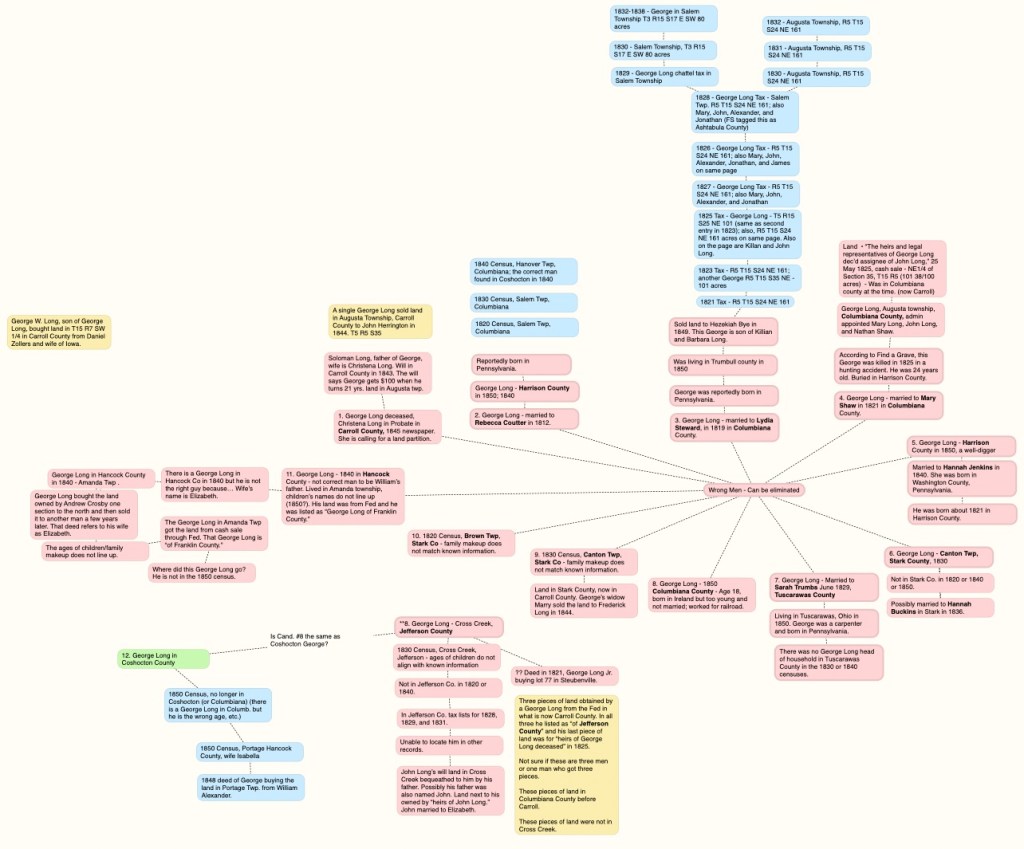
A very zoomed out view of my mind map. You’re not necessarily supposed to understand my thoughts, but this is how I organized those candidates and narrowed it down to twelve separate men.

Mind mapping can be used to organize your thoughts. I’ve been to lectures and webinars on the topic. Many times they are used to help with writing in which you can just dump your thoughts into a mind map in no particular order and then later drag the pieces around to become more organized. I personally generally do better with outlines. However, as you can see, I had a lot of little bits of information I was trying to match up to individuals of the same name.

As I am looking at this mind map now, months after its use was finished, I don’t recall the point of the different colors. I believe the red/pink was definitely the wrong man but the blue and yellow I can’t remember why I used them. I’m sure I had a great reason at the time. They all ended up being the wrong man except for the green one and his connected records. And once I got to a certain point of understanding who was who, I stopped using the mind map and started writing. So, it is unfinished as a work product on its own.

Some of the boxes have questions, thoughts, reasoning, and information items. This was very useful when having to set the project aside to say, make dinner, and work, and then come back to it several days later. This allowed me to recall my thinking about a particular man and why I thought he was the wrong one.

Different tools fit different situations and different brains. You might absolutely love mind mapping and use it a lot more than I do. Someone else may prefer to have done all of this in a spreadsheet. Honestly, it doesn’t matter. What matters is that it works for you.