Tag Archives: research plan

Research Plogs: Final Thoughts

When you are starting to work on a more difficult research problem, beyond the collection phase, you’ll want to make more directed, pointed, plans for your research. Here are the steps I take to plan research:

  1. Think about your research question. Clear it up if it isn’t already clear. Who exactly are you trying to identify? Have you singled out a unique person in time and place? Don’t make it too complicated or to simple. There is a Goldilocks effect when it comes to a research question, one that is “just right.”
  2. I catalog my starting point information. During this process, I reevaluate what I have. Many times this is research I haven’t looked at for a long time. Are the assumptions I’ve made sound and based on documents? Is my starting point information actually correct and known to be for the right individual? Are there any conflicts in the starting information? I write all of this down, usually in bullet points. If there are a lot of conflicts, they may get their own section. Sometimes (often?) I find some kind of mistake I made in my reasoning, often because I didn’t know then what I know now. I have more experience and knowledge now and sometimes that breaks through a brick wall all by itself.
  3. I make a list of what I need to do to resolve anything from step 2. If there are conflicts, can I give sound reasoning as to why they may exist? If not, what additional research do I need to do to resolve them? If I made an incorrect assumption, what do I need to do to correct it?

    You’ll notice that everything above is not even planning the RESEARCH yet!
  4. I survey the records that are available (both online and off) that may answer my research question. I utilize the catalogs available on websites such as Ancestry, FamilySearch, and local public libraries, archives, universities, and etc. as it applies to the topic or the location I’m working in. From that research, I may make a larger list, but I truly start with a top 3-5 items. Invariably, you’re going to find something that changes the course of your research. Spending too much time creating an extensive and detailed plan will likely be a waste of time.
  5. Conduct the research! This is the fun part. Look at what you planned on looking at. Note why you are looking at it (purpose of search) and what you found. Collect any URLs, waypoints, download images, note any conflicts, note any negative findings, and note any changes in your plan or direction of your research.

Whether you are in collection mode or brick-wall mode, planning your research is an important part of being efficient with your research time. Hopefully you found some trips or tricks you can use from this series on how I do it. Everyone thinks and plans and organizes differently. So take what you think will work for you and go make it happen!

Happy plogging!
Research “Plogs” – the Planning Part – part 3

Last time we looked at research planning for when you’re in the “collection” phase. Usually the collection phase happens when we are just starting out and gathering as much as we can on our ancestors, or it may happen when you are starting a new client project or a new project for yourself that you haven’t researched before. The collection phase is when you are gathering as much of the “low-hanging fruit” as you can, the easy to find documents and sources to advance your family trees.

What do you do when you get to a point of resistance, commonly called a “brick wall” in our field. We invariably get to a point where the low-hanging fruit doesn’t identify that next generation, for example, and we have to do some extra work to determine who the parents are. This is where we can really put our skills to the test, or learn new skills and methods if that is the case. Part of this is effective research planning.

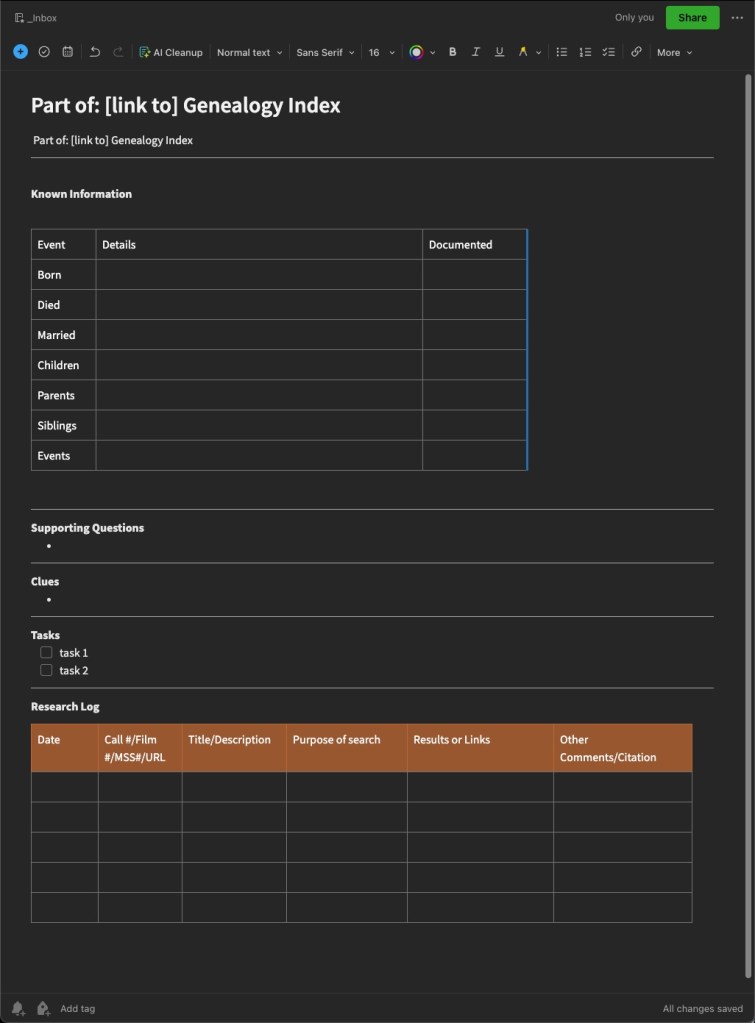
I have an Evernote template that I use for more directed research. This same sort of “set up” will work in Word or Excel or your note-keeping tools of choice. The most important thing is that you figure out what works best for you, for your way of thinking, and how you view your findings.

My Evernote Research Plan/Log template.

I fashioned this template after one I found online, probably from Cyndi of Cyndi’s List (click here to see all her Evernote templates.) I almost always end up changing or adapting them to fit the needs of whatever I am working on. Do not try to shoehorn yourself into something that someone else created. If that doesn’t work for you, change it until it does. You can recreate something similar to mine, find one that works from Cyndi’s list, or create your own in Word, Excel, or the program of your choice.

When I set out to work on a “brick wall” in earnest, I will start one of these “plogs” to help me get myself and my thoughts organized, and ready for research. Next time, we will look at this template filled in for a project I am currently working on so you can see how I use it in actual practice.

Research “Plogs” – the Planning Part – part 2

In the previous post, I discussed two “phases” that I saw in myself in terms of my genealogical development. There is the “collection” phase where you are gathering the information for your family tree, perhaps regardless of a family line or specific problem. When I started out, I spent hours and hours at libraries and on websites gathering what I call the “low-hanging fruit” or the easier to find records for family groups and my direct line ancestors. Those records often include censuses, death certificates, obituaries, tombstone photos, etc. Depending on the area where your research is located, some of these may be easier than others.

In terms of research planning when working in the “collection” phase, when I was in this phase, things were a little bit different than they are now, but the planning portion is pretty much the same. The difference is in how we might access those records and collect them. I started research in 2000. Ancestry as a research website was in its early stages so a large portion of my early collecting was done at local public libraries, local cemeteries, the Family History Library, the local branch of the National Archives (where you could view the census on microfilm before it was digitized and available online).

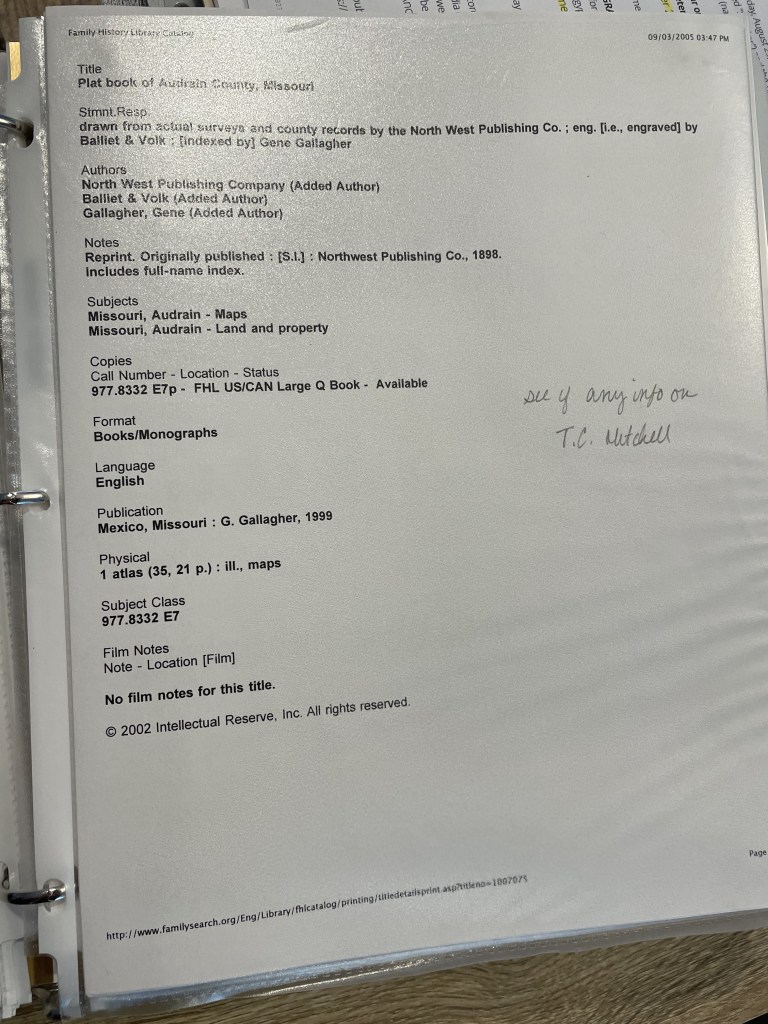
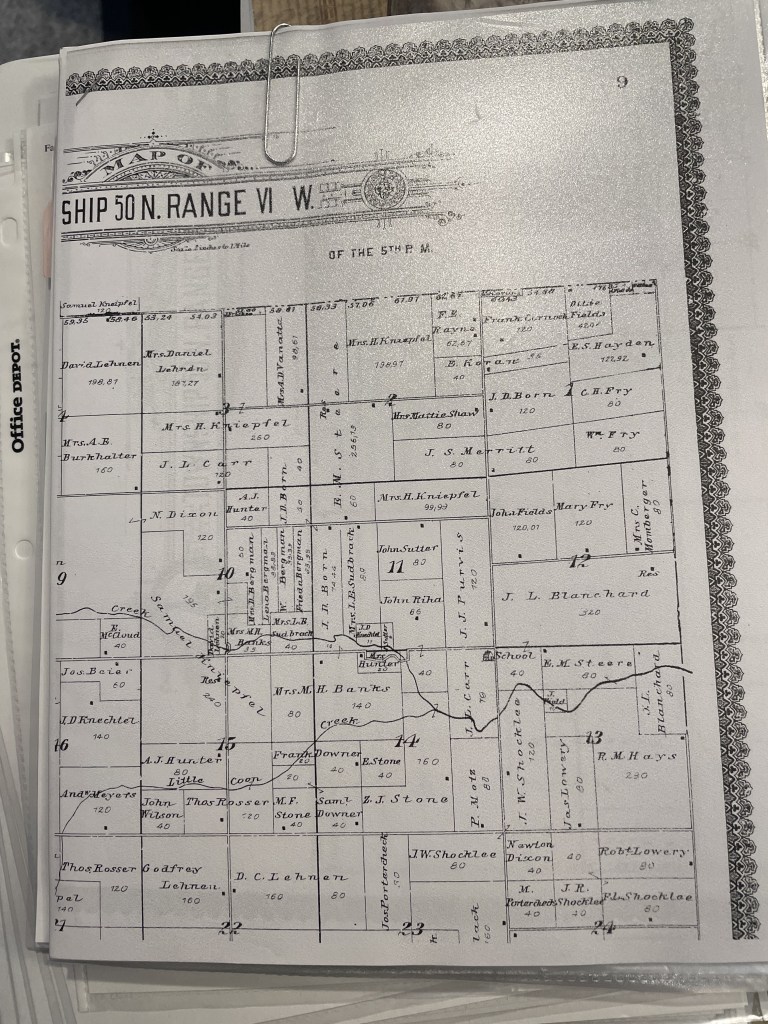
When preparing to visit any library, I visit that library’s catalog to determine what sources I plan to use to find records for my family tree. Remember, I’m in the “collection” phase here, so these will be a lot more broad-purpose searches. My tasks might be something like “find the obituary for Thomas Mitchell” or “Find Thomas Mitchell in the 1900 census.” When I started, I would print out that catalog item and put it in a sheet protector in a binder specific to that repository. Then, when I visited the repository, I used my binder as a guide or a to-do list and would complete each item. Back then, you made photo copies. We didn’t have scanning or photography (well not conveniently), when I started. I would tuck the photocopies into the sheet protector that contained the original catalog entry. Keeping the photocopy and the catalog entry together allowed me to go back later and create the citations for the items found.

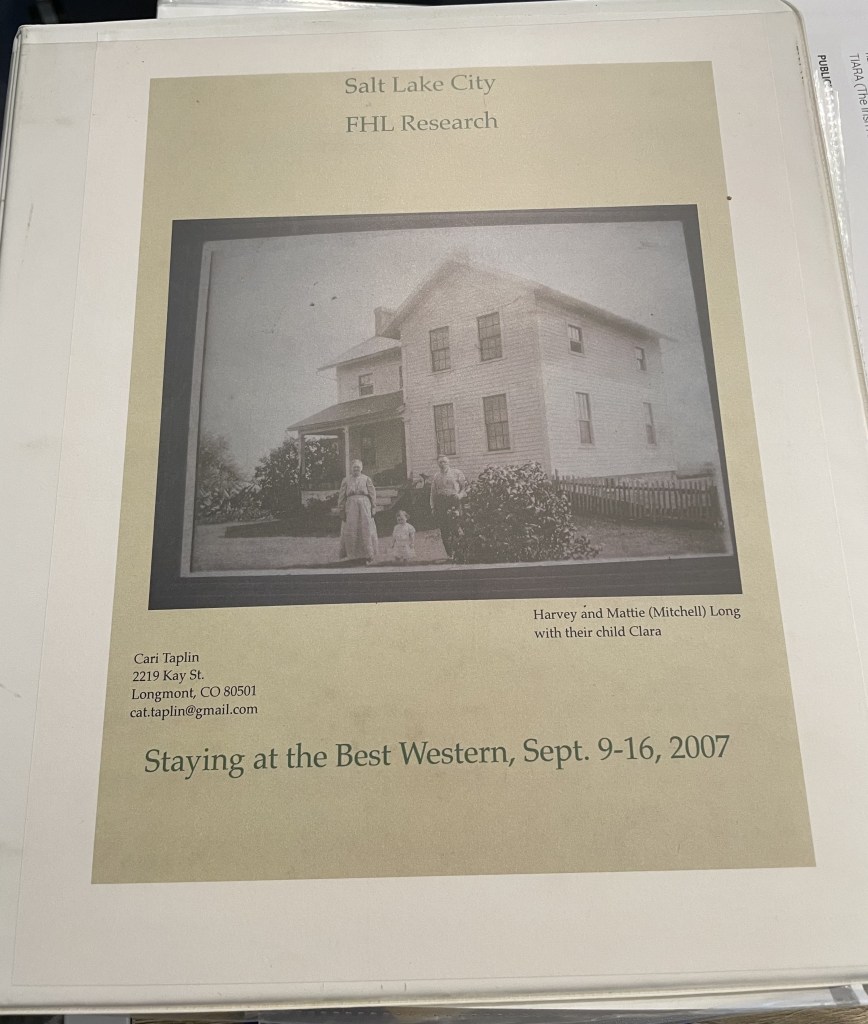
My binder from a 2007 trip to the Family History Library. I do not live at that address any longer.
Print out of catalog page from the FamilySearch Catalog
Printouts of Items Found from the FamilySearch Catalog Entry Above, tucked into the sheet protector.

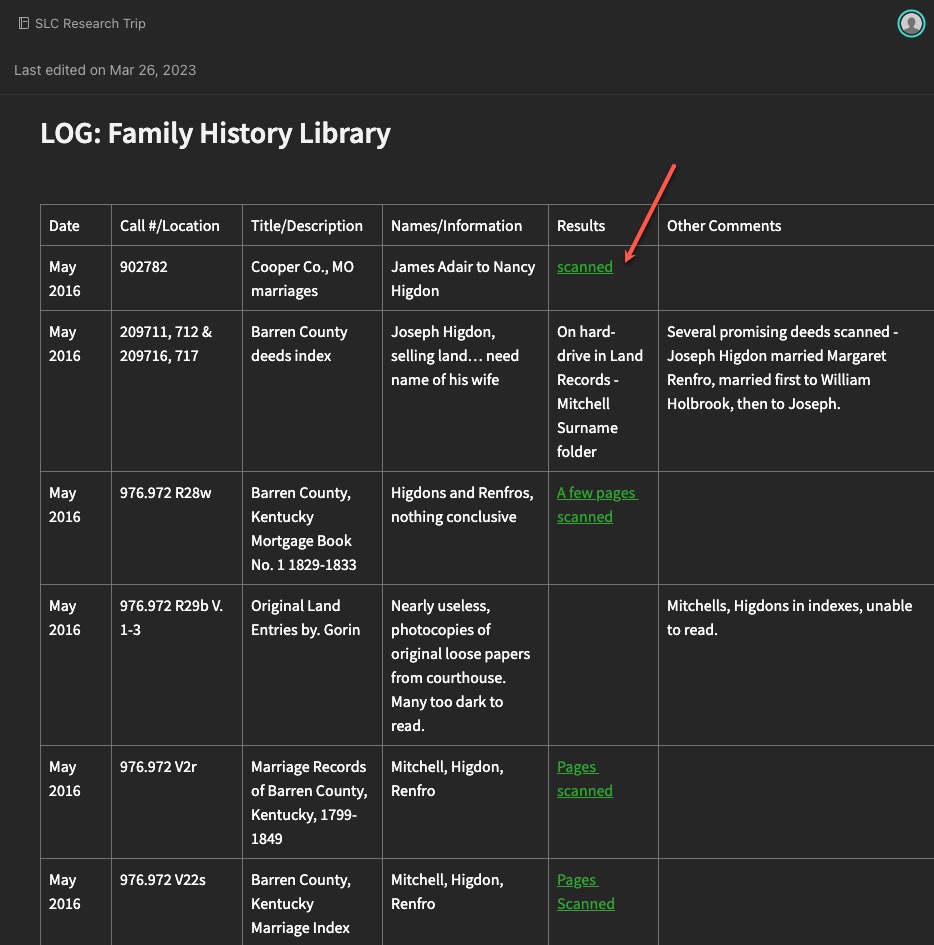
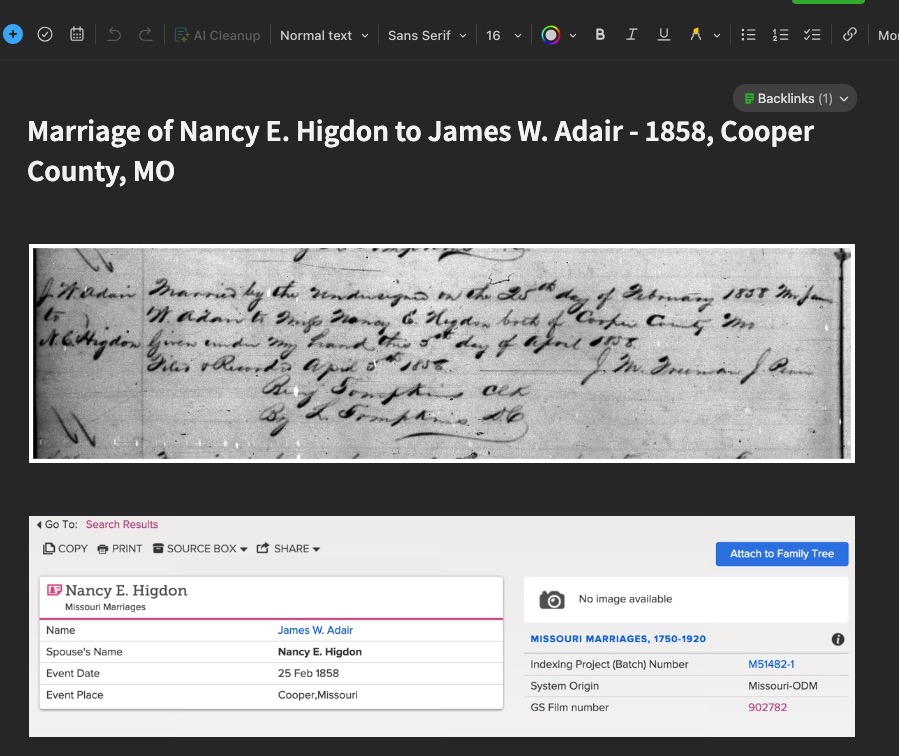
Ok, so that isn’t exactly the same system I used today when I’m “collecting.” I still visit the catalogs, but many items (not ALL) I’m looking for are now digitized and available online from home. So, my plan consists of a spreadsheet or Evernote note with links to databases, and the tasks, rather than a printout. If items are only available at the repository, I still copy the link into my plog, and then retrieve it next time I’m at that repository. I then collect my “copies” (scans or phone photos these days) and add them to Evernote where I can link them to the “plog.”

Evernote note showing a “collection” example with links to scanned items (red arrow).
The scanned item from the “scanned” link above.

You might still like to have printouts. You might also prefer to only work in digital. And you might be a combination of both like I am. That doesn’t matter. What matters is that you have a system for keeping track of what you want to research, what you expect to (hope to) find in a particular source, and then what you found.

Next time, we will look at some examples of more directed research plogs based on specific research questions and projects.

Research “Plogs” – the Planning Part – part 1

Creating a research plan takes a bit of practice. There are differing opinions on just how much planning one should do for a given research question. I have seen long lists of sources one should consult when working on a project. Great, long lists that identify every source you may ever think of (even if it doesn’t apply to a particular ancestor or situation), like this one from the Puget Sound Genealogical Society. Others have taught that the plan should only be a few items, because what you find in those items may dictate where you look next. Some example research checklists, forms, and templates can be found here on Cyndi’s List.

I’ve discussed before that I think (at least in my experience) that are two phases of a genealogists “life.” The collection phase comes first; gathering as much as you can. In this phase you find all of the “low-hanging fruit” such as census records, vital records, newspaper articles, obituaries, and so on. The “easy” to find items for your ancestors. Then there is the phase that you face when the easy-to-find runs out. And not just runs out but when there are conflicts in the records you have found. The second phase I think of as the “brick wall” phase, or maybe just the “it is going to take more concentrated effort to figure out” phase.

I think the long checklist forms you can find are more appropriate for the collection phase. The more thoughtful, intentional, and detailed research plans are what is needed to get through the tougher problems. So, my point in saying all the above is this: What phase are you in? Choose the most appropriate system that works for you. I have two examples one for each “phase” that I will share both over the next few posts and discuss MY thoughts on the benefits of each.

Research “Plogs” – Different Styles

As I have evolved as a genealogist, so has my working style, and specifically how I use research “plogs.” I’m going to share some of my earlier plogs… no judgement. I mainly want to demonstrate how I used to do it, and how I’ve improved, at least in terms of keeping track of my thoughts and research.

My earliest logs were on printed paper. I’m sure I have copies of them, but I’m having some remodeling done in my office and my “stuff” is in piles under drop cloths and I can’t get to them right now. If I can before this series is over, I’ll snap a few photos. For now, let’s look at some of my earliest digital versions.

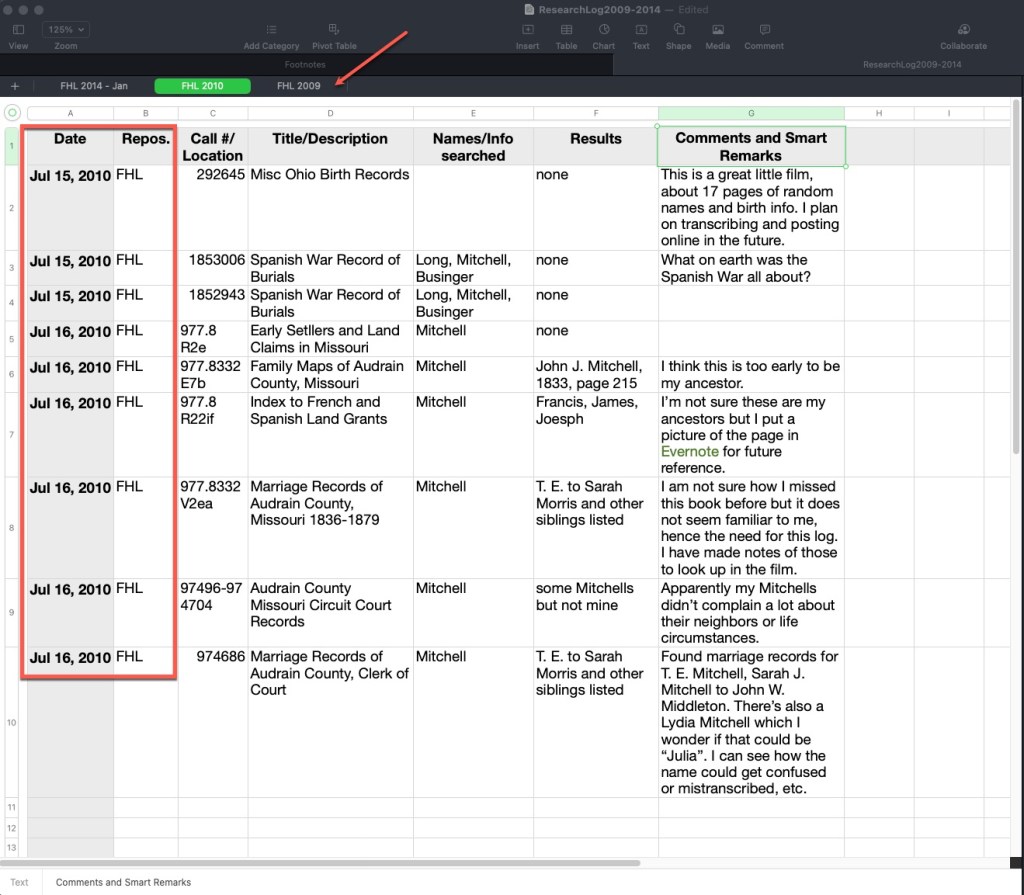
The following plog was done on a spreadsheet. I use a Mac and the Numbers spreadsheet program. It works very nearly like Excel. Across the top you can see tabs indicating the repository and the year. The column headers have not changed a lot over the years. I usually indicate a date, the repository, the call number/film number/manuscript number if it is in an onsite location, or a link and database title if it is an online source, the title or description of that item, the names and parameters used to search, the results, and then any comments, ideas, analysis, etc.

Example Research Plog by Author, using Mac Numbers Spreadsheet

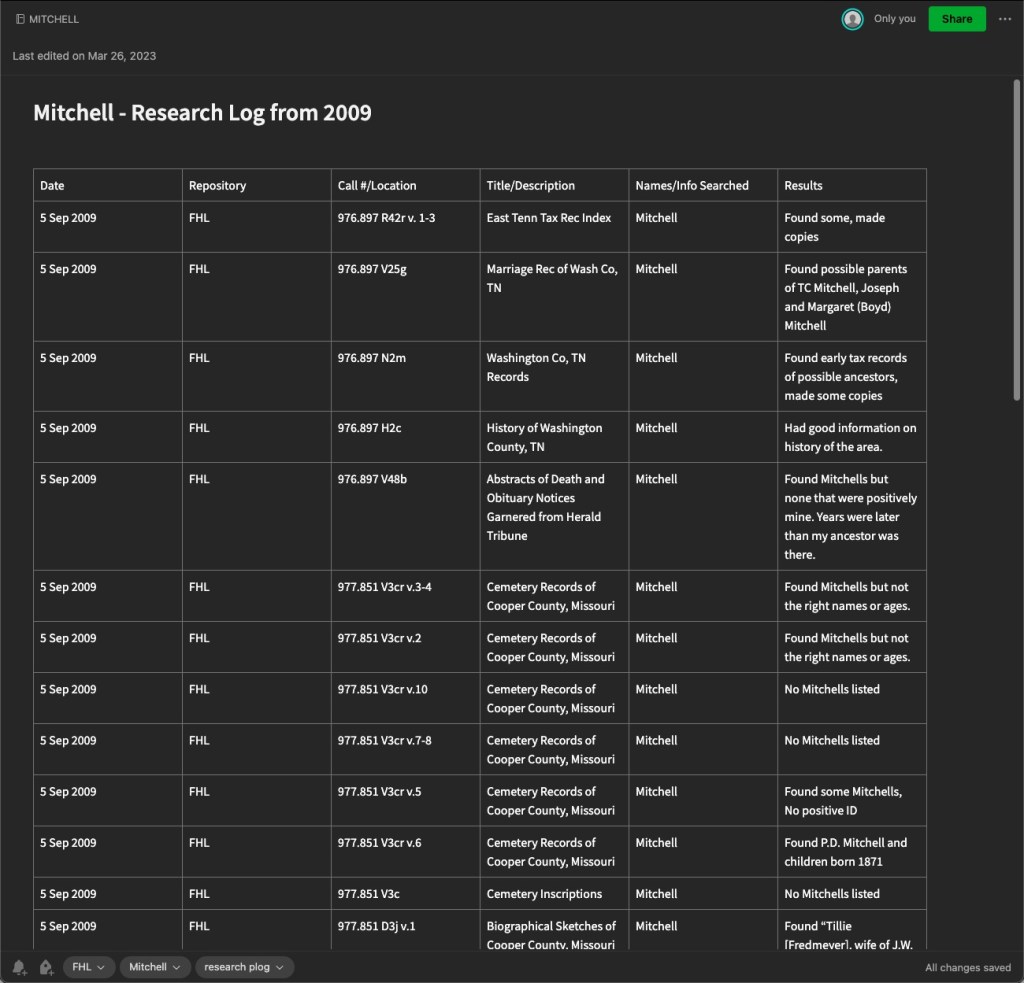
Here is another plog I’ve created, this time in Evernote. Other note programs exist and you may prefer. This is an example of one from 2009, you’ll note very similar column headings. You’ll also note that I didn’t do as much thought-process writing in the results column. I mostly noted what I found. In newer plogs in Evernote, I generally take photos of the pages in books and store them right in Evernote and then link the results in this log to those separate notes so that this log would be much more useful. Stating “Found some, made copies” doesn’t really help if I have to track down those copies. Earlier in genealogy time, we made a lot of paper copies. Now we can take digital photos and link them to these logs.

Example Research Plog by Author, using Evernote

The advantage to a note-taking software like this is that they often are shared to the cloud and you can access them on mobile devices as well as your computer. Of course, a spreadsheet can do this as well if you store in Dropbox or other file sharing service. Note-taking apps generally work more seamlessly, in my opinion. On these things, my advice is to always do what works best for you. It makes no sense to spend valuable research time trying to use someone else’s system if it isn’t working for you. If you have a favorite system, keep using it! Just adapt and evolve.

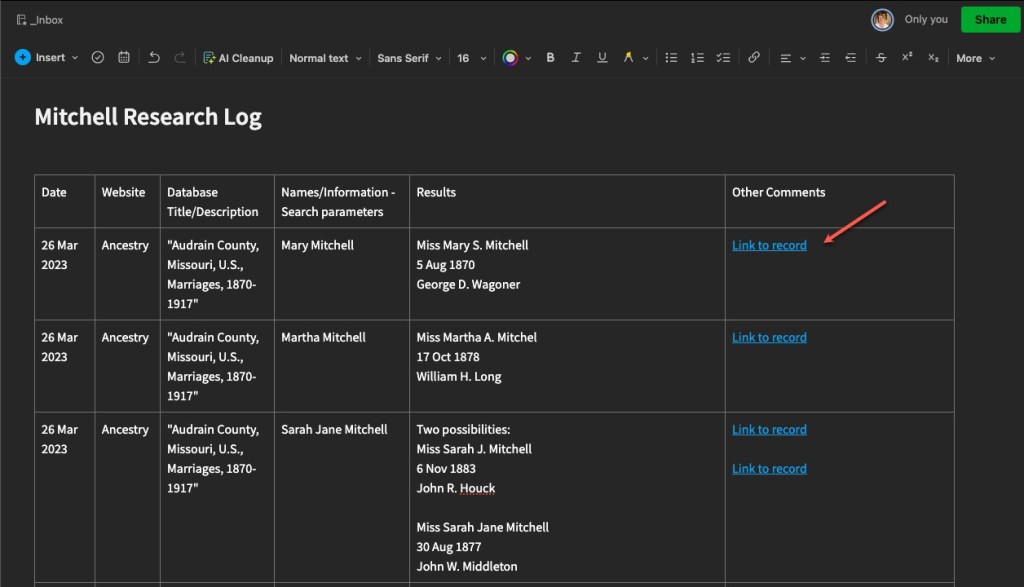
Here is another, more recent plog, showing linked records. These are links directly to the item in online databases, in this case Ancestry. With Evernote, and other note-taking options, you can link to other notes within the software.

Example Research Plog by Author, using Evernote, demonstrating links

You can, of course, use a word processor to keep a plog as well. Below is an example of one I did back in 2014 as I was experimenting and evolving.

Example Research Plog by Author, using Word Processor

The above example of a word processor plog, I tend to use for client work, but also in my own personal research when I’m trying to “round up” all of the research I’ve done and write more analysis from the findings I collected in the plogs I have made in Evernote or a spreadsheet.

Most recently, I’ve begun doing this “round up” more frequently, writing a kind of informal client report for myself. I think of it as writing notes to my future self telling me what I was thinking at the time, what I thought then that the next steps might be, and future tasks for myself. This has really helped me because my memory is getting worse as I get older (and busier) and I always think I’ll remember what I was doing, but then months go by and I’ve completely forgotten what I was doing.

Next we will talk in more detail about the plan part of the “plog.”

Beginning Concepts: The Research Plan Part 2

Last week I described why a research plan/log or PLOG, is a good idea. This week, let’s get into some of the nitty gritty of what a research PLOG looks like.

First, you will want to have several research plans. They should be based on a particular project you are working on. Remember, we are past the “collecting” phase and are now into the FOCUSED phase of our research. (Refer back a few weeks to the post on Getting Focused.) Your research plans and logs will want to reflect that focus. I have a research plan for each individual project I’m working on. And my projects are generally driven by my research questions. So, I have a PLOG that holds research tasks and findings relative to a particular research question I am trying to solve.

You can create these PLOGs in any platform that works for you: word processor, spreadsheet, Evernote or One Note, Scrivener, and so on. Even paper. I’m not here to tell you which one to use. But I will share what I use: Evernote. Now there was a recent Evernote update that had a lot of people upset, they didn’t like the changes. Well, who likes change? I know I don’t. I am still working with the new update and forming my opinions, but so far, everything has been working ok with a few minor hiccups.

I like Evernote because of its ability to sync between my laptop, my phone, my iPad, and a web version, so I literally have access anywhere I have the internet. I can also access my notes offline as long as I synced everything before I left the land of the internet. It also acts like a word processor and I can add tables, images, links to other notes, and more. I can also search my notes by keyword or tags (if I added them).

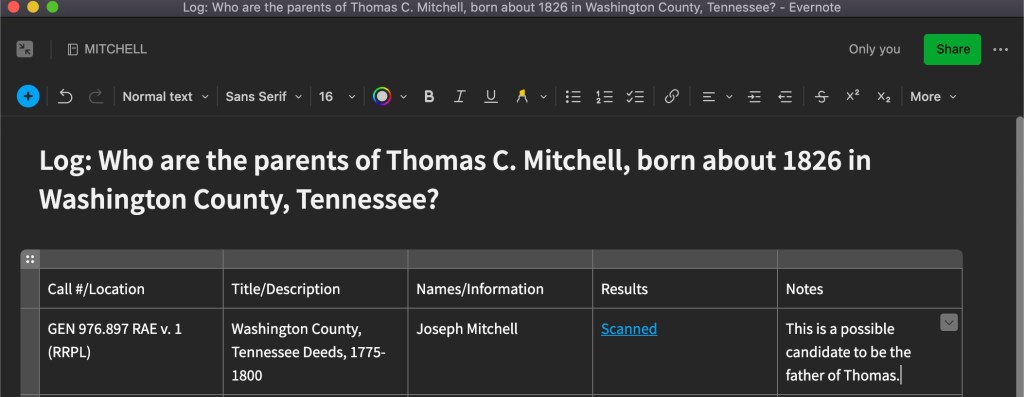
When I create a research plan/log in Evernote, I put the research question at the top so that I remain focused and my notes are categorized and organized. I then have a table with the following column headings: Call#/Location, Title/Description, Names/Information I’m looking for, Results (notes, or a link to another note that holds the scanned images), Notes reflecting my thoughts. See the example below:

Screenshot of my new project’s PLOG to identify the parents of Thomas C. Mitchell.

I have several variations, and they change depending on circumstances. Sometimes I add a column for the date or the repository if it is a PLOG that covers many repositories. Most often, I have another note that contains the actual contents of what I found, usually photos I took with my phone and uploaded to Evernote. On those Evernote notes, I will write out the citation for that item, so they are together.

I also have research PLOGs that are repository focused. Pre-pandemic, there were repositories I visited on a semi-regular basis, so as I worked from home and identified things I wanted to examine at a particular repository, I would add them to those PLOGs, with a link to the overall log for that research question.

You can do a similar thing in other platforms. In a spreadsheet, for example, you can have multiple tabs in one spreadsheet. Perhaps you have a spreadsheet about your John Smith family and organize those tabs by the particular generations, brick wall problems, repositories, and so on. Or, if you prefer word processing documents, organize your hard drive in a similar way: a folder for each surname, then perhaps broken down by generation or research problem, and then the various documents within that pertain to that problem. The sky is really the limit in terms of how you organize.

The main point with the research plan and log is that you create a system whereby you can collect what you plan to look at and what you found, in an easy, effective, and efficient way that works for you. Then, when it is time to sit down and really analyze what you have, it is all logged in one location.

If you are a longtime reader, you know a phrase I often say in this blog and when I’m presenting to an audience: “Do what works best for you. But do it!” So, go get a system set up that you think might work for you. You’ll end up modifying it as you learn and grow as a researcher, but just get started.

Beginning Concepts: The Research Plan

In genealogy, there are two things you really ought to keep track of to help your research be FOCUSED and effective. Several weeks ago I wrote about how when we all begin, we are collectors of family history information, but eventually, we have to get focused to solve any of the “brick walls” we encounter. Two things that help you be focused are utilizing a research PLAN and a research LOG. In my world, these are the same document. I lovingly call them my Research PLOG (patent pending).

Different researchers have different techniques. Look around at what others have to say on the topic if my system doesn’t work for you or make sense for how you work. The main message here is to do it!

I’ve written about research plans twice before:

Both of those previous posts come from the angle of preparing for a research trip. However, you don’t have to be going on a trip to create a plan. It will make your time at a repository more efficient and effective if you have a pre-planned list of what you want to look at when you arrive. But we have all been stuck at home for a year, and it looks like we will be for a bit longer. Have you been planning your research before you do it at online “repositories”? I know I have not been doing it enough. I have an idea of what I want to find, I go look for it, I don’t find it, I move on to the next thing… but months from now, I am not going to remember that I did that search and will do it again. And if I don’t utilized my PLOG, I’ll do it again in another several months.

A research plan/log allows you to plan your research “attack” and record your findings so that you can review what you’ve done on a given project and NOT DO IT AGAIN! (I am sure I am not the only genealogist in the world who spent precious research dollars ordering the same death certificate twice…or three times?) A research PLOG, if used correctly, can save you time and money. I wish I had learned about research plans and logs earlier in my genealogical journey!

Of course, there are databases that are constantly growing, that you should go back and search again at a later time. Be sure to note in your log what years those databases covered at the time you looked at them (we will get into more on this later). Also, a caveat to using a PLOG correctly…you have to review it before you start in on another research session. This is where I find myself failing many times. I just don’t take a moment to read my log for a given project. So, it’s like I never logged anything if I don’t go back and review it!

Now that I’ve convinced you that you need to start utilizing a log, next I will get into the nitty-gritty of what my research PLOG system looks like.

Beginning Principles: Important Repositories

Undoubtedly, the most important repository for you is the one that holds the records you need. I gave some tips on finding records in previous blog posts such as “Accessing Archives from a Distance.” This post is simply meant to highlight some of the important onsite repositories for beginners. “But we are in the middle of a pandemic,” you say. And I say now is the perfect time to get your game plan ready. We can visit all of these repositories virtually and create a research plan, which I will discuss in more detail in a future post in this series, but you can read a previous post on the topic here.

Top repositories for beginning genealogists:

  • Family History Library, Salt Lake City, Utah – This is the largest collection of genealogical materials in the world. Much is being digitized and can be found on their website. Some is “locked” due to contractual obligations and requires you to be in the library or at a local Family History Center to access. They have a huge collection of books on site. This is an important repository simply because of the geographical reach one can get from working on site. You can work on several projects at once while at the FHL.
  • Allen County Public Library, Fort Wayne, Indiana – This library is possibly the second largest collection of genealogical materials in the U.S. As the creator of PERSI (the PERiodical Source Index), they hold over 8,000 titles of genealogical society journals, on site, in addition to many other genealogical books and materials from all over the world.
  • Your State historical society or genealogical society library – Find out where your state’s historical and/or genealogical society is and whether they have a repository. Their collection will most likely be tailored to the state you are working in.
  • Any large genealogical collection in a city near you – Many cities have large libraries, and many of those libraries have a genealogy or local history collection that focuses on that city and region.
  • Local public library with a genealogy/local history collection in the area of your research – When you are working in smaller, rural areas, finding a small public library will often be the treasure trove you need. Small public libraries have the granular focus of collecting and saving information for that area.

Get online and find the catalog on the website for each of these locations. Pick a research project and start searching the collection for sources that might be useful for your goals. Then create a research plan. Someday the pandemic will lift and we will be able to travel again. I hope you come away with a ginormous amount of research to do onsite because you will have filled your days with research planning.

Using Newspapers: Leads to Other Records

When you are researching in newspapers, the articles you find should lead you to other records. Well, unless the article is one of those from the gossip column that reported your ancestor went to the big city to go shopping last week. We are probably not going to find shopping receipts in our ancestors’ papers, but you never know! Articles, and obituaries in particular, can lead us to look for records such as: census, probate, land and tax, church, school, naturalization, ships’ lists, and … that list is nearly infinite. Here’s an example of what I mean.

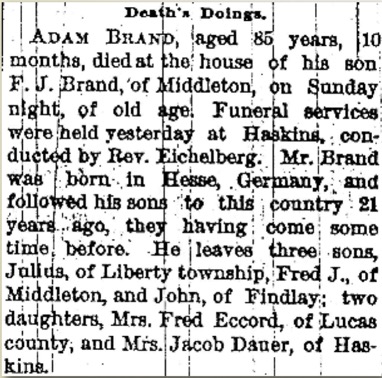
Adam Brand obituary, Wood County Sentinel, Bowling Green, Ohio, 14 Nov 1889, p. 3

This obituary for Adam Brand states that he was “born in Hesse, Germany, and followed his sons to this country 21 years ago…” Since the paper was published in 1889 that means he arrived in the U.S. in about 1868. There are some other clues:

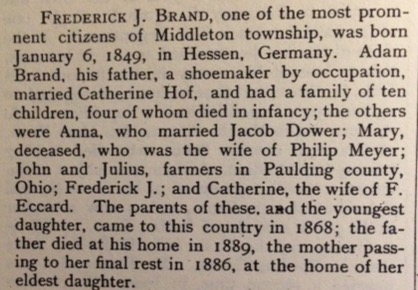
Frederick J. Brand biography, J. H. Beers, Commemorative, Historical and Biographical Record of Wood County, Ohio, (Chicago, Illinois: J.H. Beers and Co, 1897, p. 862.

In the biography of Adam’s son Frederick, Adam was “a shoemaker by occupation” was married to Catherine Hof, and his parents (Adam) came to this country in 1868.

These clues from the newspaper (and a corroborating biographical sketch) led me to ships’ passenger lists.

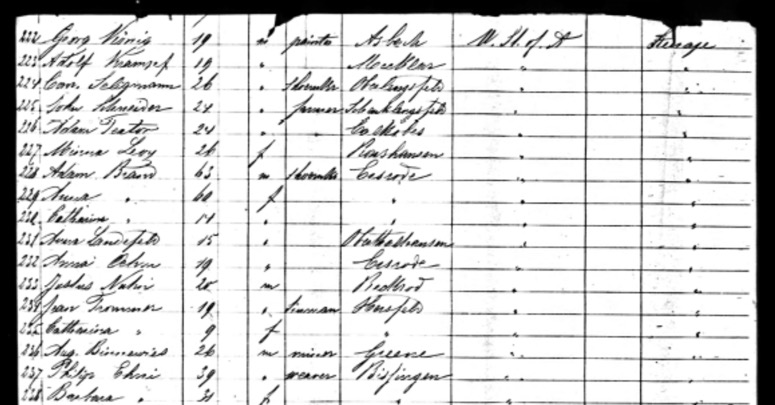
“New York Passenger Lists, 1820-1957,” digital images, Ancestry.com (http://www.ancestry.com : accessed 19 June 2012), manifest, S. S. America, 1 June 1868, [no page numbers on manifest], steerage passenger 228, for Adam Brand, age 63.

I know you can’t read that… here’s a zoom-in on the folks in question:

Adam Brand, 63, m, shoemaker, Ersrode
Anna Brand, 60, f, Ersrode
Catherine Brand, 14, f, Ersrode

Adam’s wife’s full name is Anna Catherine (as is his daughter’s). The clincher here is that his occupation is that of a shoemaker, corroborating the information I have from previous research. And they arrived in 1868, just as two other documents also reported.

So, go back through the newspaper articles you’ve found. What other records could they be leading you to? Make a list. Turn that list into a research plan. And then get started!

Accessing Archives from a Distance

I’ve tantalized you with what you might find in an archive in previous posts here and here. And I’ve given you some tips on how to find a collection that might apply to your personal research through the use of ArchiveGrid. Now, what happens if you find a collection in a repository that is far, far away?

You have three options:

  1. Create a research plan or list, saving all of the information you need to access that collection someday when you are nearby. I do this quite a bit for areas I think I might be visiting in the next 1-3 years and if it is on a personal project that is not time-sensitive. Save the URL to the collection, repository name, address, hours, and so on. I use Evernote for such a task. I have notebooks for various locations or repositories titled “Family History Library,” “Ohio Research Trip,” or “Washington DC.” And I just drop notes in there to access later. A word processing document, spreadsheet, or even a spiral notebook would work as well.
  2. Hire an on-site researcher. Many repositories have lists of proxy researchers because they do not have the staff or resources to do research for individuals. If a repository does not have such a list, check the directories for the Association of Professional Genealogists (APG), the Board for Certification of Genealogists (BCG), or International Commission for the Accreditation of Professional Genealogists (ICAPGEN). These directories allow you to search by location or by specialty. You might also consult with the state or county genealogical society for the area of interest as well. You might also find a cousin, hobbyist genealogist, poor college student, or some other person who would be willing to go to the repository for you.
  3. Ignore it. Now, I don’t recommend this one, especially if you are interested in not only the coolest possible finds out there, but also in conducting “reasonably exhaustive research.” I would at the very least put items in a list and get to them eventually.

I hope this series has convinced you to visit archives and manuscript collections. And if you weren’t sure about how to even go about it, I hope I gave you some helpful tips to quell your anxieties. Where else would you find a petticoat worn by Lizzie Johnson from 1865-1870? (The answer, of course: at the Southwestern University Special Collection in Georgetown, Texas.)