Review: New Jersey Family History Institute

Over the weekend I had the pleasure of attending the New Jersey Family History Institute … from the comfort of my own home! Melissa A. Johnson, CG® has put together a fantastic two-day course on New Jersey Family History Research. I have a project in mind to work on some of my New Jersey ancestry and so when I saw this opportunity, I jumped on it. njfhi-logoThe course is offered online or in person “to learn all about sources and strategies for researching NJ ancestors and families.” 

I expected two days of lectures giving me a run-down of the unique history, geography, record sets, and other information to help me with my New Jersey research. I even figured I’d fold laundry while I listened. What I got was a whole lot more. I did manage to fold the laundry, but I also found myself paying very close attention, taking notes, answering class exercises in the chat, and creating a research plan for a future research trip!

Melissa has done a fantastic job of creating an in-depth, interactive course (even with the online audience), with in-class exercises pertaining to the topic of the hour. She asked for people to share their answer to the exercises, including those online, and would read them out for everyone’s benefit, which also made me feel like part of the class. Optional homework was given as well.

This course covered topics ranging from the basic timeline of New Jersey, highlighting key points as they would pertain to records and research, to laws and their impact on research findings, a breakdown of the court system, major resources, libraries, collections, and so on. A lot of attention was given to differentiation between the Colonial period and post-statehood. Melissa is a fantastic instructor, not only because she provides the students with the information they need to be successful in their research, but by also giving relevant exercises that were challenging and educational on the topic at hand. Furthermore, she is very cognizant of the online community tuning in as well, repeating questions from those in class and interacting with us in an individual and meaningful way.

While this course is over for this year, I suspect it will be held again. The website indicates that more courses will be added in the future on other topics as well. You can join the mailing list to be informed when new events are added.

I will be watching this educational resource for future opportunities and encourage you to do so as well!

Fox listening in
Even my dog “Special Agent Fox Mulder” (Fox for short) had a fun time listening to Melissa’s course!

Getting Organized: What’s Your Goal?

I’m moving from tech tools for being organized to actual organizational tips and systems for our genealogy (research, notes, files, and more). I’ve always worked on the principle that if you can’t find something in less than a minute, your system is not working.

If you are like me, you are busy and there are never enough hours in the day! Being organized is a key component to getting the most out of our time. Consider the following:

  • You should be able to find your documents in a short period of time. If you can’t find what you are looking for quickly, then your system isn’t working.
  • Your system should be understandable to others. What will happen to your work if someone else has to take over?
  • Your system should preserve your documents. You don’t want your descendants (or whomever takes over for you) to have to relocate all of the same documents.
  • Your system should reflect your purpose for your research. Ask yourself, “What is my goal?” and “What am I going to do with my stuff?”

In this series, I’m going to discuss some of these thoughts as they pertain to my own system, share with you some of the ways I keep organized, tips on research plans/logs (or “plogs” as I call them), and so on.

I’m hoping that the act of writing up this series will also help me get organized again. I’ve let it slide lately because I’ve been so busy! Stay tuned for some excellent tips and thoughts on getting organized!

An actual view of my desk today. Yikes!

Top Tools I Use: Project Management

I have a lot of irons in the fire at any one time. Between client work, volunteer positions, speaking arrangements, and personal projects, I have a lot to keep track of. There are a lot of tools that can be used for this. I like Asana. It allows me to make categorized lists, with subtasks, and calendar reminders.

asana1

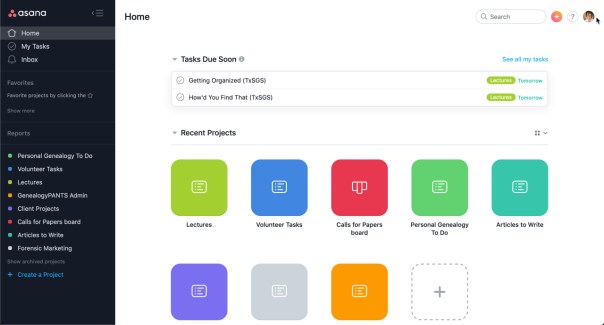
I find the interface to be easy to understand and set up. In the image above you can see some of my categories: Lectures, Volunteer Tasks, Calls for Papers, Personal Genealogy, Articles to Write. I also have a category for Client Projects, general business admin, and so on.

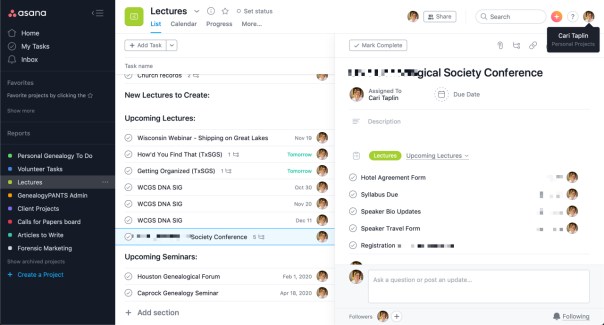
The sub-tasks allow you to keep track of more details. I use this most when there are smaller tasks to be finished as part of a larger project. For example, in the image below, you can see that I for upcoming speaking agreements, I keep track of when various contracts, forms, bio and headshot, syllabus and other materials are due. I also keep track of whether I’ve made travel and hotel arrangements, and any other details. You can also attach files and links.

asana2

Asana makes completing your to-do items fun by also playing cute animations when you click off your items.

gamification-asana-unicorn

There are many online videos, tutorials, and help files that help you get into the details of Asana. See some of these for more:

Tools like Asana can help you stay on top of all of your tasks. With so many tasks, projects, and responsibilities, I couldn’t live without it. Well, I could, but I’d be much more disorganized.

Top Tools I Use: Time-tracking

Whether you take clients or do genealogy as a hobby, I highly recommend you track your time on various tasks. I keep track daily of all my time spent on working (clients, administrative, marketing, writing proposals, etc.) and on volunteer tasks for the various societies I’m involved in. Then I can determine where I’m spending too much time or not enough time. My favorite tool for time-tracking is Toggl.

toggle-example

Above is the main workspace for Toggl on the website version. You can use the timer or enter time manually. You can set up clients (I have clients by name as well as the societies I’m involved in), set up projects, and then describe the particular task you are working on. You can see the top item on my example is “Blog post” (writing this very post), the “project” and the “client” both being GenPants, my business. You can see some other examples as well.

On the left are some options, the one I use most is “reports” which allows me to see how much time I’ve given to any given client or project over a period of time. You can choose by week, month, or year, or input a set of dates. I tend to do this at the end of the year or quarter when I reevaluate my goals and where to spend my time.toggl-desktop

Toggl also has a desktop application which I have open usually in the bottom right of my screen. I simply click on and off as I change between tasks throughout the day.

Keeping track of what you’ve done throughout the day, whether for work, personal, hobby, or volunteer, can help you tighten up your productivity or convince you that you did get some things done even if it doesn’t always feel like it at the end of the day. And it can help you reevaluate where you spend your time.

Top Tools I Use: Screenshots

As a speaker, I often find myself needing to make screenshots, and annotate them with arrows or underlines. I also often use screenshots in client reports to help educate or inform the client. It is also handy to be able to add screenshots to emails, research logs, notes, and more. My favorite screenshot tool is Snagit by TechSmith (not an affiliate link).

snagit

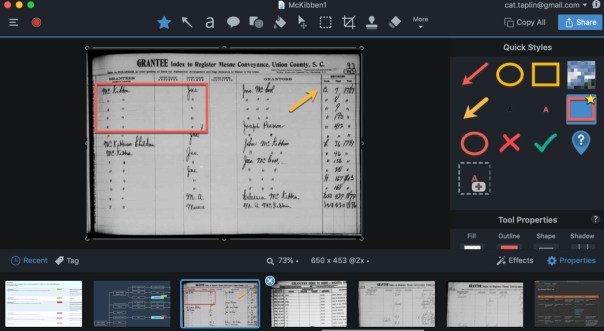
In the above screenshot, you can see the interface. In the large part of the screen is the working surface. The screenshot can be annotated by adding arrows, boxes, text, blur (to retain privacy), and other shapes. Along the bottom is a deck of previous screenshots. And along the right side is the menu where you can choose your tools, determine how wide or narrow the lines should be, the colors, and so on.

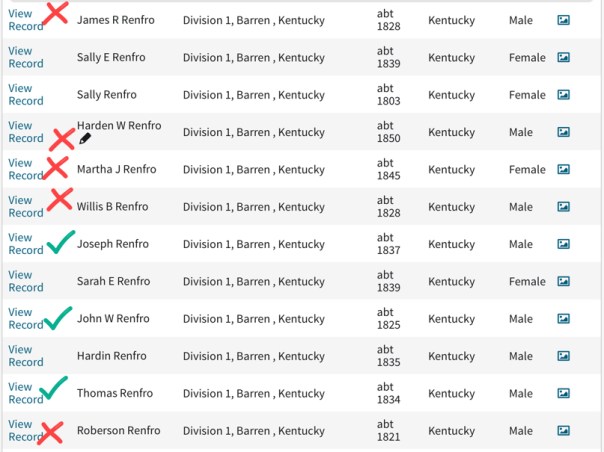
One of the things I use it for in my personal research is to create a list from a database, such as a list of hits in a census search, and then using the screenshot tool to keep track of what I looked at and which can be eliminated. The following is an example from a search for “Renfro” in Barren County, Kentucky in the 1850 census.

example-snagit

There are other features that I have not used as much such as video capture, that could be used if you wanted to demonstrate using a website or something along those lines. The TechSmith website has excellent tutorials and help pages.

I find Snagit to be very easy to use, intuitive, quick, and handy. There are probably others screenshot tools out there that you enjoy. The main point here is not necessarily to use Snagit itself, but to bring attention to how useful a screenshot tool can be. I use it nearly every day, largely to create slides in my presentations.

The screenshot can enhance whatever you are working on by providing more explanation to your audience or yourself through the use of arrows, lines, boxes, text, and more.

Top Tools I Use: Note-taking

I have had people ask me about various tools when I teach classes or deliver lectures/seminars that I thought I’d share some of those through my blog along with any tips I think of along the way. To read last week’s post click here. Enjoy!

Genealogists take a lot of notes. Notes from a research project. Notes from presentations and institutes attended. Notes on DNA projects. Notes on recipes, Christmas lists, quilting patterns, books to read, movies to watch, and so on. I have notes in a lot of places: notebooks of varying shapes and sizes, binders, napkins and scraps, and on my computer in a variety of programs. However, I have made a concerted effort to get all of those old notes into one location: Evernote.

Evernote allows you to title, tag, create notebooks, stack notebooks, add PDFs and images, create tables, and more. All of this functionality allows for many different ways to keep your stuff organized. You can also do a keyword search in Evernote so even if you don’t have a tag on a note, you can search by keywords and find what you are looking for. You can also create links of notes so that you can link one note to another. I love this feature for my research plans and logs (plogs I call them) and allows me to keep the log in one place, and notes on findings in another so all I have to do is click on the link I created to pull up the note with the images I made or the notes I took.

_evernotelog

In the image above there are several links, those in green link to another Evernote note whereas the blue links point to webpages. Evernote also has “dark mode” which is much easier on the eyes.

Evernote can do so much. There are many helpful resources out there. They have an excellent help and learning section of their website, a YouTube channel, and a blog. At FamilyTreeWebinars.com they have an Evernote category with four webinars on the topic.1 Lisa Louise Cooke of Genealogy Gems has a YouTube playlist with her videos all about how to use Evernote for genealogy. I have even written about Evernote before here.

There are other note-taking apps and systems out there. Primarily I wanted to share what I use. But if you prefer another method, by all means. As Nike says, Just Do It. Get your notes organized. Well, maybe Nike didn’t have notes in mind, but you get the idea.


1. This is an affiliate link to FamilyTreeWebinars.com. When you click it, and IF you make a purchase, I get a small percentage back. This is a great way to support my blog. Thank you in advance!

Top Tools I Use: Charting

I have had people ask me about various tools when I teach classes or deliver lectures/seminars that I thought I’d share some of those through my blog along with any tips I think of along the way. Enjoy!

Once you get past your basic pedigree or family group sheet, and especially when working on DNA projects, genealogists find themselves wanting to make a chart that is more complicated and/or more customizable than most genealogy software offers. I have used simple text and boxes in Mac Pages (same can be done in Word), Keynote (same can_LucidChart be done in Powerpoint), and various drawing programs. A friend introduced me to LucidChart and I’ve never looked back! (NOTE: This is NOT an affiliate link or anything. I do NOT get any kind of compensation for sharing this information.)
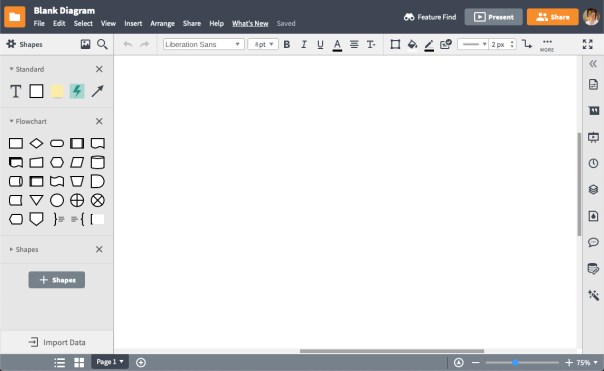
Lucidchart is very easy to use, intuitive, versatile, and did I say easy? The workspace is very intuitive.

_LucidWorkspace

You can easily add shapes, put text into those shapes, fill the shapes with color, connect the shapes with lines, put text onto the lines, and so much more. There are options for what file type to download your chart as, sharing with others, creating slides for a presentation, and many other fancy options.

I won’t go into the details of how to do everything. There are many resources for learning more about Lucidchart. They have an excellent help section on the website and they have a YouTube channel that features helpful tutorials and some funny videos that demonstrate Lucidchart features.

In genealogy, we run into “pedigree collapse” quite frequently. Pedigree collapse happens when cousins marry cousins such that on two (or more) branches of your family tree you find the same ancestral couple. For example, my parents are fourth cousins. Back in the tree the Meeker family lived next door to the Avery family, and four Avery siblings married four Meeker siblings. So two ancestral couples are actually the same ancestral couple, I have Mahlon Meeker and Frances Cooper on both my mother’s side and my father’s side.parentsrelated

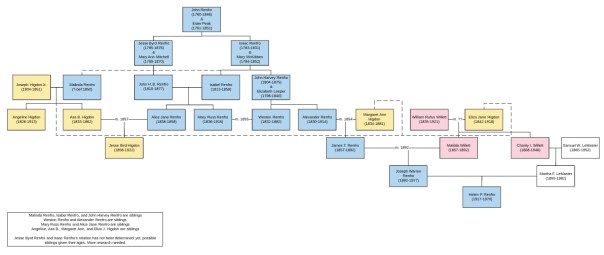
Sometimes this sort of thing gets much more complicated. I am currently working on a project to figure out how the Higdons and the Renfros (and the Renfros) are related. Take a look:

HigdonRenfro-demochart

Now, I know you probably can’t read that text. The point is not to help me with my research project (though if you have Higdons or Renfros in Missouri and Kentucky please email me), but to show you how complicated a chart can get and how easy it is to demonstrate it with Lucidchart. (The yellow boxes are Higdons, the blue are Renfros, and the pink are Willetts. Several Higdons married the Renfro cousins and several Renfros married their Renfro cousins.) And I also know genealogists and you probably REALLY want to see that text. You can see this chart on Lucidchart here.

I use Lucidchart nearly everyday when I’m working on projects for my personal work and for clients. I don’t know what I’d do without it. There is a free level and a subscription level as well. I did very well with the free level for quite some time.

Lucidchart is not the only charting game in town. You might have a tool you prefer. But if you have been struggling with charting, you might give Lucidchart a try. I highly recommend it.

Book Review: New Church Records Book!

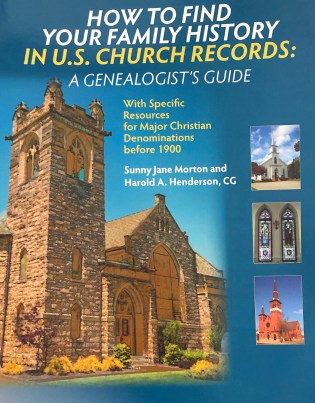
ChurchRecordsBookI have recently had the privilege to read and review the new book How to Find Your Family History in U.S. Church Records: A Genealogist’s Guide by Sunny Jane Morton and Harold A. Henderson, CG (Baltimore: Genealogical Publishing Co., 2019). Back in 2015 I attended the course “Problem Solving with Church Records” at the Genealogical Research Institute of Pittsburgh (GRIP) with Rev. David McDonald, CG as the instructor. It was a fantastic course (highly recommend!) and I have used the information from that course time and again but have longed to have a text with the information learned laid out in a concise manual. This book is the answer!

The book has two parts, the first is methodological and the second addresses twelve different denominations: Anglican/Episcopal, Baptist, Congregational, Dutch Reformed/Reformed Church in America, German Churches: Reformed and Sectarian, Latter-Day Saint (Mormon), Lutheran, Mennonite and Amish, Methodist, Quaker (Religious Society of Friends), Presbyterian, and Roman Catholic.

The meat of the book is in the first part, the methodology. This is an excellent, concise, and thorough section that delves into various techniques to identify your ancestor’s denominations, to determine if any records exist for that denomination, for working with old church records, and for expanding your research to include information for contextual understanding.

Quite possibly my favorite part of the first section is the survey of WPA (Works Progress Administration) resources available regarding church directories and church record inventories. The WPA inventories of all kinds can be so helpful to understand what records did exist during the 1930s and 1940s and give clues about what might exist now. Another enjoyable portion of the book was the discussion about other records that might discuss church life, these would be the items that give more context to our ancestors’ lives and communities. Beyond the baptisms, confirmations, burials, and such are a number of other resources to use, such as: denominational newspapers, church histories, denominational encyclopedias, administrative papers (membership lists, Sunday school records, membership lists, donors for various projects, pew rentals, ministers’ records, and so on.

Part two of this book delves into the specific history, practices, records, resources, and access instructions for the twelve denominations mentioned above. Each denomination’s chapter starts with a helpful “Quick Stats” section that gives you some at-a-glance information such as when the church was organized, its dominant region in the US, the dominant ethnic origin, and its affiliated faiths. I appreciate each section’s bibliography directing you to some helpful resources for a deeper understanding of that denomination.

In conclusion, this is a fantastic resource every genealogist needs on their bookshelf. As stated in the book’s introduction, church records are “a surprisingly neglected resource” and this book leaves very little room for excuse! Get this book, learn about church records, and then get out there and access them!

The book is $29.95 and available at Genealogical.com.

FGS Week was a Success!

I know this is going to come out a little bit late to my readers… but frankly, I was exhausted after the Federation of Genealogical Societies (FGS) conference that took place in Washington DC. I serve as the VP of Membership for the organization and so that came with some responsibilities. I was in charge of the Society Showcase area. Despite a few minor hiccups in the beginning, we got it all looking good! I worked the FGS booth quite a bit, I also volunteered at booths for the Association of Professional Genealogists (APG) and the Board for Certification of Genealogists (BCG). I was able to attend three lectures!

The big news out of this conference was the planned merger between FGS and the National Genealogical Society (NGS). NGS’s general focus is on genealogy education, methodology, their scholarly journal, and other aspects for the individual genealogist. FGS’s focus has been on society management and support. Both have held national conferences and focus on Records Preservation and Access (RPAC). To read the official press release, click here.

Personally, I am excited about the merger. As a board member, I have seen our strengths and weaknesses and believe that we can be supportive to each other rather than separate and competitive entities. I believe cooperation and collaboration is the direction we need to move toward. Helping each other and coming together rather than having a separation in the field. I often found that there were people who were “team FGS” or “team NGS” rather than seeing the two as complementary. So I do think this will be good for the field.

However, I don’t have a crystal ball and don’t really know what the future holds. Time will tell, for sure.

Accessing Archives from a Distance

I’ve tantalized you with what you might find in an archive in previous posts here and here. And I’ve given you some tips on how to find a collection that might apply to your personal research through the use of ArchiveGrid. Now, what happens if you find a collection in a repository that is far, far away?

You have three options:

  1. Create a research plan or list, saving all of the information you need to access that collection someday when you are nearby. I do this quite a bit for areas I think I might be visiting in the next 1-3 years and if it is on a personal project that is not time-sensitive. Save the URL to the collection, repository name, address, hours, and so on. I use Evernote for such a task. I have notebooks for various locations or repositories titled “Family History Library,” “Ohio Research Trip,” or “Washington DC.” And I just drop notes in there to access later. A word processing document, spreadsheet, or even a spiral notebook would work as well.
  2. Hire an on-site researcher. Many repositories have lists of proxy researchers because they do not have the staff or resources to do research for individuals. If a repository does not have such a list, check the directories for the Association of Professional Genealogists (APG), the Board for Certification of Genealogists (BCG), or International Commission for the Accreditation of Professional Genealogists (ICAPGEN). These directories allow you to search by location or by specialty. You might also consult with the state or county genealogical society for the area of interest as well. You might also find a cousin, hobbyist genealogist, poor college student, or some other person who would be willing to go to the repository for you.
  3. Ignore it. Now, I don’t recommend this one, especially if you are interested in not only the coolest possible finds out there, but also in conducting “reasonably exhaustive research.” I would at the very least put items in a list and get to them eventually.

I hope this series has convinced you to visit archives and manuscript collections. And if you weren’t sure about how to even go about it, I hope I gave you some helpful tips to quell your anxieties. Where else would you find a petticoat worn by Lizzie Johnson from 1865-1870? (The answer, of course: at the Southwestern University Special Collection in Georgetown, Texas.)