Using Websites’ Catalogs: FamilySearch

The FamilySearch website has several different aspects to it such as the Family Tree, records, images, books, the research wiki, and more. Ninety-nine percent of the time, my first stop is the catalog.

The Catalog is found under Search.

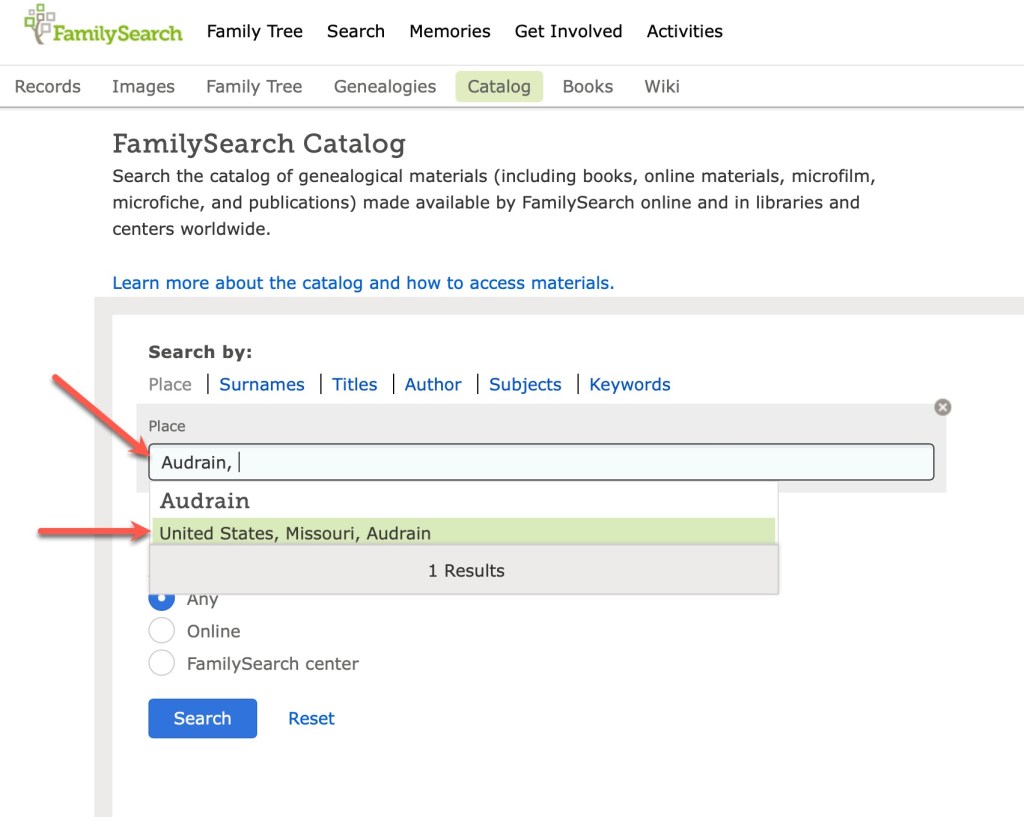
When I am planning my research, or wondering what records might be available for a given location, I always start with the catalog. It’s just the way I work. You might prefer to start with the Wiki or the records or images. This is just how I learned it back when I was a “baby genealogist” and it makes sense to me. You find the catalog under the Search tab. I nearly always put in a location to get started.

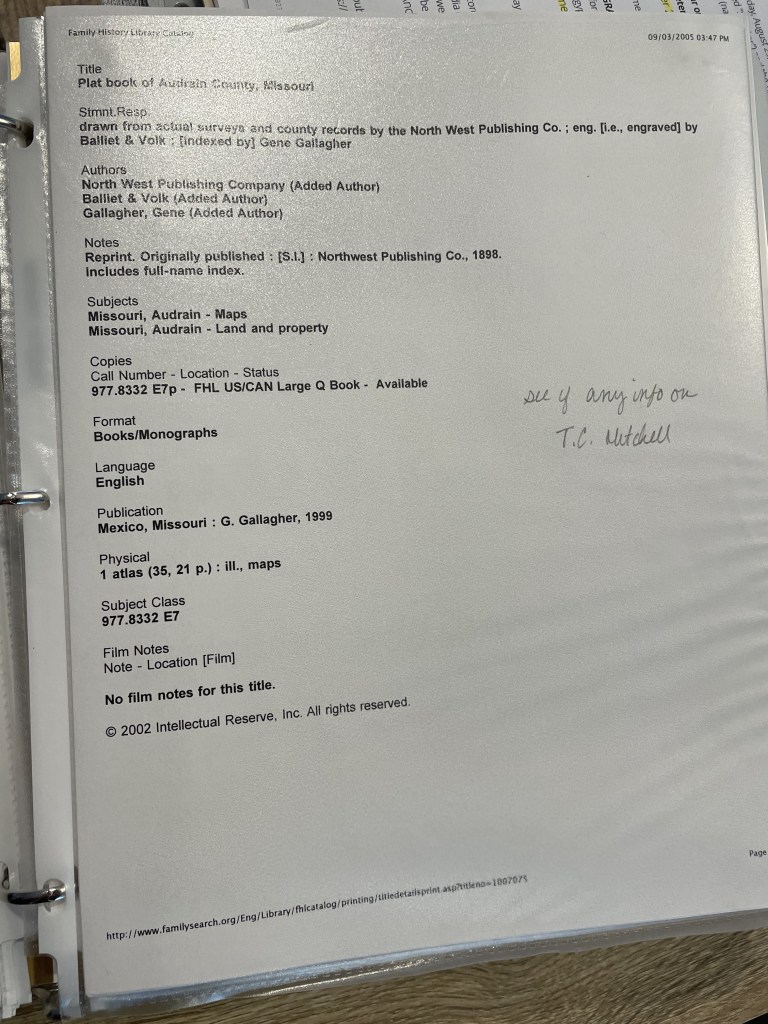
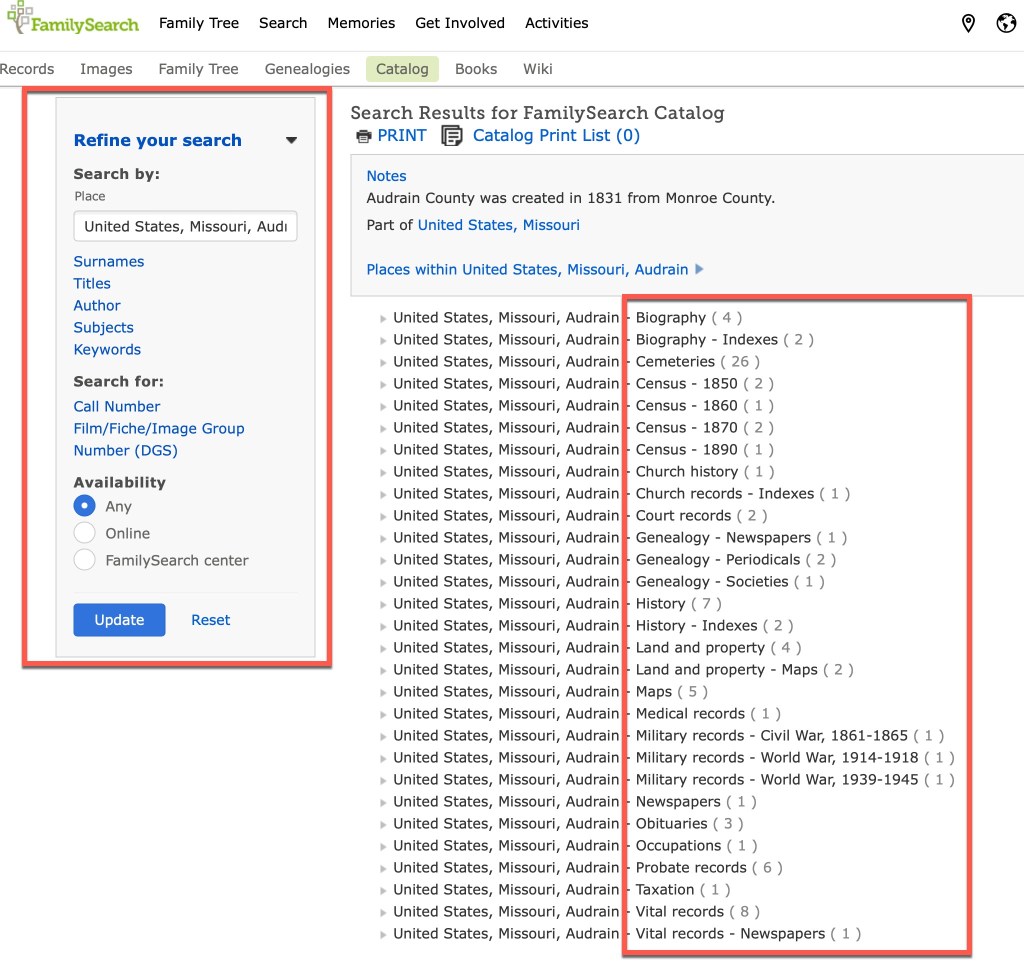
I start by typing in the county, and the catalog brings up the places that match that name. Lucky for us, there’s apparently only one county in the United States named Audrain. Once you click on that location, you are then taken to the page that has all of the topics available for that location.

You’ll notice, on the left are various filters you can use to narrow down your results. However, in the main section on the right, you can see all of the topics (see red box on the right in the screenshot above). You can see the topics such as biography, census, church records, land and property, probate, vital records, and so on. Clicking on vital records gives you the following options:

If those records have been incorporated into a larger database, you might see a link to that database on the page:

This one tells us that the Audrain marriages are included in a larger database. Usually I will click on that link and see if the record I’m seeking can be found quickly. However, they don’t always show up and I’ll go “old school” and click through the digital microfilm. This sometimes happens because of handwriting/indexing issues, or because this particular film hasn’t been indexed, or probably a number of other reasons I am unaware of.

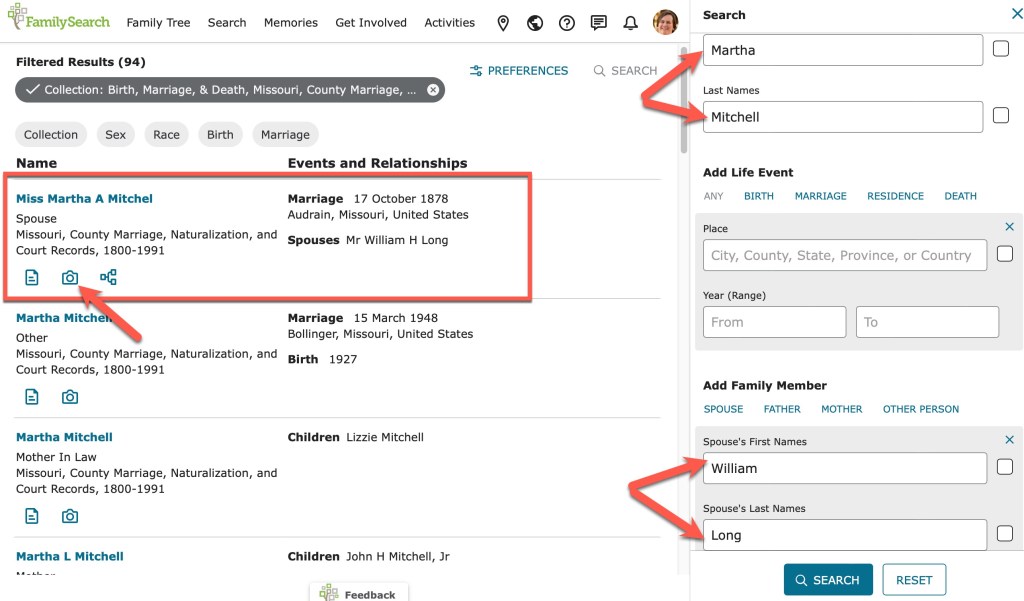
A search through the database does indeed bring up the record I am seeking.

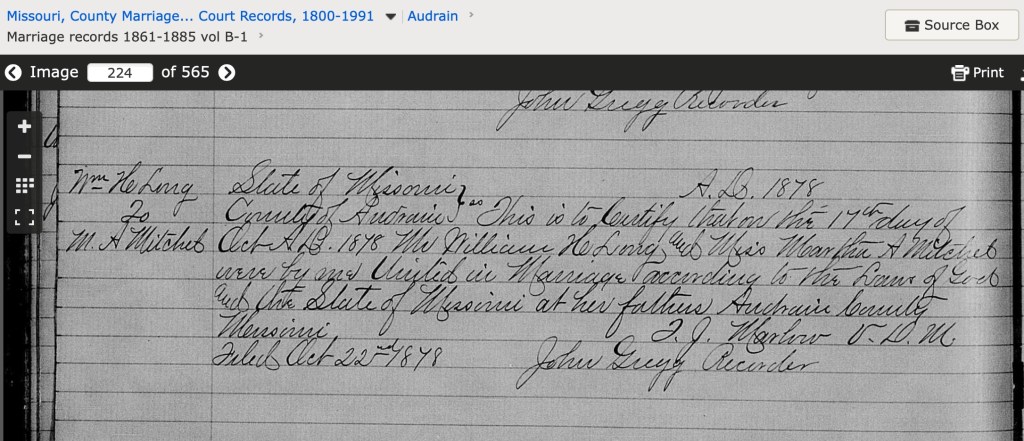
Martha Mitchell, daughter of Thomas Mitchell, married William Long in Audrain County in 1878. The index entry shows a camera icon which, when clicked, takes you directly to the image.

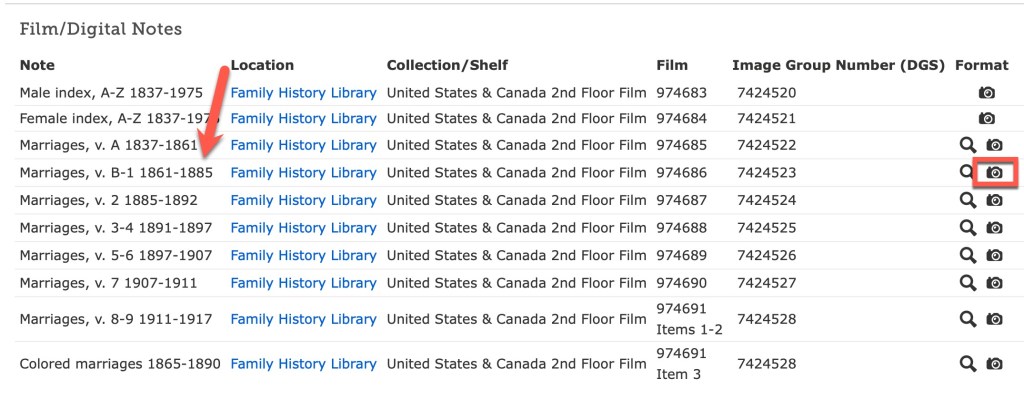
Sometimes, you will not be taken to the image because they haven’t gotten everything connected. But you will usually be given enough information in the index to find the record on the appropriate digitized microfilm.

If you click on the camera icon, you will be taken to the digitized microfilm that you can “scroll” through just as if you were looking at the microfilm.

Those are the basics of using the FamilySearch Catalog. There is a lot more to the FamilySearch site, and we may come back to that in a future series. We will stick with catalogs for now. Next time we will look at a few others and see how they are very similar in function.

Using Websites’ Catalogs: Ancestry Tips

Tip #2 – Use the filters

Ancestry (other websites do this too) has provided users with some filters to help narrow search results. Ancestry also provides this nice “Jump back in” section on the main search screen. This provides you with easy access to recently used databases. If you’ve been following along, I’ve been showing examples from the Audrain County, Missouri, obituaries collections.

From the main search screen, I’m going to start a new search for Thomas Mitchell in Missouri. Thomas Mitchell is a very common name, so we will then use the filters to help narrow our results.

Main search page starting our search for Thomas Mitchell.

At the time of writing this post, a simple search for Thomas Mitchell in Missouri returned over 380k results! That’s too many. We need to narrow down the results to something more manageable.

Too many results to be useful!

To work with the filters, click on the pencil icon above the list of filters on the left. You can slide the little button on the slider bars under his name and location to get results that are “exact” so “Thomas” only, no Toms, for example. You can also add any other information you know about the person, date of birth or death, parents’ or spouse’s names, etc. You can also narrow down the results to a certain geographic collection under “collection focus.”

For our example here, I am going to add one parameter to start with, Thomas’s wife’s name: Angeline.

I’ve added ‘Angeline’ to the spouse’s name.

Adding Angeline reduced our results to 43k instead of 388k. That’s a big reduction, but still too many results to manage. Continue adding details that you know or utilize the filters on the left to narrow your focus to a type of record. Setting everything to “exact” gets us down to 22 results.

My system is to narrow down the results one filter at a time. Then I might back up and change a different filter leaving a previous one set on “broad” just to see what kind of different results I can get. You never know when an index might have a typo or have run into difficult handwriting. You also never know when an original record might have an error in it. Conducting searches using a variety of filter changes can help you find some of those records that may have been overlooked.

Next time, we will look at some websites other than Ancestry.

Using Websites’ Card Catalogs: Ancestry Tips

Tip #1: Read Stuff!

We all skip and skim and scan and think we are “reading.” It is just part of how the human brain works. The brain wants to do as little work as possible to conserve energy. It is part of how our species has evolved over time. So we have to work really hard to act against that instinctual desire to be efficient. You have to stop and make yourself read and understand what has been written about various databases. This can often answer questions you’ve formed such as “Why am I not finding a record I think I should be finding?” Reading the “about this database” section might inform you that the county your working in was not included in the database, for example.

The “stuff” you should read about the Audrain County, Missouri, obituaries database.

Not only the “about” section, but other sections on the page can be useful for extending your research and conducting better searches. There are links under “More help” that will point you to other aspects of using Ancestry.

The “More help” boxes provide more tips.

There is a page that explains ways to improve your search results (we will look at this in more detail in another post).

There is a page that explains how to use wildcards for searching.

Page explaining wildcards.

Also, on the search page for a given database, there is a section of “Related data collections.”

Be sure to READ STUFF! That’s tip number one. Reading this “stuff” can often provide you with answers, more clues, and new avenues to pursue.

More tips on the way!

Mastering Genealogical Proof Study Groups Registration Now Open

We have had a little delay in the blog posts lately. Last week I was course coordinator for the “Spirit of the Inland Seas: Research in the Great Lakes” along with Cyndi Ingle (Cyndi’s List), Paula Stuart-Warren (Genealogy by Paula), and Judy Russell (The Legal Genealogist). It was a fantastic week with a great class! In that course, I taught eight lectures, and I also taught two lectures in Paula’s “Digging Deeper course.” As you can imagine, the weeks leading up to it and last week were quite busy with preparations and teaching! Therefore, a bit of lag on the blog. I will continue the current series next week.

Cyndi and I also opened registration for our next Mastering Genealogical Proof study groups that are beginning in August. Here are the details:

This will be a beginner/low-intermediate level class to study the book Mastering Genealogical Proof by Tom Jones. We will cover the principles outlined in the book as well as discuss the workbook questions.

Details of the course (PLEASE READ):

  • There will be THREE sessions: Wednesday daytime at 3pm Eastern, led by Cyndi Ingle (of Cyndi’s List), Wednesday evenings at 7pm Eastern led by Cari Taplin, or Saturdays at 1pm Eastern, led by Cyndi Ingle. Times are in Eastern so adjust for your time zone. Beginning Wednesday August 2, 2023 or Saturday August 5 (for 7 weeks). Each class will be about an hour.
  • We will meet on Zoom. 
  • Cost for the course: $75
  • You will need to have the book, Mastering Genealogical Proof. It can be purchased on Amazon or through the National Genealogical Society if you don’t already have it.
  • There are questions in the book that we will use to guide discussion. Reading the chapter and answering the discussion questions will prepare you for each week’s class.
  • For the first half (or so) of each class session, we will present/recap the principles for that week (we’ll have slides).
  • The second half will be going over the discussion questions.
  • There will also be a private Facebook group for this class only so you can ask questions and discuss issues in-between class sessions.
  • Class size is limited to 25.
  • Sessions are NOT recorded. Please plan on attending in person.

Choose one of the following times, click the link to register:  

We look forward to studying with you! However, if this session does not work for you, we will be holding the next session in early 2024. To be notified when registration opens for the next session, please click this link to sign up for the waitlist. (This waitlist is just a way for us to collect your email so we can notify you of registration and is not a guarantee of a seat in the class.)

Using Websites’ Card Catalogs: Ancestry

Many, if not all, major genealogical websites have some sort of catalog that allows you to see their holdings. This allows you to drill down to specific databases for a given location or topic. Effective searching when working on a specific research problem will hinge on utilizing the catalog.

At Ancestry, from the home page, you’ll see some menu items along the top, to the right of the Ancestry logo. One of them is “Search.” When you click on that, a dropdown menu appears. Select “Card Catalog.”

You will then get a full list of every individual database at Ancestry. At the time of writing this post, the total is 33,274 collections.

In the image above, you can see some tools on the left. At the top are title and keyword search boxes. Below that are a series of filters. Usually, I type in a word or two in either the title or keyword box (sometimes I do each separately depending on what kind of results I get). For example, “Kentucky death.”

There are two items that come up with Kentucky death in the titles. You can also use the filters below to narrow down the database list. This is especially helpful if you don’t know exactly what you are looking for and you’d like to see what databases a website might have on a location or topic. Let’s say I want to see if there are any newspapers or obituary collections that might apply to Thomas Carroll Mitchell. Click on Newspapers & Periodicals, then Newspapers, then filter by location. In our case, we are looking for Missouri and Audrian County.

There are four databases from Audrain County (the neighboring county to Montgomery) that contain obituaries, one of them covering the year when Thomas C. Mitchell died in 1914. So, I will add this to my research plan. (Or, let’s be realistic, we’ll just jump in and search for Thomas.)

We will look at some more tips for using Ancestry’s catalog next time.

Having a Good Research Question

I know at the end of the last post I said I would next be talking about the Ancestry catalog. But as I started that, I felt like I needed to give a little background on why I’m even writing this series. I’ve probably talked about this before on this blog, but it is so important, that I’m going to say it again. Good research begins with a good research question. If you don’t know what you are looking for, how are you going to know when you find it?

I talked previously in this series about the two phases I’ve seen and experienced throughout my genealogical lifespan, collecting and then focused research.

The two genealogical phases.

Having a good research question guides your research in the second phase. It helps tell you where to look for answers.

There’s a Goldilocks effect when it comes to research questions. They can be too broad, too narrow, or just right. And we aim for the “just right” question. The question needs to identify a unique person in time and place, and it needs to be answerable. For example:

Who were the parents of Thomas Carroll Mitchell who died in Montgomery County, Missouri on 29 April 1914?

This question identifies a unique person by giving a full name and death date and location. It says “I’m talking about this specific Thomas Mitchell, not the man of the same name who lived two counties over and died a year later.”

A question too broad will not give those details: Who was Thomas Mitchell? Who were Thomas Mitchell’s parents? When was Thomas Mitchell born? All these only provide a name, and not a full name (use it if you have it), and not location or dates. There are far too many Thomas Mitchells in the world for these to be useful questions. They do not give enough information to even know where to start.

A question too specific might be: What was Thomas Carroll Mitchell’s exact date of birth? Believe it or not, some people did not know their exact birth dates, or records may not have been left that provide that information. A better question might ask for “when was he born” which can be answered with a date range or a year only.

The “just right” question will give enough information to guide our research. Let’s look at the example above. From that question, we know where and when Thomas died. Likely we have a document (death certificate or burial records) that provided that information. Now, we can work backwards to try to identify his parents. We know he died in 1914, so one step in our research plan might be to find him in all of the censuses starting with 1910 in Montgomery County, Missouri, provided he didn’t recently move there.

Based on what you find in the censuses, you then decide where to go from there. Part of that is what I call “pre-research.” How do you know where to go to find the records you want to look at? Guess what. It’s the catalog.

Using Websites’ Card Catalogs

I’ll bet many of us (most of us?) go to a genealogical website and plug our ancestors’ names into the first search box we see and hope for the best. At least at first. In the past, this was exactly how I conducted my research. Rather haphazardly, with varying success.

In my experience, I think there are two phase in the life cycle of the genealogist (there may be three or more, but I haven’t gotten there yet). First, there is the collection phase. We’ve just gotten started, we know a few details from our parents or grandparents, and we just start collecting records and filling in the pedigree chart as fast as we can. In this phase we find the “low-hanging fruit” in terms of records. And that is fine, but eventually, you get to the second phase. In the second phase, you’ve run into some trouble. You’ve found some conflicting records or some brick walls and have some harder work ahead of you.

Ancestry’s Front Page Search Box – Arrow Points to Advanced Search Option

Each of the major genealogical websites has a front page with that ever-tempting search box in it. That is their way to get quick engagement with website users and potential subscribers. This blog series is going to assume that we are all subscribers. If you try to do some of the things I’ll discuss, it will likely ask you to subscribe to see the documents or the search results anyway. Just be aware. This is not meant to be a blog series that discusses only FREE websites or databases. FamilySearch is the only free site I’ll be discussing.

The main front page search box is going to be great for that collection phase, but not so great for the phase where you work on more difficult problems. This series is going to help you learn some other facets of these websites to make your searching more targeted and efficient. That front page search may also be a hindrance if you are working with common names or don’t have much information to help narrow down your search results. When working with general search results, we have to pay extra attention to details so we don’t end up “adopting” the wrong family into our family tree.

Up next… Ancestry’s Card Catalog

I had a little break…

Hi loyal readers. You might have noticed I took a bit of a break from my blog. I just had so many things come up that something had to give for a while. But I’m back, so never fear, all is well and I’ll try to get back into my blogging routine.

First, what have I been up to? Well, the biggest event was that I was the keynote speaker for the Ohio Genealogical Society Conference that took place at the end of April. My keynote followed the theme of the conference “What Brought Them Here?” and focused on why families move and how might those who moved to the Great Lakes area have made their way there. I also gave a workshop on using Google’s MyMaps, as well as five other lectures. It was a busy week! And all of the time leading up to that event was when I took a blog break. I had to make sure all of my materials were ready!

Second, what am I up to for the rest of the year? The biggest thing going forward is that I’m coordinating a course and teaching in another for the Genealogical Research Institute of Pittsburgh. My course is “The Spirit of the Inland Seas: Research in the Great Lakes States” along with Cyndi Ingle, Paula Stuart-Warren, and Judy Russell. There are a few seats left if you’d like to join us! It is virtual so held entirely online and from the comfort of your own home. The other course I’m teaching in is “Digging Deeper: Records, Tools, and Skills” coordinated by Paula Stuart-Warren.

I also have some webinars planned:

You can follow my speaking calendar here.

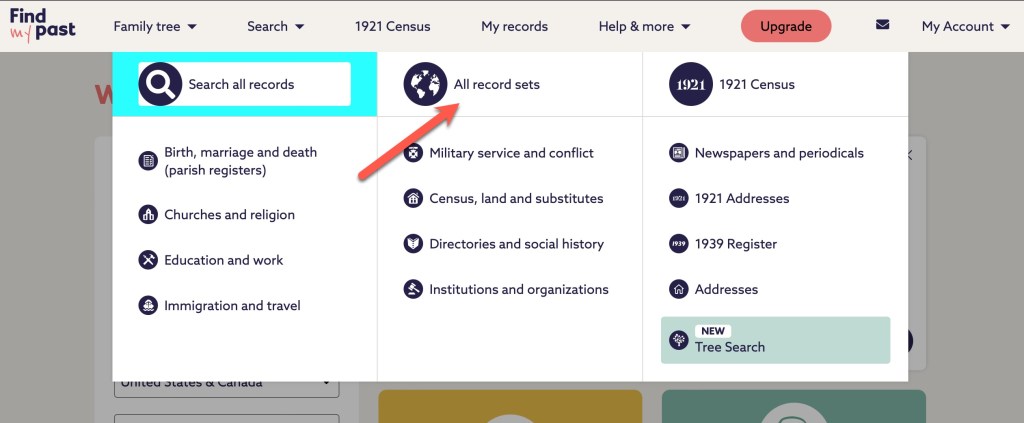
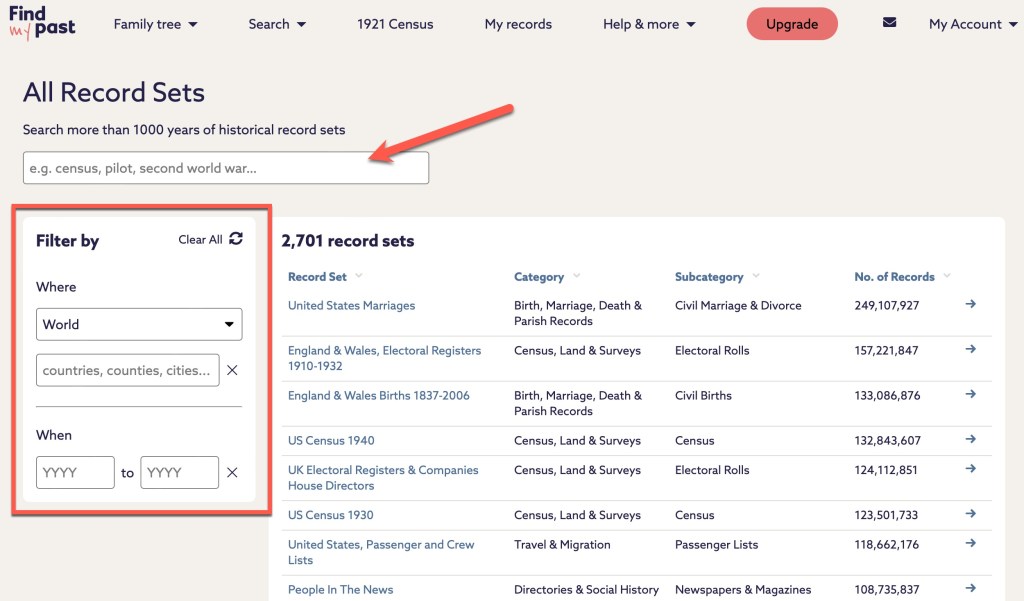
Third, what’s the next topic for the blog? I’m going to share some tips and techniques for using various online catalogs at websites many genealogists use frequently, starting with Ancestry, but we will eventually get to FamilySearch, FindMyPast, MyHeritage, and others. With this series I’m hoping to share some different ways to utilize the websites that you may not have thought of.

Happy Spring!

County Histories: Strategies and Tips

When looking for county history entries regarding your ancestors or collateral relatives, I have a few tips and strategies for you.

First, look for county histories published in the areas where your ancestors lived. For Samuel Cook Dimick, I found him in the Wood County, Ohio county history, but also found mention of him in a few publications in Grafton County, New Hampshire. Don’t limit yourself to where they ended up. Expand your searches.

If you find the county history on a digital repository such as Google Books or Internet Archive, those services have decent searching capabilities and OCR (optical character recognition). You may also see if a supplemental index exists. The original county histories were rarely indexed though you may find a Table of Contents that lists the names of the subjects of the biographical sketches. When I began working on Samuel Cook Dimick, I was fortunate to discover that the Wood County Chapter of the Ohio Genealogical Society had published an index to the Wood County history.

Title page of the Wood County Index.

One book that has been a valuable resource for identifying county histories, has been A Bibliography of American County Histories by P. William Filby. This book contains a state-by-state listing of county histories. Some county histories encompassed several counties in one region. County histories can also be found at the local public library of the county that the history is about. If you cannot find a digital copy, don’t forget the public library. Utilize the local library’s catalog or WorldCat to help you find a copy.

You may be able to find most of these county histories in online digital repositories because many of them are coming out of copyright and are in the public domain. The benefit of these is that you can download them right to your computer. You may find different versions online, or the digitization my have lumped volumes one and two together rather than as separate books.

There are a lot of places to find digitized books these days.

There are probably more, but these are my top places to visit to find county histories.

County histories are a valuable resource full of information on topics of community context. They give us fantastic clues on our ancestors and provide a lot more research avenues for us to follow. Remember, though, the information in them is subject to scrutiny. These sketches are very rarely documented and were written by the family, usually, so the details may have been embellished to make the family sound more prominent. That’s not to say they should be completely discounted or tossed aside. So far, I have not found an error in the information I have been able to corroborate on Samuel Cook Dimick from his biographical sketch. These sources should be an integral part of your research plan when researching your ancestors.

County Histories: More on the FAN Club

Last time I mentioned that looking for the collateral relatives or those in the FAN Club (friends, associates, neighbors) of your ancestor can be quite revealing. Let’s look at an example of what I mean.

Throughout this research on S.C. Dimick, I realized that his biographical sketch mentioned that they lived in Toledo a few years before going to Wood County. Toledo is just a county to the north, not very far away from where Samuel finally settled near Bowling Green. Looking at city directories for Toledo, I discovered that he worked for “H. M. Clark & Co.” who were manufacturers of tin and “Jappaned Ware.” Basically they made metal plates that were covered in enamel and painted. Here are some examples of “Jappaned Ware”:

Images from Wikimedia Commons.

I’m going to be honest here. It took me a while to look for a county history entry for H. M. Clark. But when I finally got smart and started researching him and his company. I discovered an amazing county history entry, in a county history in … South Dakota! Through the power of internet searching I found it in South Dakota. I would never in a million years thought to have looked there, so I’m ever-thankful for the technology we have today to bring these disparate sources right into our homes and computers.

The following table shows the key datapoints from each biographical sketch:

Samuel Cook Dimick (OH)H. M. Clark (SD)
Born Lyme, NH 1835Born Lyme, NH 1832
In “hardware business” in NH, which he later soldWas a clerk in a store in NH, opened his own general store which he sold in 1868
Congregational Church in LymeCongregational Church in Lyme
Moved to Toledo (abt. 1871)Moved to Toledo 1868
Engaged in can manufacturing until 1875Operated manufacturing establishment until 1881
“Disposed of that business” and moved to Wood County, OhioSold his business and moved west to “Dakota”
Married Mary Marshall, 1860 in Lyme, New HampshireMarried Alice E. Dodge, 1856 in Lyme, New Hampshire
Side-by-side comparison of the biographical sketches of Samuel Cook Dimick and his associate H.M. Clark.

Samuel Cook Dimick and H. M. Clark lived nearly parallel lives. And it seems most likely that Samuel went to Toledo to work with Clark in his can manufacturing business.

The lesson I learned and I hope to share with you is to research the FAN club, those people living around and beside our ancestors. They might reveal important information on your ancestor.