Tag Archives: evernote

Research “Plogs” – the Planning Part – part 4

We looked at a blank example of my research PLOG template that I use in Evernote last time. You do not have to use Evernote to make something like this. You could use Word, Mac Pages, Google Docs, a spreadsheet, or any other note-taking tool of your choice. This is simply how I do it. Please adapt to find something that works for you and your way of thinking.

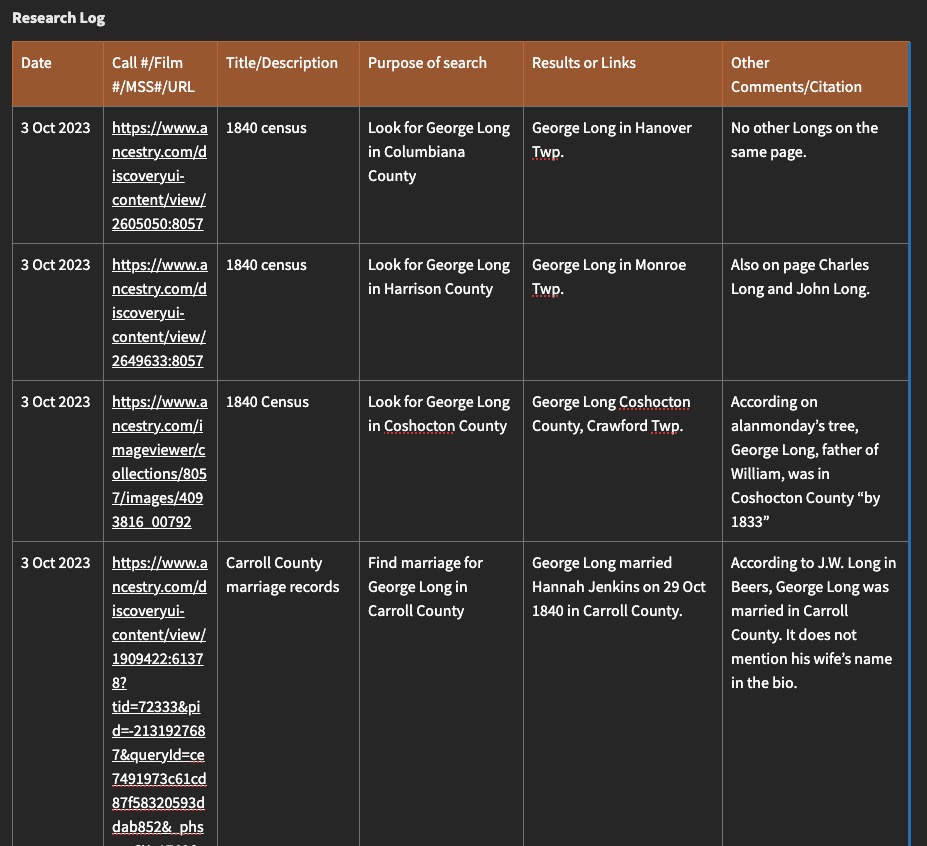
I am currently working on a project to identify the father of William Long who was born in about 1819 in Ireland and who married Sarah Metzger in Stark County, Ohio, in 1841, and died in Putnam County, Ohio, in 1861. I have only a name for his father “George Long.” The problem is, there are a lot of George Longs that could be the father of William. The son of William, John W. Long, has a biographical sketch in the Wood County, Ohio, county history that states that his grandfather was “George Long” and he “emigrated to the United States in 1817, locating in Carroll County, Ohio, where he was married and became the father of seven children: George, William, John, Catherine, Ellen, Susan, and Alexander.” There are a few problems with this, one of which is that Carroll County was not formed until 1833 from Columbiana (1803), Stark (1809), Harrison (1813), Jefferson (1803), or Tuscarawas (1808).

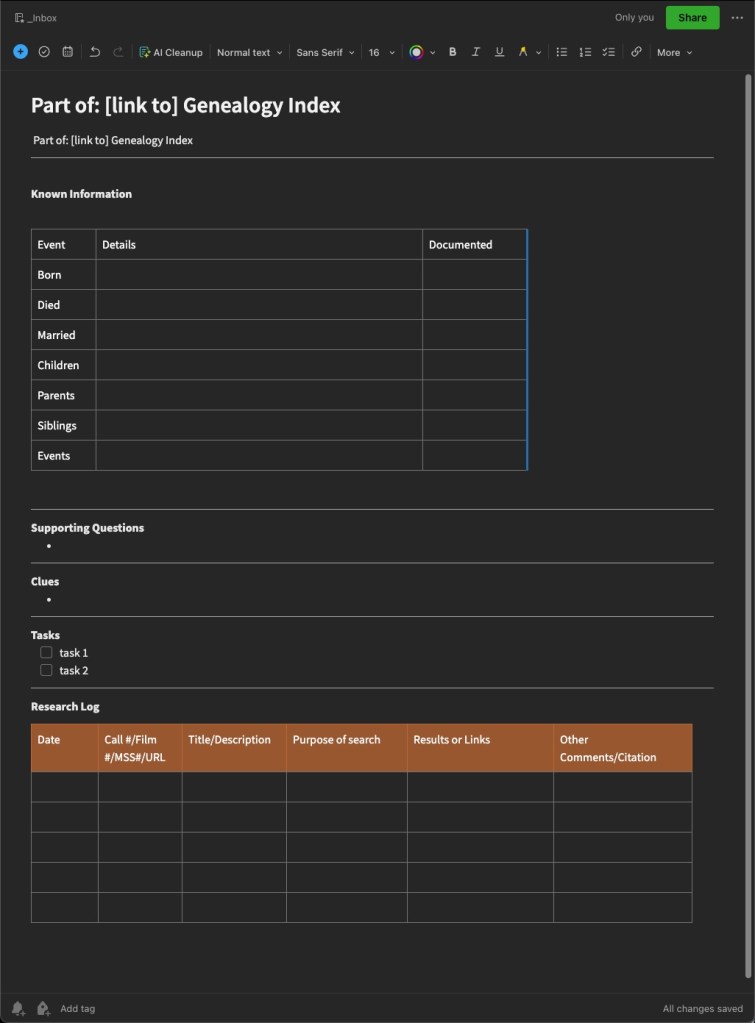
So, my research question is listed at the top of my “plog” template, followed by a cataloging of known information, supporting questions to answer, thoughts and analysis of the problem, some tasks, and then the research log portion of the template, which will get filled in as I complete the tasks.
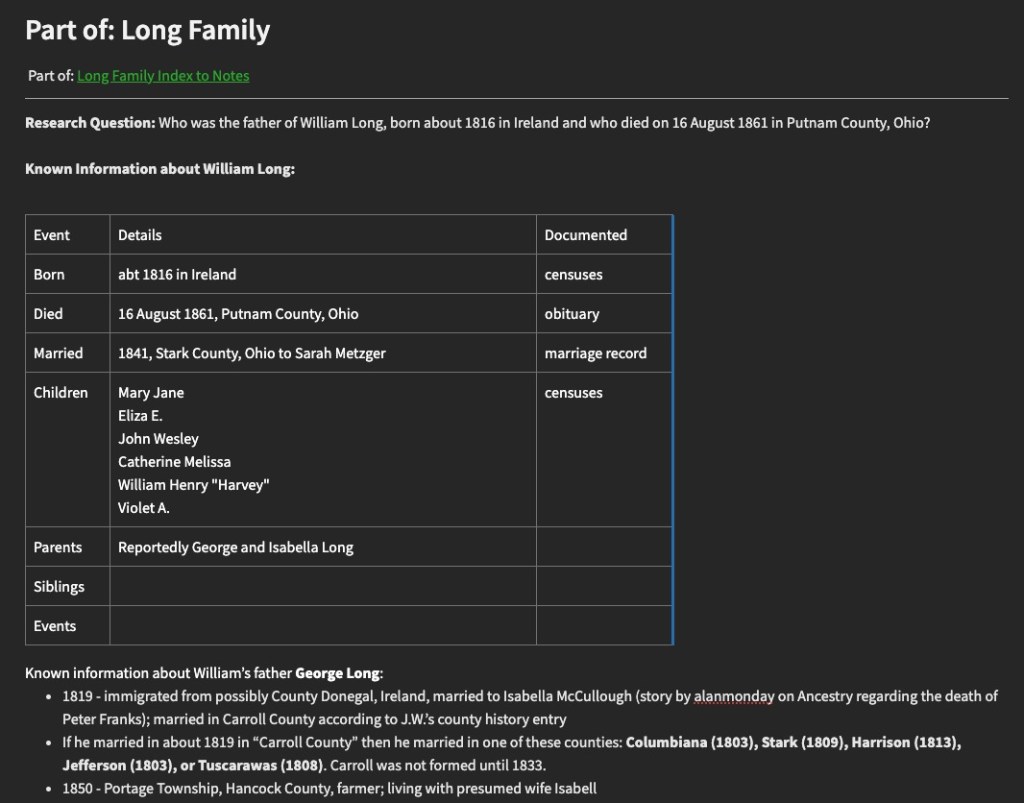
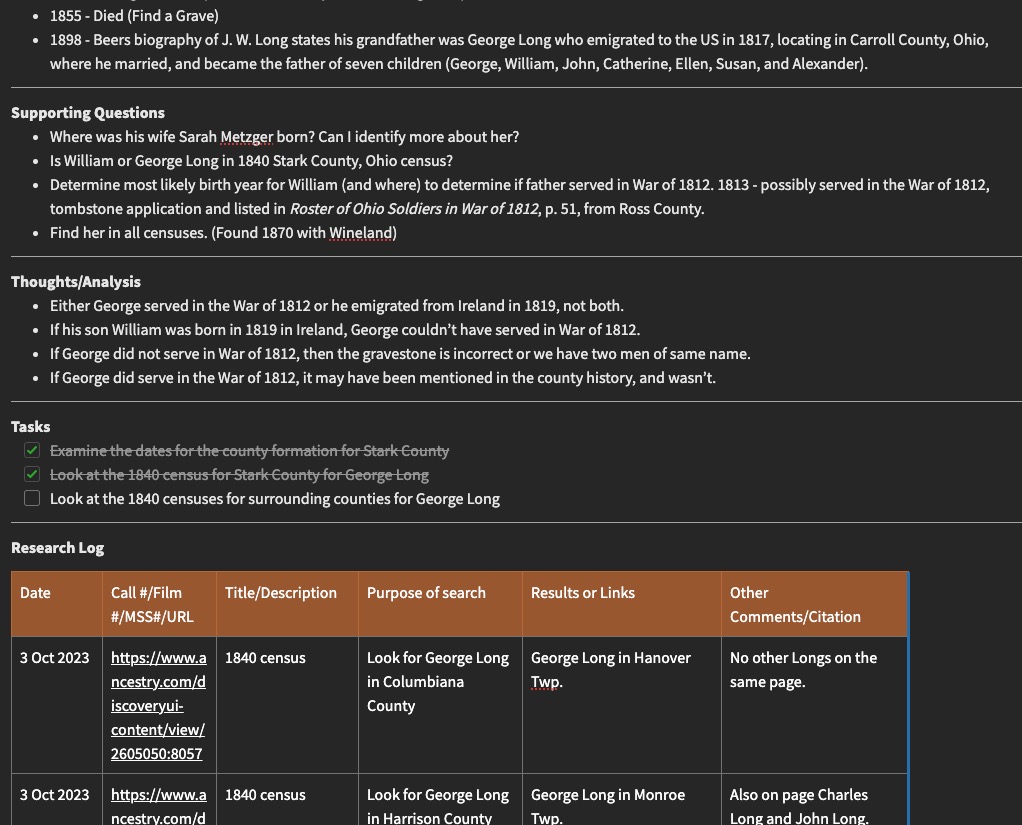
As you complete tasks, they often create more questions than they do answers. I document these in the last column and add things to the task list. Sometimes the template gets too long and too much scrolling needs to be done. One cool feature of Evernote is that you can link the notes together and essentially create an index where you can see all of your notes for one particular project in a list. Provided you titled your notes in a meaningful way, this will be great to get to notes quickly rather than scrolling through long notes. There are likely ways to do something similar in other programs.
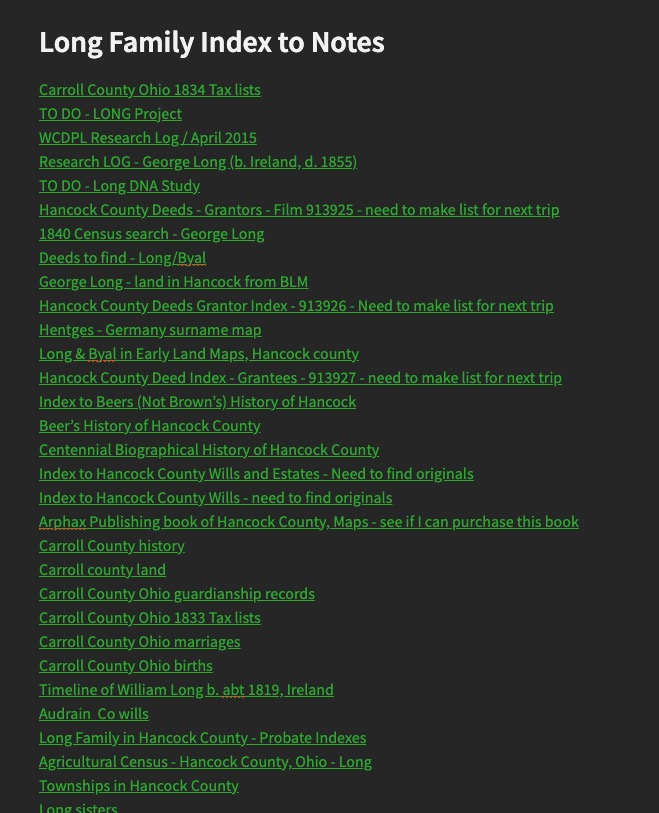
So, that’s the mechanics of research “Plogs” and how I use them. The next post will have some final thoughts on research planning and logging in general, tips and tricks, etc.
Research “Plogs” – the Planning Part – part 3

Last time we looked at research planning for when you’re in the “collection” phase. Usually the collection phase happens when we are just starting out and gathering as much as we can on our ancestors, or it may happen when you are starting a new client project or a new project for yourself that you haven’t researched before. The collection phase is when you are gathering as much of the “low-hanging fruit” as you can, the easy to find documents and sources to advance your family trees.

What do you do when you get to a point of resistance, commonly called a “brick wall” in our field. We invariably get to a point where the low-hanging fruit doesn’t identify that next generation, for example, and we have to do some extra work to determine who the parents are. This is where we can really put our skills to the test, or learn new skills and methods if that is the case. Part of this is effective research planning.

I have an Evernote template that I use for more directed research. This same sort of “set up” will work in Word or Excel or your note-keeping tools of choice. The most important thing is that you figure out what works best for you, for your way of thinking, and how you view your findings.

My Evernote Research Plan/Log template.

I fashioned this template after one I found online, probably from Cyndi of Cyndi’s List (click here to see all her Evernote templates.) I almost always end up changing or adapting them to fit the needs of whatever I am working on. Do not try to shoehorn yourself into something that someone else created. If that doesn’t work for you, change it until it does. You can recreate something similar to mine, find one that works from Cyndi’s list, or create your own in Word, Excel, or the program of your choice.

When I set out to work on a “brick wall” in earnest, I will start one of these “plogs” to help me get myself and my thoughts organized, and ready for research. Next time, we will look at this template filled in for a project I am currently working on so you can see how I use it in actual practice.

Research “Plogs” – the Planning Part – part 2

In the previous post, I discussed two “phases” that I saw in myself in terms of my genealogical development. There is the “collection” phase where you are gathering the information for your family tree, perhaps regardless of a family line or specific problem. When I started out, I spent hours and hours at libraries and on websites gathering what I call the “low-hanging fruit” or the easier to find records for family groups and my direct line ancestors. Those records often include censuses, death certificates, obituaries, tombstone photos, etc. Depending on the area where your research is located, some of these may be easier than others.

In terms of research planning when working in the “collection” phase, when I was in this phase, things were a little bit different than they are now, but the planning portion is pretty much the same. The difference is in how we might access those records and collect them. I started research in 2000. Ancestry as a research website was in its early stages so a large portion of my early collecting was done at local public libraries, local cemeteries, the Family History Library, the local branch of the National Archives (where you could view the census on microfilm before it was digitized and available online).

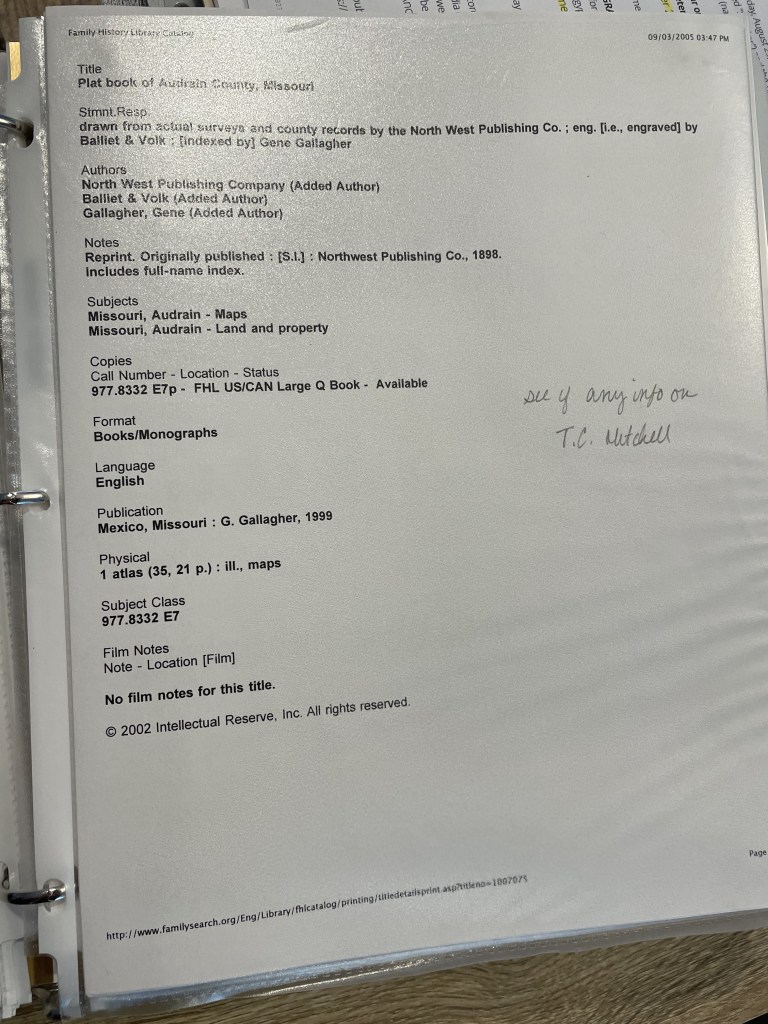
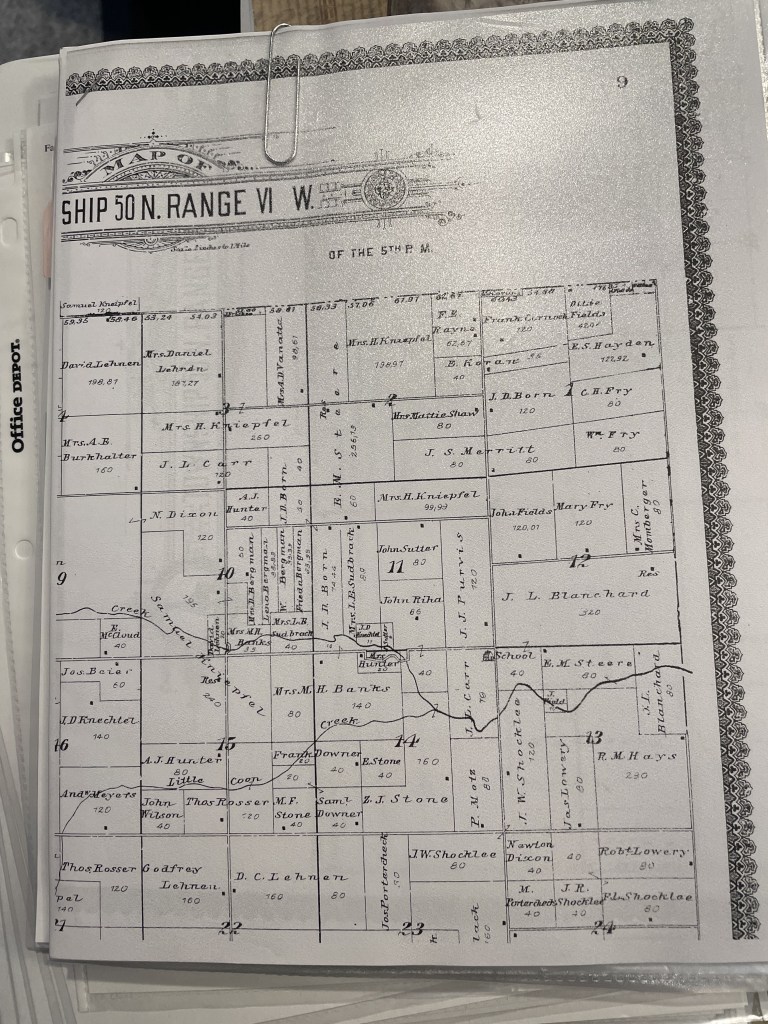
When preparing to visit any library, I visit that library’s catalog to determine what sources I plan to use to find records for my family tree. Remember, I’m in the “collection” phase here, so these will be a lot more broad-purpose searches. My tasks might be something like “find the obituary for Thomas Mitchell” or “Find Thomas Mitchell in the 1900 census.” When I started, I would print out that catalog item and put it in a sheet protector in a binder specific to that repository. Then, when I visited the repository, I used my binder as a guide or a to-do list and would complete each item. Back then, you made photo copies. We didn’t have scanning or photography (well not conveniently), when I started. I would tuck the photocopies into the sheet protector that contained the original catalog entry. Keeping the photocopy and the catalog entry together allowed me to go back later and create the citations for the items found.

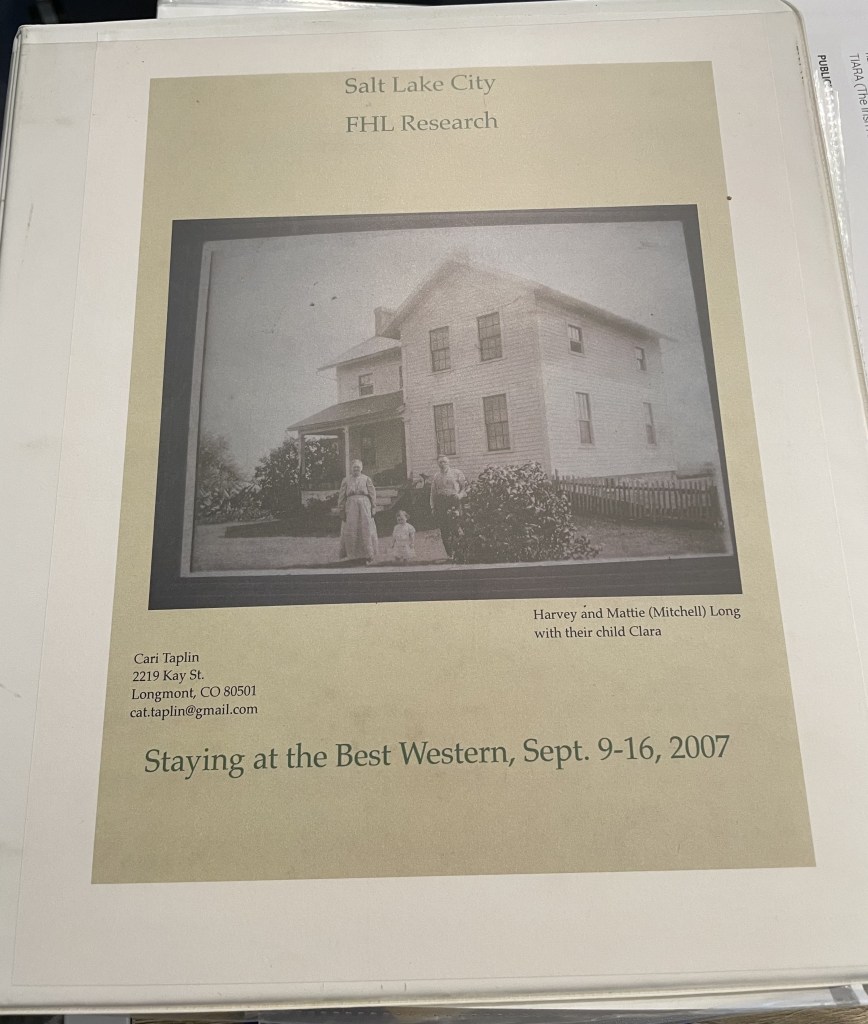
My binder from a 2007 trip to the Family History Library. I do not live at that address any longer.
Print out of catalog page from the FamilySearch Catalog
Printouts of Items Found from the FamilySearch Catalog Entry Above, tucked into the sheet protector.

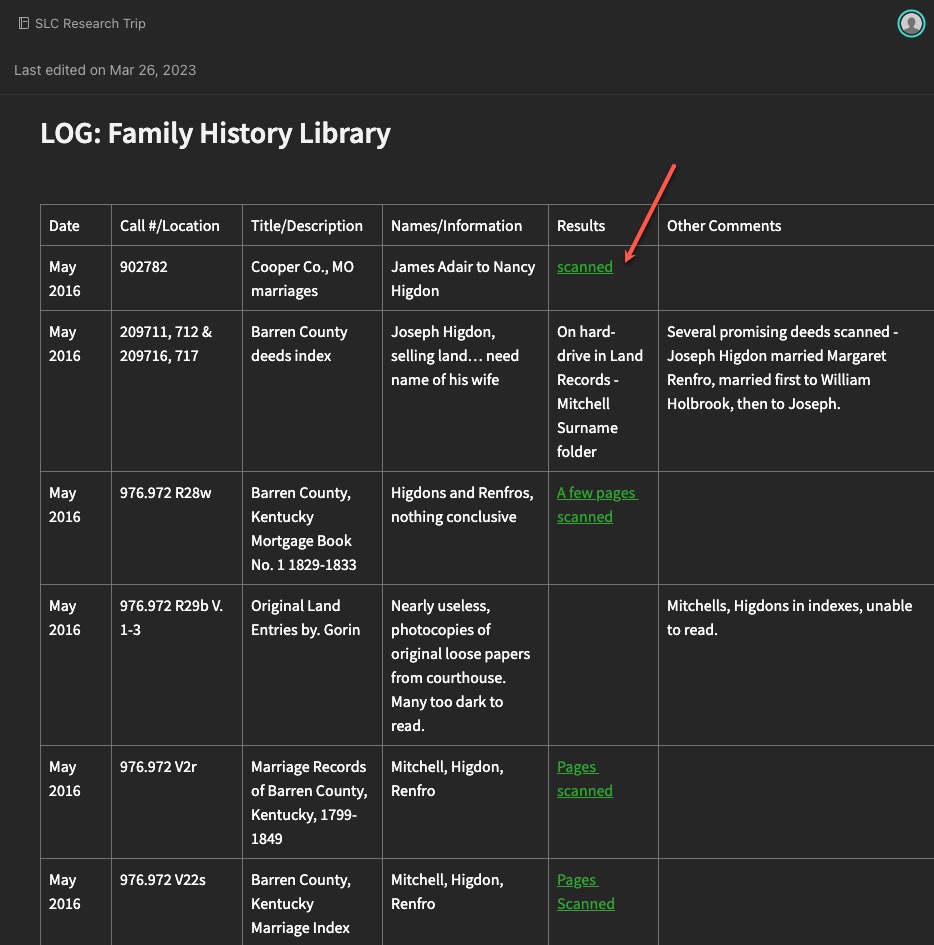
Ok, so that isn’t exactly the same system I used today when I’m “collecting.” I still visit the catalogs, but many items (not ALL) I’m looking for are now digitized and available online from home. So, my plan consists of a spreadsheet or Evernote note with links to databases, and the tasks, rather than a printout. If items are only available at the repository, I still copy the link into my plog, and then retrieve it next time I’m at that repository. I then collect my “copies” (scans or phone photos these days) and add them to Evernote where I can link them to the “plog.”

Evernote note showing a “collection” example with links to scanned items (red arrow).
The scanned item from the “scanned” link above.

You might still like to have printouts. You might also prefer to only work in digital. And you might be a combination of both like I am. That doesn’t matter. What matters is that you have a system for keeping track of what you want to research, what you expect to (hope to) find in a particular source, and then what you found.

Next time, we will look at some examples of more directed research plogs based on specific research questions and projects.

Research “Plogs” – Different Styles

As I have evolved as a genealogist, so has my working style, and specifically how I use research “plogs.” I’m going to share some of my earlier plogs… no judgement. I mainly want to demonstrate how I used to do it, and how I’ve improved, at least in terms of keeping track of my thoughts and research.

My earliest logs were on printed paper. I’m sure I have copies of them, but I’m having some remodeling done in my office and my “stuff” is in piles under drop cloths and I can’t get to them right now. If I can before this series is over, I’ll snap a few photos. For now, let’s look at some of my earliest digital versions.

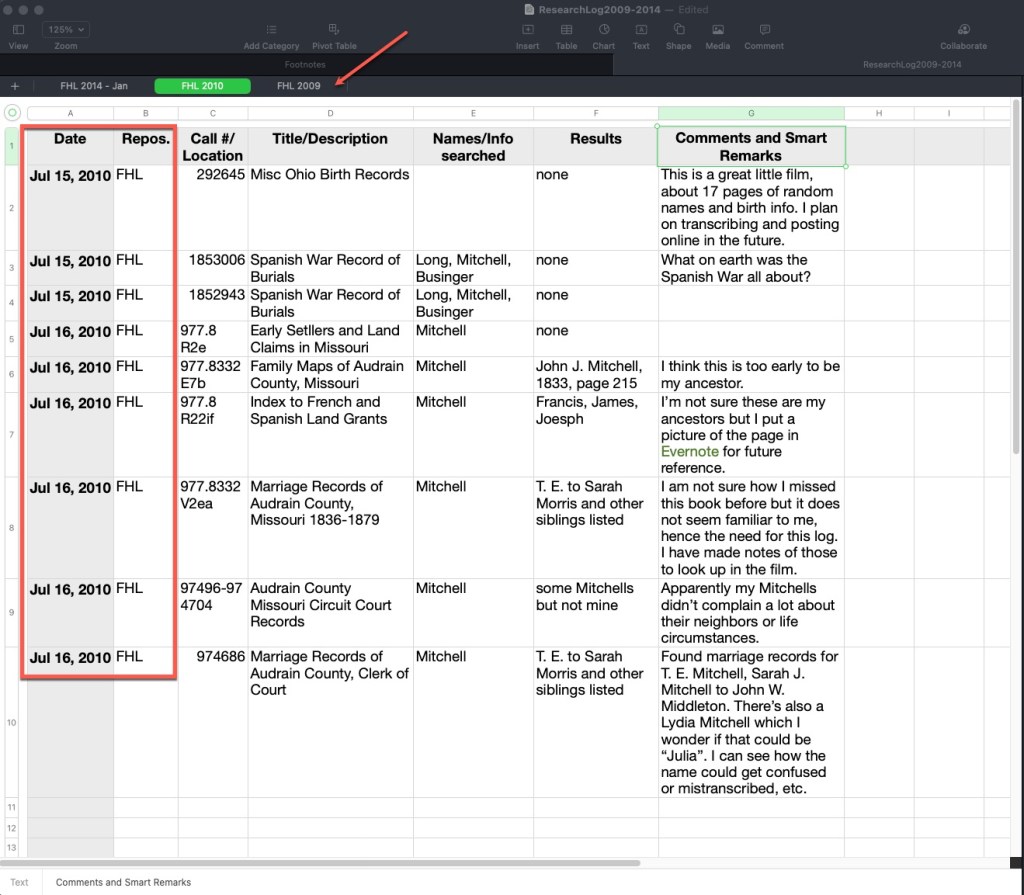
The following plog was done on a spreadsheet. I use a Mac and the Numbers spreadsheet program. It works very nearly like Excel. Across the top you can see tabs indicating the repository and the year. The column headers have not changed a lot over the years. I usually indicate a date, the repository, the call number/film number/manuscript number if it is in an onsite location, or a link and database title if it is an online source, the title or description of that item, the names and parameters used to search, the results, and then any comments, ideas, analysis, etc.

Example Research Plog by Author, using Mac Numbers Spreadsheet

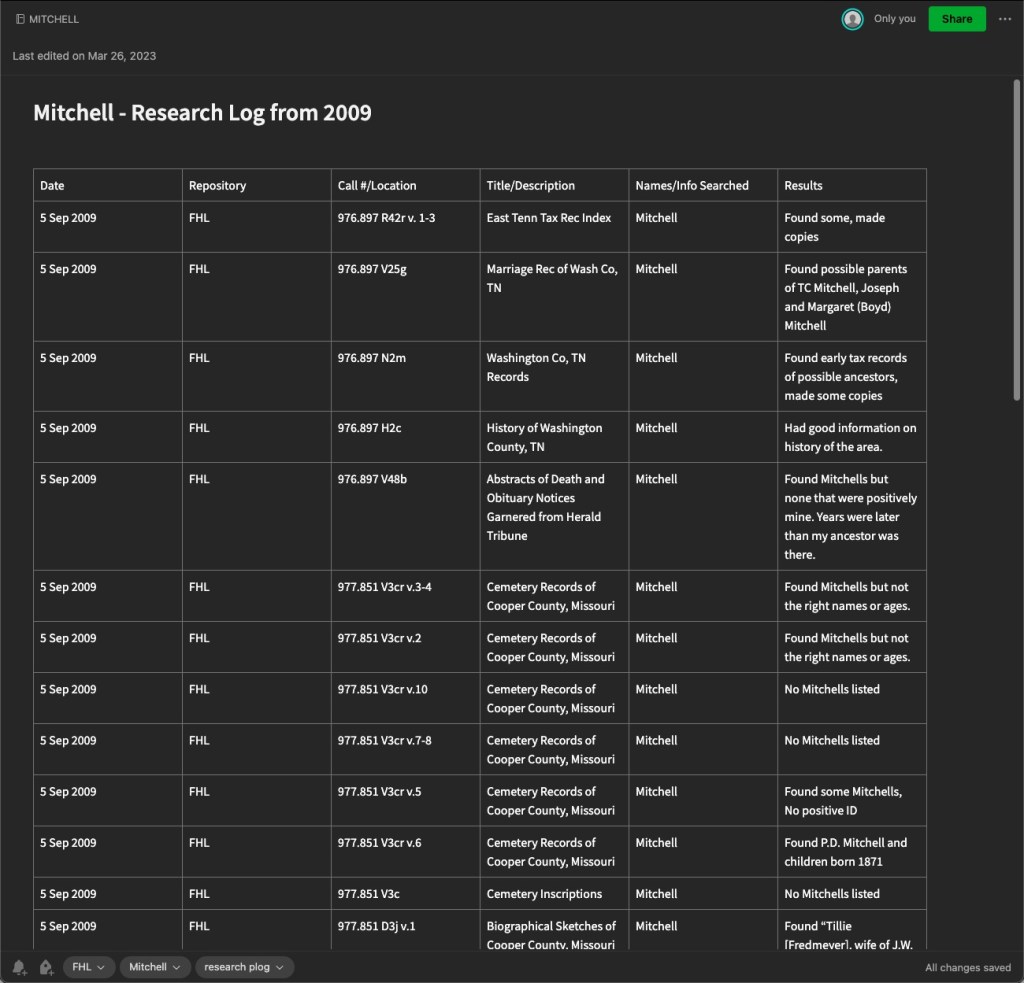
Here is another plog I’ve created, this time in Evernote. Other note programs exist and you may prefer. This is an example of one from 2009, you’ll note very similar column headings. You’ll also note that I didn’t do as much thought-process writing in the results column. I mostly noted what I found. In newer plogs in Evernote, I generally take photos of the pages in books and store them right in Evernote and then link the results in this log to those separate notes so that this log would be much more useful. Stating “Found some, made copies” doesn’t really help if I have to track down those copies. Earlier in genealogy time, we made a lot of paper copies. Now we can take digital photos and link them to these logs.

Example Research Plog by Author, using Evernote

The advantage to a note-taking software like this is that they often are shared to the cloud and you can access them on mobile devices as well as your computer. Of course, a spreadsheet can do this as well if you store in Dropbox or other file sharing service. Note-taking apps generally work more seamlessly, in my opinion. On these things, my advice is to always do what works best for you. It makes no sense to spend valuable research time trying to use someone else’s system if it isn’t working for you. If you have a favorite system, keep using it! Just adapt and evolve.

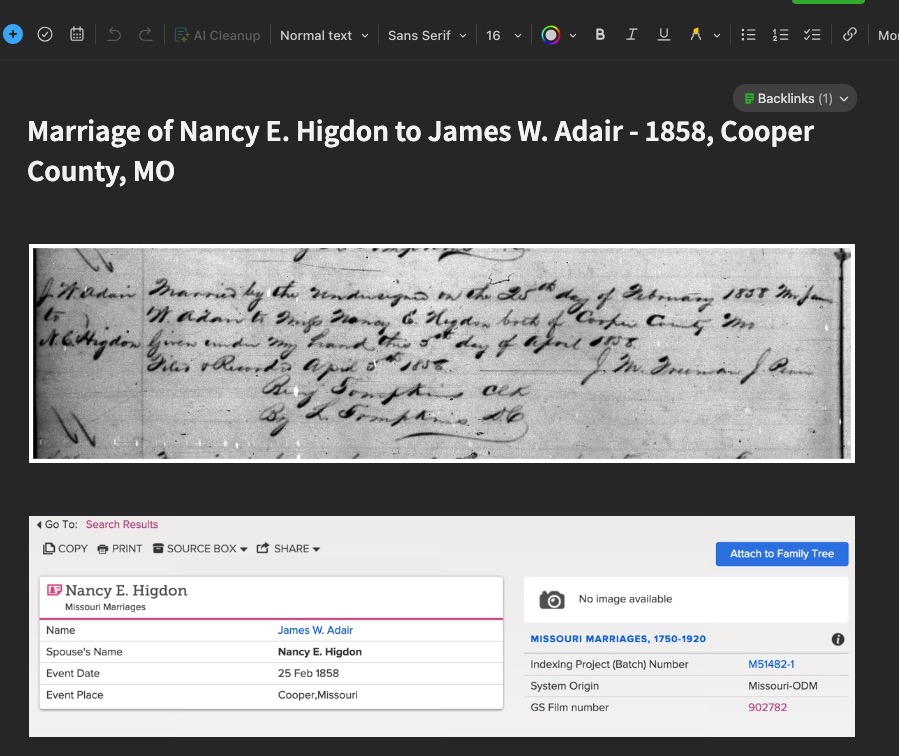
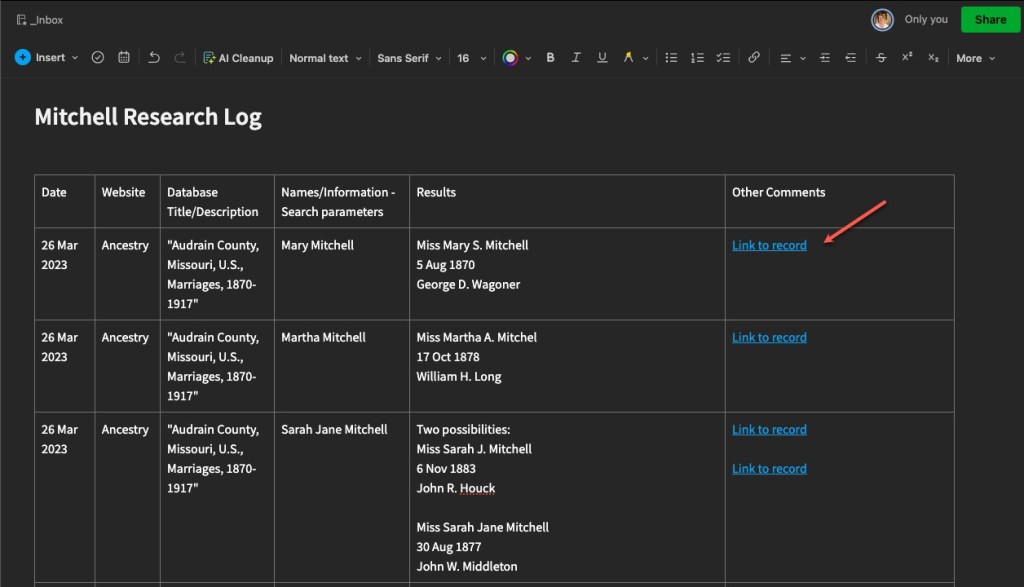
Here is another, more recent plog, showing linked records. These are links directly to the item in online databases, in this case Ancestry. With Evernote, and other note-taking options, you can link to other notes within the software.

Example Research Plog by Author, using Evernote, demonstrating links

You can, of course, use a word processor to keep a plog as well. Below is an example of one I did back in 2014 as I was experimenting and evolving.

Example Research Plog by Author, using Word Processor

The above example of a word processor plog, I tend to use for client work, but also in my own personal research when I’m trying to “round up” all of the research I’ve done and write more analysis from the findings I collected in the plogs I have made in Evernote or a spreadsheet.

Most recently, I’ve begun doing this “round up” more frequently, writing a kind of informal client report for myself. I think of it as writing notes to my future self telling me what I was thinking at the time, what I thought then that the next steps might be, and future tasks for myself. This has really helped me because my memory is getting worse as I get older (and busier) and I always think I’ll remember what I was doing, but then months go by and I’ve completely forgotten what I was doing.

Next we will talk in more detail about the plan part of the “plog.”

Research “Plogs” – Get Started

Last time I discussed the “why” of using research research “plogs” (a combo plan/log). Now we will look at some of the “how” for creating a plog that will work for you. The first thing you’ll want to decide is how you’re going to create yours. I have ideas and suggestions, but ultimately, it will be up to you to decide what makes sense for your workflow.

Over the years, I have done this in many different formats. My first research plogs, were just logs (not plans), and were written on paper! I don’t have any of those old plans at my finger tips (if I even kept them at all) or I would should you a picture. You can find PDF forms that you can print and fill in if paper is the way you’d like to go. Check out this category on Cyndi’s List for some options.

Now I utilize digital options for my research plans/logs. The main advantage to this is that they are searchable. Once your plog gets lengthy, and you want to check something, being able to do a keyword search with the “find” option on the software you use is so valuable. The other advantage is that digital plogs can be mobile. If you’re using paper, you have to make sure you don’t forget it when you head off on a research trip. Whereas, depending on the software you use, it can be accessed via your laptop or mobile device if you’re syncing to the cloud.

Options for plogs:

  • Paper forms
  • Spreadsheets
  • Word processing documents or tables
  • Note-taking software, I use Evernote but others exist

The other aspect I want to share about how I use plogs in the setup stage, is by project. My plogs are based on one project, and those projects are based on a research question.

Early on, I made logs that had to do with a repository visit and nothing at all to do with a particular project, or even a surname. Those got very clunky and unwieldy and just not very usable. They were not organized in a logical way that I didn’t not really discover until later when I went to review what I had done for one particular surname or project.

So I evolved. And that’s what we do, right? We try things, make mistakes, make adjustments, and try again. I guarantee I will likely change how I use my research “plogs” in the future. But for now, they are working for me. We will dive into some in more detail next time and discuss their pros and cons for different types, styles, and versions.

Building a Locality Guide: Decisions

Before you start building your locality guide, you may want to make a few decisions. Primarily you will want to decide what format you want your guide to be in. Do you want to use a spreadsheet, word processor, or note-taking software such as Evernote? Do you want to use paper and pencil/pen? Where do you want to store it? On the cloud, in your desk, on your laptop? These are decisions you will have to make and they will depend on how you work and think and organize your resources.

I have traditionally organized my locality guides in a word processing document creating my own “quick sheet” for that location. However, I have begun moving them into Evernote (a note-taking software system that can sync between your devices) so that I can access them anywhere if need be. I prefer an electronic system over a paper system because:

  • You can add clickable links directly to databases, e-books, websites, etc.
  • You can use the “find” and “search” features for locating keywords in your guide.
  • You can add information, copy/paste, and insert graphics quite easily.
  • You can save it to the cloud and access it anywhere with your phone, laptop, or tablet.

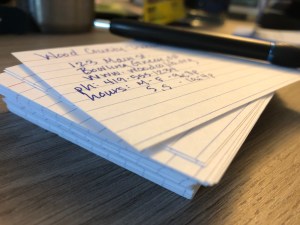
If you prefer paper and pencil, I’m not one to judge. I still love reading things on paper. If I were to make a locality guide entirely on paper, I would use index cards whereby each card is its own entry. This will allow you to sort and organize your index cards in any order you like, and add new information to the set as it is found.

If you decide to use a word processor for your guide, you may consider saving it to the cloud either through a service such as DropBox or by compiling it directly in a service such as GoogleDocs. Both of these will allow you to access your guide anywhere.

Next we will discuss what to start putting IN your guide…

Beginning Concepts: The Research Plan Part 2

Last week I described why a research plan/log or PLOG, is a good idea. This week, let’s get into some of the nitty gritty of what a research PLOG looks like.

First, you will want to have several research plans. They should be based on a particular project you are working on. Remember, we are past the “collecting” phase and are now into the FOCUSED phase of our research. (Refer back a few weeks to the post on Getting Focused.) Your research plans and logs will want to reflect that focus. I have a research plan for each individual project I’m working on. And my projects are generally driven by my research questions. So, I have a PLOG that holds research tasks and findings relative to a particular research question I am trying to solve.

You can create these PLOGs in any platform that works for you: word processor, spreadsheet, Evernote or One Note, Scrivener, and so on. Even paper. I’m not here to tell you which one to use. But I will share what I use: Evernote. Now there was a recent Evernote update that had a lot of people upset, they didn’t like the changes. Well, who likes change? I know I don’t. I am still working with the new update and forming my opinions, but so far, everything has been working ok with a few minor hiccups.

I like Evernote because of its ability to sync between my laptop, my phone, my iPad, and a web version, so I literally have access anywhere I have the internet. I can also access my notes offline as long as I synced everything before I left the land of the internet. It also acts like a word processor and I can add tables, images, links to other notes, and more. I can also search my notes by keyword or tags (if I added them).

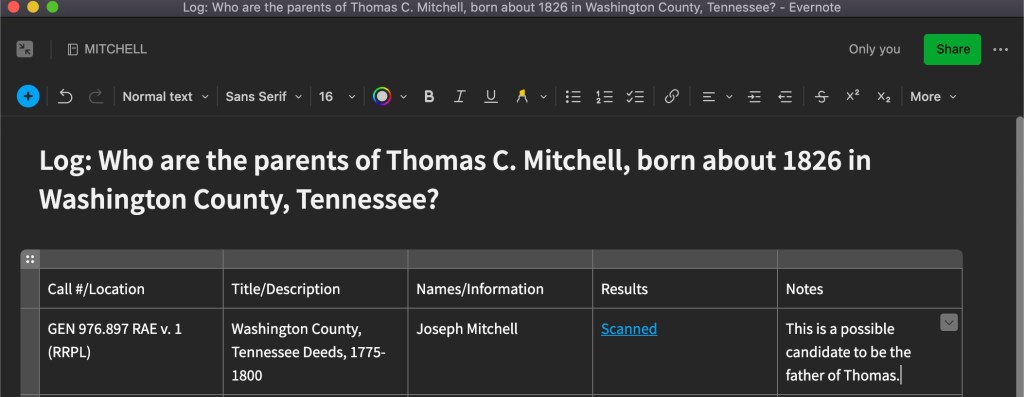
When I create a research plan/log in Evernote, I put the research question at the top so that I remain focused and my notes are categorized and organized. I then have a table with the following column headings: Call#/Location, Title/Description, Names/Information I’m looking for, Results (notes, or a link to another note that holds the scanned images), Notes reflecting my thoughts. See the example below:

Screenshot of my new project’s PLOG to identify the parents of Thomas C. Mitchell.

I have several variations, and they change depending on circumstances. Sometimes I add a column for the date or the repository if it is a PLOG that covers many repositories. Most often, I have another note that contains the actual contents of what I found, usually photos I took with my phone and uploaded to Evernote. On those Evernote notes, I will write out the citation for that item, so they are together.

I also have research PLOGs that are repository focused. Pre-pandemic, there were repositories I visited on a semi-regular basis, so as I worked from home and identified things I wanted to examine at a particular repository, I would add them to those PLOGs, with a link to the overall log for that research question.

You can do a similar thing in other platforms. In a spreadsheet, for example, you can have multiple tabs in one spreadsheet. Perhaps you have a spreadsheet about your John Smith family and organize those tabs by the particular generations, brick wall problems, repositories, and so on. Or, if you prefer word processing documents, organize your hard drive in a similar way: a folder for each surname, then perhaps broken down by generation or research problem, and then the various documents within that pertain to that problem. The sky is really the limit in terms of how you organize.

The main point with the research plan and log is that you create a system whereby you can collect what you plan to look at and what you found, in an easy, effective, and efficient way that works for you. Then, when it is time to sit down and really analyze what you have, it is all logged in one location.

If you are a longtime reader, you know a phrase I often say in this blog and when I’m presenting to an audience: “Do what works best for you. But do it!” So, go get a system set up that you think might work for you. You’ll end up modifying it as you learn and grow as a researcher, but just get started.

Writing: Be Organized with Your Words

Be Organized With Your Words-2I like to write in “bits.” By ‘bits’ I mean short thoughts, a couple of paragraphs on one idea, or a page at a time. My ‘bits’ can be found everywhere: notebooks, margins, on my phone in the notes app, in emails or texts to myself, slips of paper on my desk, sticky notes sticking to all kinds of things, in Evernote, and in other places. This is not very organized! Unfortunately, many writers that I’ve talked to are like this. When an idea hits you, you have to take a moment to write it down wherever you can.
How do you manage all of those ‘bits’? Here are some ideas I’ve developed over the years:

  • Keep a notebook on your desk. I have a notebook that I use as a holder for my writing ideas of whatever kind. I prefer paper most of the time. I find it easier to jot my ideas down rather than finding my phone, opening an app, being clutzy with the typing and dealing with autocorrect, and so on.
  • Evernote. I already use it a lot for research notes. This one is easy for the mobile aspect of note-keeping. I may not always have my notebook, but I’m rarely without my phone. Now, instead of texting myself or emailing myself or using the notes app, I try to put thoughts into my Evernote app in a folder called “writing ideas” if it is a general idea, or in a particular folder if it has something to do with something I’m already working on. And if you aren’t an Evernote user, use your software/app of choice.
  • Use timelines and tables. When working on certain research projects, especially trying to determine if I’m working with one man or two (or more), timelines and tables can be helpful in organizing the evidence I’ve found and then make a reasonable determination.
  • Use note cards. Yep. I said it. Use that old-school item, the 3×5 notecard. I use them when I’m working on how to organize my evidence items. They help me decide when to introduce a new evidence item, concept, or individual when working on a larger writing project such as a case study.

When you accumulate a lot of ‘bits’ you need to do something with them to keep them organized. Some of the above might work for you, or you may find another system that speaks to your way of doing things. However you do it, your system should help you keep your ‘bits’ in a logical order, contained (to avoid tangents), and on topic or theme.

I find that over time, that I can take those ‘bits’ and put them into a larger writing piece. And nothing is better than getting a larger writing piece put together!

Prepping for Institutes Digitally

I am heading off to Georgia to attend the Institute of Genealogical and Historical Research (IGHR). I am excited to finally take the writing course from Tom Jones, “Course 4: Writing and Publishing for Genealogists.” This has been on my educational “to do list” for years and I’m finally getting to it!

These days, we are saying good-bye to paper more and more. Don’t get me wrong, I LOVE PAPER. Ask any of my students, discussion group attendees, family, or friends. I still print all of my research documents and organize them into binders. I also like taking handwritten notes. However, those institute binders really add up and for many of us, space is at a premium. Plus, it keeps the costs down if an institute doesn’t have to pay to print and organize all of those syllabi. Of course, you can still usually buy a printed syllabus or print it on your own. And if you do, do not worry! I’m not here to be down on anyone’s system. However, in order to use less paper, and utilize the electronic syllabi more effectively, I have come up with a system that works for me. Maybe you’ll find something in here that can work for you too.

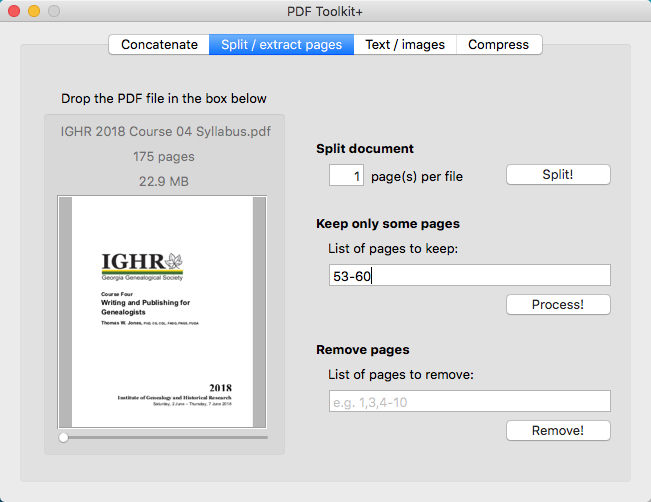
Before I go to any institute, there is an amount of prep-work I do with the digital syllabus so I’m organized and ready to take notes. I utilize a combination of a PDF-splitter and Evernote. What I mean by a “PDF-splitter” is using a bit of software to make one large PDF into several small PDFs. I believe the full version of Adobe Acrobat will do this (but I don’t use it so do some research first), as will several other programs. I use a Mac and have found “PDF Toolkit+” to meet all of my needs. It has a lot of features, but today I’m focusing on the “split/extract pages” portion of the software.

pdfsplitter
Screenshot of PDF Toolkit+ with a range of pages to be extracted.

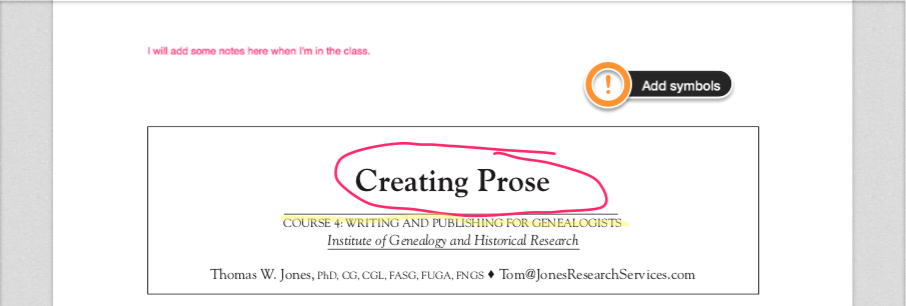
Basically, I sit down with the class schedule, the large PDF, the PDF-splitter, and Evernote. Using the splitter, I extract the pages for each class and then create their own note in Evernote, dropping in just that portion of the PDF. This allows me to have each the syllabus material for each class split out into one small file. Then I can type my notes into each note or take handwritten notes on paper to scan/type in later (they say the brain retains information better when you take notes by hand). Evernote also has tools that allow you to highlight, add symbols, draw, or take notes directly on the PDF.

markup
Just an example of some of the ways you can mark up the PDF using Evernote’s tools.

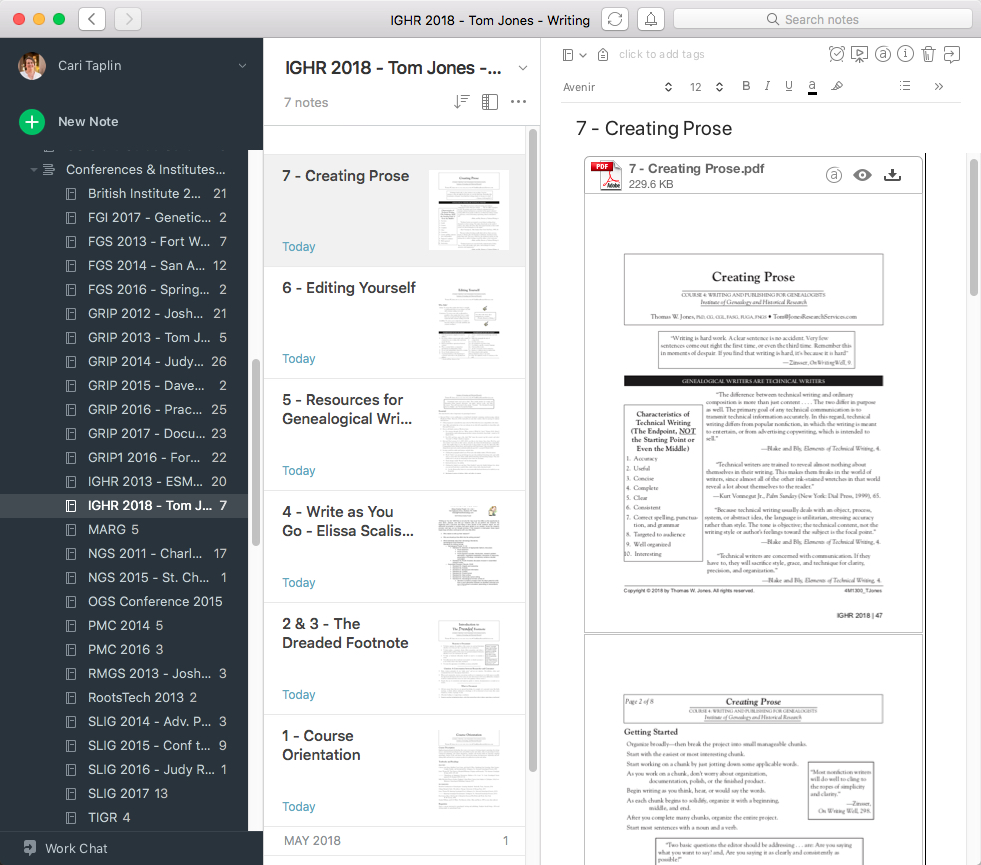
I organize these notes into a new Evernote notebook titled appropriately for the institute I’m attending. You can organize them in whatever way works best for you. I number them according to the order they should be taught based on the class schedule. See my example below.

EvernoteSetup
On the left is the list of notebooks from all institutes I’ve ever attended (and added to Evernote), IGHR 2018 is highlighted. In the middle are the thumbnails of each individual note in the highlighted notebook, numbered according to class order. On the right is the full view of the note with the PDF dropped in.

As the week moves on, I open the note for the appropriate class, and either use the syllabus visually and then take handwritten notes or I type my notes above the PDF. I take handwritten notes most of the time for the reasons already mentioned) but I do also use the mark-up tools available as well, especially if I don’t want to forget something in particular mentioned in the syllabus. Often, it just depends on how I feel when I get up in the morning. Evernote notes are word searchable, and there is a tagging system to help you be organized as well.

The most important thing is that you find a system that works for you. If digitized notes and syllabi are not for you, I hear you! It really has taken me a long time to get to this point…and I’m not completely digital myself and probably never will be. But, to save on costs and space, this is one of my systems for eliminating paper.

Genealogical Preparedness – Part 4 – The Research Trip

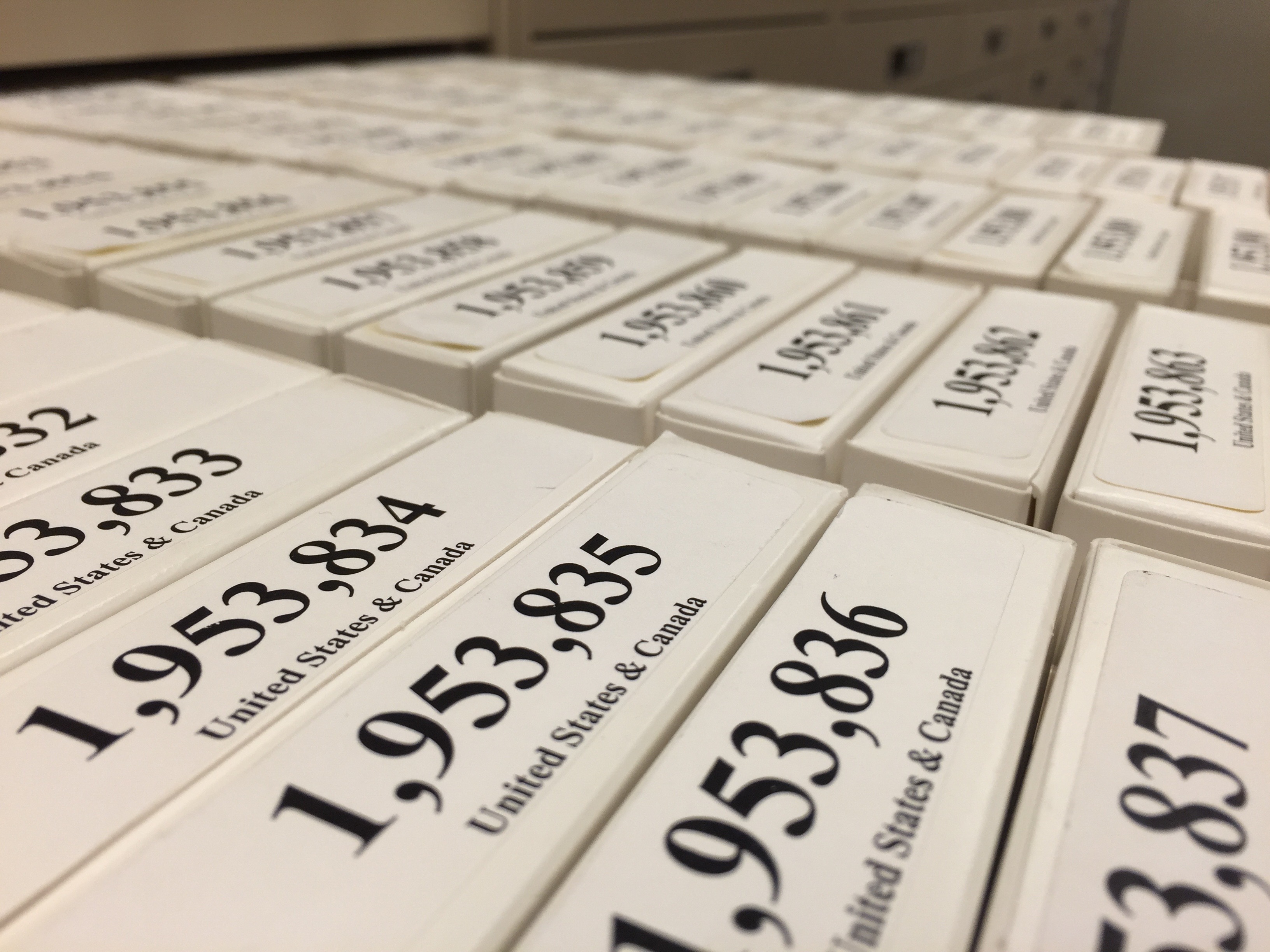
Films in a Family History Library drawer
Films in a Family History Library drawer, photo by author, October 2015

I mentioned previously that I had the opportunity to attend the British Institute in Salt Lake City. Following that week, I stayed another week to spend coveted research time at the library. I was so busy leading up to that trip that I didn’t have time to prepare. I spent a lot of time while there doing things I could have done at home. That week in the library reminded me of all of the things I should have done but didn’t. I have written before on planning for a research trip beginning with this post. I did not do most of the things I mentioned in those posts. This trip was a reminder that I still need to practice what I preach.

I did not REALLY have a research plan in place before I left. That’s not to say I didn’t have some shred of an idea of what I wanted to accomplish that week or that I didn’t know at least some microfilms or books I wanted to look at before I got there. I have what I willingly call a “half-assed research plan” system using Evernote. When I find something I want to look at next time I’m at the library I do one of two things. I either make a completely new note in my “FHL Research Trip” notebook with a screen shot or a link. If I am really on top of things I will even make a note about what exactly I wanted to find in that book, which surnames or individual, or even topic. Usually not though. Or I may add it to my ever helpful checklist notes that may fall in my surname notebooks under a useful note title like “Dimick – To Do” or I have a master checklist in the aforementioned “FHL Research Trip” notebook that is usually less helpful than the notes in that it is usually a film number, usually the title of the film and MAYBE what I’m looking for… again, usually not. Why do I always believe I will remember what I wanted out of that film or book when I get to it?

So, I spent precious library hours using the online catalog that I could have used from home and created a REAL research plan before I left the comfort of my slippers. (I’ve been known to wear slippers at the FHL on particularly snowy and cold days.) I spent time in my hotel room on terribly slow internet doing online research filling in gaps needed to even decide which films or books I wanted to look at. I even did the whole go-to-the-section-in-the-stacks-and-pull-out-all-of-the-relevant-books system.

I’ve regrouped since that trip and set up better templates in Evernote for future research trips. Cyndi Ingle of Cyndi’s List has graciously posted some great Evernote templates on her website for organizing research and creating research plans. I’ve downloaded and customized some to meet my own needs and preferences. I’m working to go through my old “half-assed research plan” system of notes to add them to the new template, trying to figure out what some of those notes are even about.

While I won’t say that trip was not successful, I cannot help but wonder how much more I would have gotten done if I had somehow been more prepared. We’ve all probably been there. Too busy to get a research plan ready. It doesn’t make us bad genealogists, but reminds us about why we should be planning in the first place and perhaps renews our energy for doing that prep work.