You may have heard about the FamilySearch Labs “Full-Text Search” already. If not, I’m shocked. It has rocked the genealogical community’s discussions in online forums for months and months now, and it is growing by the hour. The Full-Text Search “for historical records uses artificial intelligence (AI) to transcribe images into text so they can be fully searched. This feature is meant to save hours previously spent manually reviewing thousands of images for an important piece of information—that can be found almost instantly with an automated search.” This new technology takes handwritten documents and scans them, creating fully-searchable text transcriptions. Searching is no longer limited to just an index, but the entire document!
Because your search is not limited to indexes any longer, names found in the middle of another document can now be found. You may find your ancestor listed in someone else’s deed, will, court record, or other document, possibly in a document you would have never thought to examine! But there is it. From time to time I plan to share documents I’ve found, that I wouldn’t have found otherwise, to showcase the power of this new technology.
Here is an example of what I mean. I was looking for a marriage record in Clinton County, Ohio, for Isom Gallimore. I knew he should have been married in about 1821 from other research. However, my examinations of the books covering that year did not turn up a record. Using the Full-Text Search, I found the record quickly! Amazing. But why? What is going on that stopped me from finding it where it should have been?
The following page is roughly in the middle of the book and clearly shows that these marriage licenses are from 1821 according to the top of the first column.
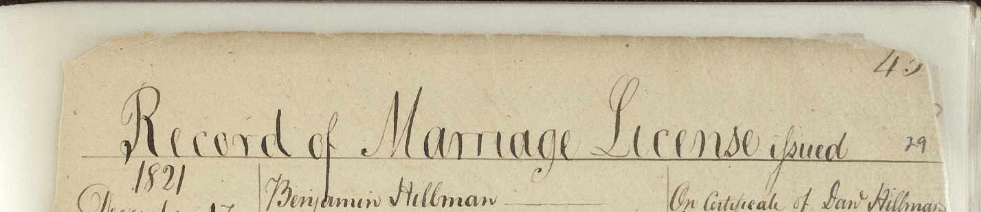
Looking forward and backward in the book, I noticed something. This is the last license in the book. It was recorded in 1817.

I also noted that the FamilySearch label for the book states the book covers 1810-1817.

What is going on here? Looking closely at the pages, you can see that they have been put into an archival sleeve or a lamination-type of preservation material (likely using the processes called “encapsulation” and re-set into a book cover.

The link for this page is: https://www.familysearch.org/ark:/61903/3:1:3Q9M-CSHP-C4VS
Using Full-Text Search, I was able to find this record which is obviously in the wrong book based on the dates and labels. Some of the page numbers have been lost to the torn and worn edges. Someone wrote in new page numbers in pencil on most corners. It looks to me like someone did their best putting a book back together that may have fallen from a shelf and the pages spilled all over.
Without Full-Text Search, I may have never found this record. I may have if it were important enough for me to go through every book and read every page. This was for a client project and they rarely want to pay us for the time it takes to do that level of searching. However, with Full-Text Search, we are far more likely to be able to find documents that are hiding from us or that we may not even know exist in the first place.
As I find examples of this, I plan on sharing them in this blog. My next blog will walk through some of the steps and tips I’ve learned along the way. The new technology is amazing. I can remember thinking, after OCR technology became readily available, that it would not likely happen to be able to train a computer how to read handwriting. I’m so glad I was wrong!


 The Salt Lake Institute of Genealogy (SLIG) held its first Tech Day this year prior to the regular week of classes. I presented a workshop on using Google’s MyMaps as a research tool. (
 In my last post I expressed by gratitude for the Internet, however, I am also thankful for technology in a more broad sense. In ten seconds, I can scan an aging photograph, have a copy on my computer and in another 10 seconds, I can send it to a distant cousin who may have never seen the photo. I am grateful for technologies like my scanner, computer, large monitor, smartphone with camera, iPad (with Kindle app), as well as software such as Reunion, Evernote, Google, WordPress, Photoshop, iChat, Skype, and so on.
 Genealogy Pants